

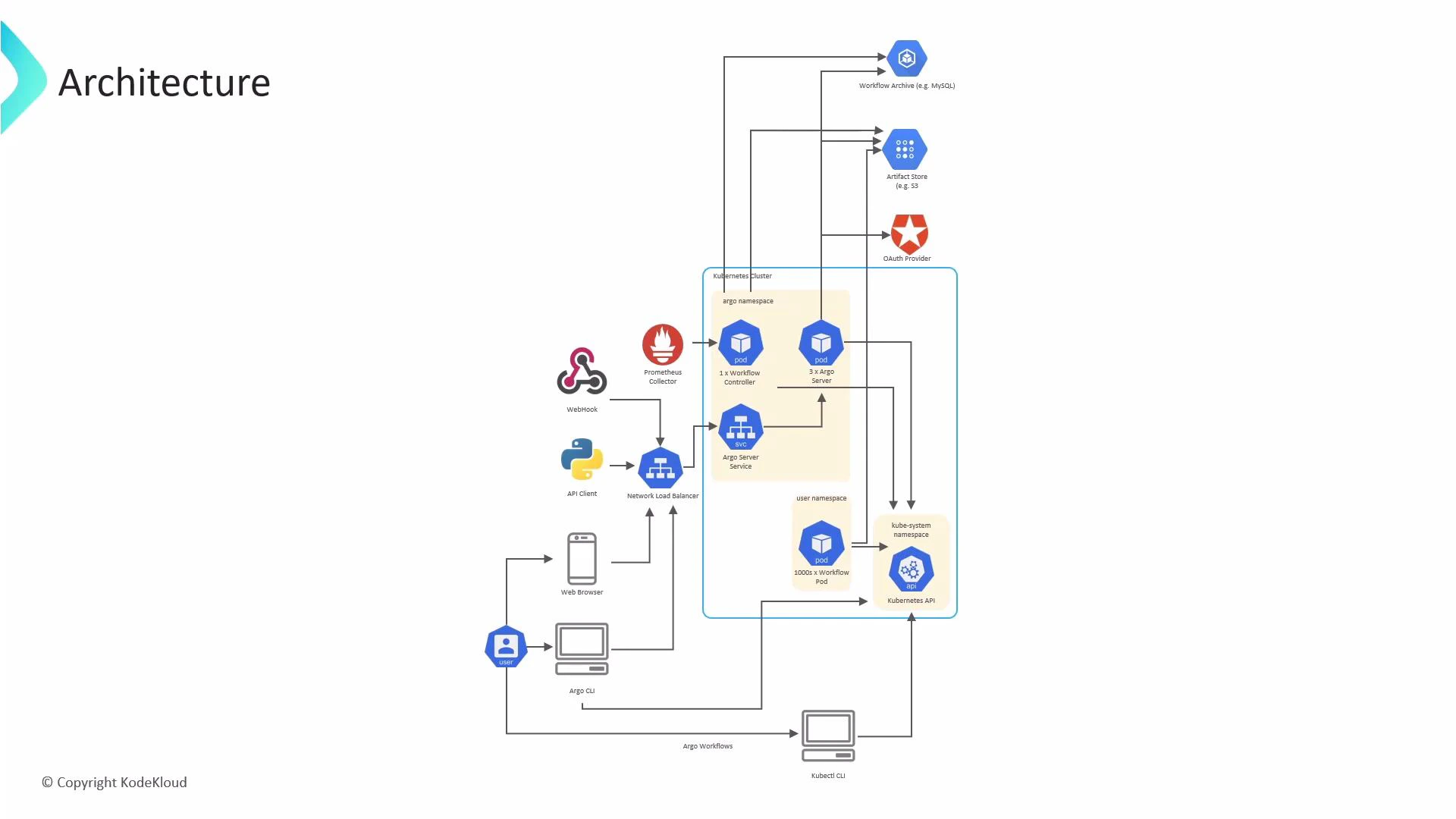
- Control plane (Argo namespace) — components that manage and orchestrate workflows.
- Execution plane (user namespaces) — where the workflow tasks run as Kubernetes pods.
Argo namespace (control plane)
- Argo Server: exposes the Argo REST API and the web UI. Users and CLIs interact with Argo Server; it’s commonly fronted by a LoadBalancer or Ingress for external access. For high availability, Argo Server can be deployed with multiple replicas.
- Workflow Controller: the reconciliation engine that watches Workflow custom resources (CRs), advances their state, and creates or updates Kubernetes resources (Pods, ConfigMaps, Secrets, etc.) to execute workflow steps. The controller runs in the Argo namespace and requires RBAC permissions via its ServiceAccount to operate cluster resources.
User namespace (execution plane)
- Workflow Pods: when the controller schedules work, it creates pods in a target namespace (commonly one namespace per workflow or per tenant). These pods run containers that perform each workflow step. Large or parallel workflows generally produce multiple pods (often one per step). Pod lifecycle is managed by the Kubernetes control plane (kube-scheduler, kubelet, etc.).
Kubernetes API (cluster interactions)
- Argo components (controller, server, agents) interact with the Kubernetes API server to create and manage resources such as Pods, Services, ConfigMaps, Secrets, and PersistentVolumeClaims.
- Access is governed by Kubernetes RBAC and the ServiceAccounts assigned to Argo components.
User interaction paths
Users and systems submit and manage workflows through several interfaces. Below is a quick reference.External integrations
Argo workflows typically rely on external systems for storage, authentication, and observability. Common integration patterns:
Links and references:
Lifecycle summary
- A user submits a Workflow to the Argo Server (via argo CLI, UI, or API).
- The Workflow Controller detects the new Workflow CR and starts reconciling its state.
- The controller creates the necessary Kubernetes pods in the chosen namespace to execute each step defined in the Workflow spec.
- Pods read inputs and write outputs to configured artifact stores; the controller observes pod status and advances the workflow accordingly.
- After completion, workflow metadata and logs can be archived to a database or object store and metrics emitted for monitoring and alerting.
Note: The Workflow Controller reconciles Workflow CRs and must have the ServiceAccount RBAC permissions to create and manage the resources your workflows require (pods, configmaps, secrets, pvc, etc.). Verify Role/ClusterRole bindings for multi-namespace or cluster-scoped workflows.