In this lesson we’ll cover looping in Argo Workflows with a focus on the withItems field and how to control concurrency using parallelism. When authoring workflows you often need to iterate over a set of inputs so a template can run multiple times. Argo provides three basic loop primitives:
Loop TypeUse CaseExample
withSequenceRepeat a template a fixed number of times (numeric range)“Run this 5 times”
withItemsRepeat a template over a predefined static list of values”Send invitations to Alice, Bob, Charlie”
withParamRepeat over a dynamic list produced by a previous step”Step 1 outputs approved attendees; step 2 iterates over them”
Quick conceptual mapping:
  • withSequence → “run this N times”
  • withItems → “iterate over this fixed list”
  • withParam → “iterate over a list produced by an earlier step”
We’ll demonstrate a common pitfall with withItems, show the correct pattern (passing items as input parameters), and then demonstrate how to limit concurrency with parallelism. Understanding withItems: a common mistake A frequent mistake is attempting to reference directly inside a called template without passing it as an input parameter. The following naive workflow shows this pattern: the step uses withItems, but the called template does not declare inputs.parameters, so the runtime cannot resolve inside the called template’s container args.
apiVersion: argoproj.io/v1alpha1
kind: Workflow
metadata:
  generateName: cosmic-moo-loop-
spec:
  entrypoint: moo-madness
  templates:
    - name: moo-madness
      steps:
        - - name: cosmic-cow
            template: moo-wisdom
            withItems:
              - "Galaxy"
              - "Universe"
              - "Cosmos"

    - name: moo-wisdom
      container:
        image: rancher/cowsay
        command: [sh, -c]
        args: ["cowsay 'Greetings from the {{item}} System!' && sleep 8"]
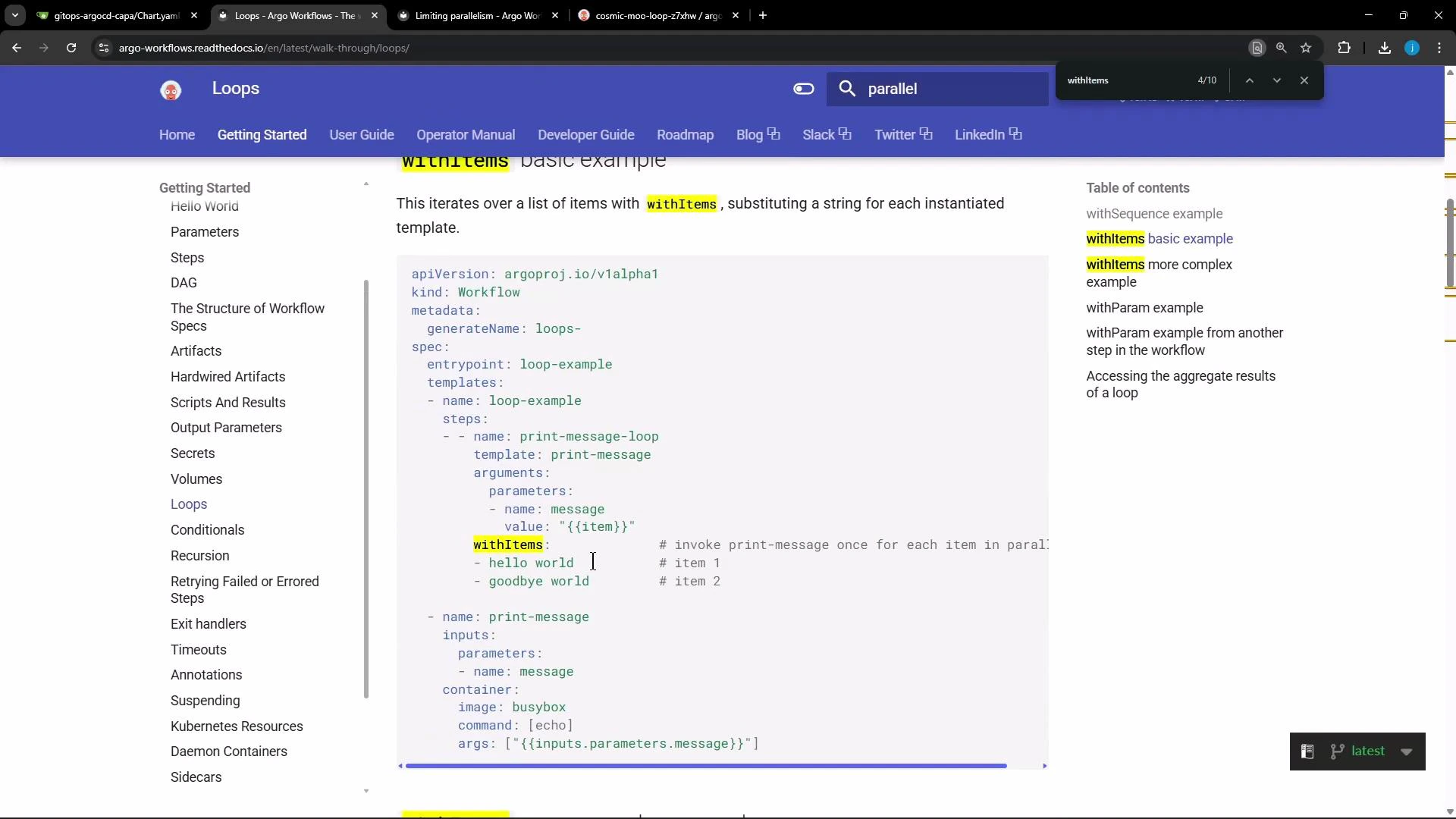
Why this fails: the called template (moo-wisdom) doesn’t declare any input parameters, so when the template executes as a called template Argo cannot substitute inside that template. For more examples and patterns, see the Argo Workflows loops documentation: https://argoproj.github.io/argo-workflows/workflow-syntax/loops/
A screenshot of the Argo Workflows "Loops" documentation showing a YAML code
example using withItems to iterate over items. The page includes a left
navigation menu, a table of contents on the right, and highlighted "withItems"
text.
Correct pattern — pass the item as an argument parameter The correct approach is to pass each item via arguments.parameters in the step, and have the called template declare an inputs.parameters entry. Then reference the value with {{inputs.parameters.\<name>}} inside the called template. Corrected example:
apiVersion: argoproj.io/v1alpha1
kind: Workflow
metadata:
  generateName: cosmic-moo-loop-
spec:
  entrypoint: moo-madness
  templates:
    - name: moo-madness
      steps:
        - - name: cosmic-cow
            template: moo-wisdom
            arguments:
              parameters:
                - name: message
                  value: "{{item}}"
            withItems:
              - "Galaxy"
              - "Universe"
              - "Cosmos"
              - "Nebula"
              - "Orbit"
              - "Comet"
              - "Star"
              - "Planet"
              - "Moon"
              - "Solar"

    - name: moo-wisdom
      inputs:
        parameters:
          - name: message
      container:
        image: rancher/cowsay
        command: [sh, -c]
        args:
          [
            "cowsay 'Greetings from the {{inputs.parameters.message}} System!' && sleep 8",
          ]
Notes on this pattern:
  • The cosmic-cow step creates one invocation per item in the withItems list.
  • Each invocation sets arguments.parameters.message to "{{item}}".
  • The moo-wisdom template declares inputs.parameters.message and references it as {{inputs.parameters.message}}.
If the template inputs are misnamed or missing, Argo will report a resolution error. A typical runtime error looks like:
{
  "code": 3,
  "message": "templates.moo-madness.steps[0].cosmic-cow templates.moo-wisdom: failed to resolve {{inputs.parameters.message}}"
}
This often means the called template didn’t declare the expected inputs (for example, inputs: misspelled as input: or parameter name mismatched). Parallel execution behavior By default, Argo schedules all items from withItems as parallel pod executions. In the corrected example above, Argo would create one pod per list item and run them concurrently. You can watch these concurrent child nodes in the Argo UI as the workflow runs.
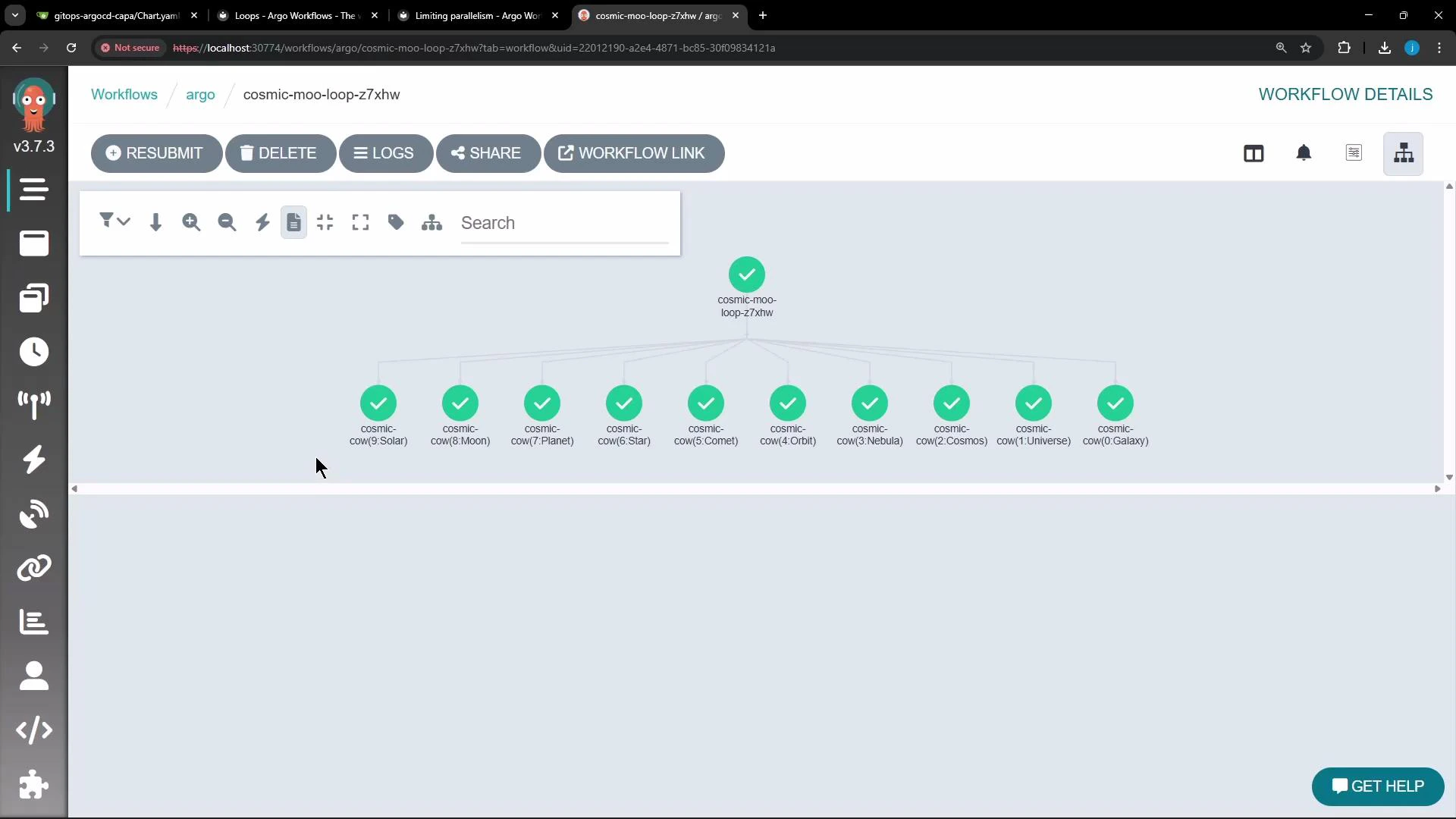
Screenshot of the Argo Workflows web UI displaying a completed workflow
named "cosmic-moo-loop-z7xhw" with multiple child nodes labeled
"cosmic-cow(...)" showing green check marks. The top toolbar includes buttons
like RESUBMIT, DELETE, and LOGS, and a left sidebar of navigation icons is
visible.
Limiting concurrency with parallelism If your withItems list contains many entries (hundreds or thousands), running all invocations in parallel can overload cluster resources. Use the parallelism field to limit the number of concurrently running templates. You can set parallelism globally on the controller (ConfigMap) or on a per-workflow basis. Example: set workflow-level parallelism to 2 so only two item invocations run at once:
apiVersion: argoproj.io/v1alpha1
kind: Workflow
metadata:
  generateName: cosmic-moo-loop-
spec:
  entrypoint: moo-madness
  parallelism: 2
  templates:
    - name: moo-madness
      steps:
        - - name: cosmic-cow
            template: moo-wisdom
            arguments:
              parameters:
                - name: message
                  value: "{{item}}"
            withItems:
              - "Galaxy"
              - "Universe"
              - "Cosmos"
              - "Nebula"
              - "Orbit"
              - "Comet"
              - "Star"
              - "Planet"
              - "Moon"
              - "Solar"

    - name: moo-wisdom
      inputs:
        parameters:
          - name: message
      container:
        image: rancher/cowsay
        command: [sh, -c]
        args:
          [
            "cowsay 'Greetings from the {{inputs.parameters.message}} System!' && sleep 8",
          ]
With parallelism: 2, Argo will schedule only two cosmic-cow pods at a time; as those complete, it schedules the next ones from the list.
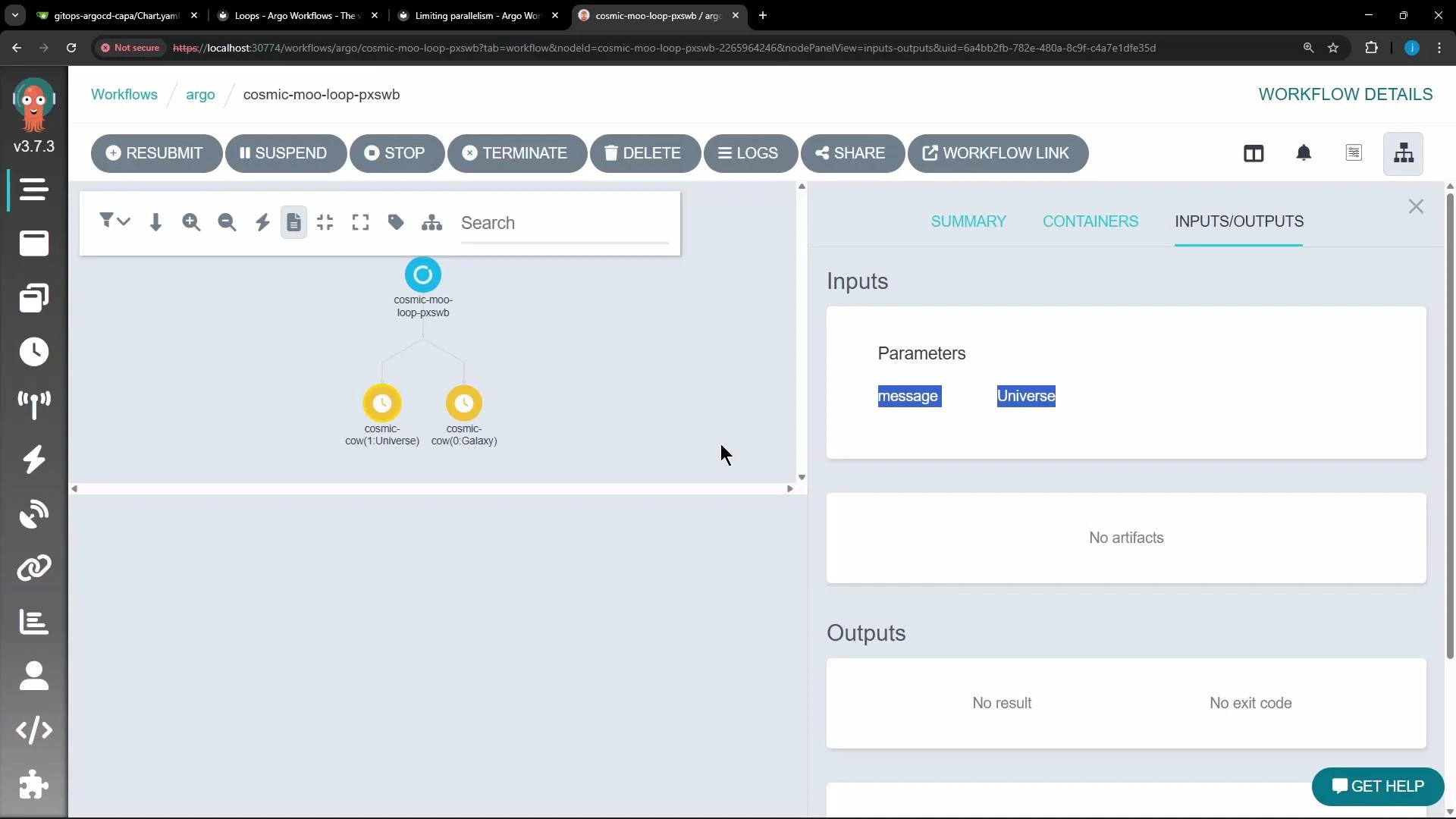
A screenshot of the Argo Workflows web UI showing a workflow named
"cosmic-moo-loop-pxswb" with two child tasks labeled for Universe and Galaxy.
The right-hand Inputs/Outputs panel lists parameters "message" and
"Universe."
Best practices and important warnings
Be careful when looping over large lists: launching hundreds or thousands of parallel pods can exhaust cluster resources. Use workflow-level parallelism, namespace-level quota controls, or controller-level limits (ConfigMap) to avoid runaway concurrency.
Tip: To pass item values reliably into a called template, always declare inputs.parameters on the called template and pass the current item via arguments.parameters: value: "{{ item }}".
Links and references That’s the core of using withItems and controlling parallelism in Argo Workflows.

Watch Video