In this lesson we cover Argo Workflows DAGs — how they model complex task dependencies, enable parallelism, and control execution behavior. What is a DAG (Directed Acyclic Graph)?
  • Directed: dependencies flow in one direction.
  • Acyclic: cycles are not allowed — a task cannot depend on another task that eventually depends back on the original (prevents infinite loops).
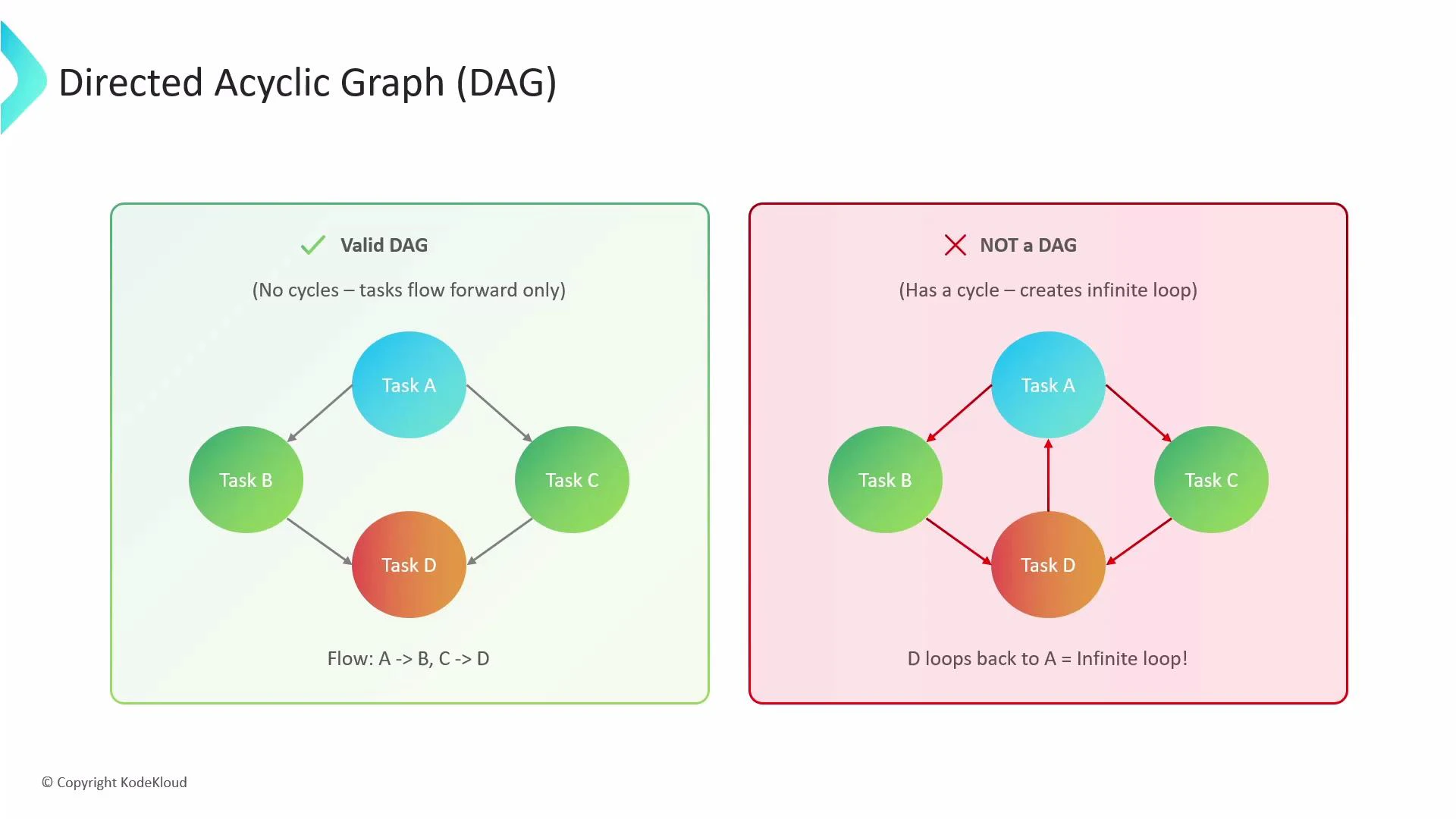
A DAG lets you express workflows as a graph of tasks and dependencies instead of a single linear sequence. This enables common orchestration patterns such as fan-out (one task triggers many) and fan-in (many tasks must complete before one runs).
An illustration titled "Directed Acyclic Graph (DAG)" showing two side-by-side diagrams. The left panel shows a valid DAG with tasks A, B, C, D flowing forward (no cycles), while the right panel shows a non-DAG where D loops back to A, creating a cycle/infinite loop.
Why use DAGs in Argo Workflows?
  • Make complex dependencies explicit and easy to read.
  • Enable parallel execution of independent tasks, improving throughput.
  • Prevent infinite loops by design.
  • Allow more efficient scheduling and faster end-to-end completion by running independent tasks concurrently.
Quick reference: DAG properties and common use cases
FeatureUse caseExample
Directed, AcyclicPrevent cycles and model dependency flowData pipelines, ETL jobs
Parallelism / Fan-outRun independent tasks concurrentlyParallel data transforms
Fan-inWait until multiple tasks finishAggregation or reduce step
failFastStop scheduling new tasks after a failureFail-fast CI pipelines
depends expressionComplex boolean dependency logicConditional task runs based on multiple predecessors
Classic fan-out / fan-in example In this pattern:
  • Task A runs first.
  • When A succeeds, tasks B and C run in parallel (fan-out).
  • Task D runs only after both B and C finish successfully (fan-in).
Example Workflow:
apiVersion: argoproj.io/v1alpha1
kind: Workflow
metadata:
  generateName: dag-fan-in-out-
spec:
  entrypoint: main
  templates:
  - name: main
    dag:
      tasks:
      - name: A
        template: echo-message
        arguments:
          parameters:
          - name: message
            value: "Task A"
      - name: B
        template: echo-message
        dependencies: ["A"]
        arguments:
          parameters:
          - name: message
            value: "Task B"
      - name: C
        template: echo-message
        dependencies: ["A"]
        arguments:
          parameters:
          - name: message
            value: "Task C"
      - name: D
        template: echo-message
        dependencies: ["B", "C"]
        arguments:
          parameters:
          - name: message
            value: "Task D"
  - name: echo-message
    inputs:
      parameters:
      - name: message
    container:
      image: busybox
      command: ["sh", "-c", "echo {{inputs.parameters.message}}"]
Execution behavior:
  • Task A starts first (no dependencies).
  • After A completes, the controller starts B and C in parallel.
  • Task D waits until both B and C have succeeded.
Enhanced dependency logic with boolean depends expressions Argo supports a depends expression (string) that lets you specify boolean logic and check node outcomes such as Succeeded, Failed, Skipped, Error, Omitted, and Deemed. This is useful when you need conditional execution beyond simple “all predecessors succeeded”. Example using boolean depends expressions:
apiVersion: argoproj.io/v1alpha1
kind: Workflow
metadata:
  generateName: dag-depends-expr-
spec:
  entrypoint: main
  templates:
  - name: main
    dag:
      tasks:
      - name: A
        template: succeeds
      - name: B
        template: fails
      - name: C-runs-if-either-succeeds
        depends: "A.Succeeded || B.Succeeded"
        template: echo-message
        arguments:
          parameters:
          - name: message
            value: "Task C ran!"
      - name: D-runs-if-both-succeed
        depends: "A.Succeeded && B.Succeeded"
        template: echo-message
        arguments:
          parameters:
          - name: message
            value: "Task D ran!"
  - name: succeeds
    container:
      image: busybox
      command: ["sh", "-c", "echo 'I succeeded.'"]
  - name: fails
    container:
      image: busybox
      command: ["sh", "-c", "echo 'I failed.'; exit 1"]
  - name: echo-message
    inputs:
      parameters:
      - name: message
    container:
      image: busybox
      command: ["sh", "-c", "echo {{inputs.parameters.message}}"]
How this evaluates:
  • A and B run in parallel. If A succeeds and B fails:
    • C (A.Succeeded || B.Succeeded) evaluates to true and runs.
    • D (A.Succeeded && B.Succeeded) evaluates to false and is skipped.
Conversion: dependencies array -> depends expression You cannot use dependencies (array) and depends (expression) on the same task. To convert an array-style dependency to a depends expression, join the nodes with the operator you need. Example:
  • Original (array-style):
      - name: my-task
        dependencies: ["A", "B", "C"]
        template: do-something
  • Equivalent depends expression (all must succeed):
      - name: my-task
        depends: "A.Succeeded && B.Succeeded && C.Succeeded"
        template: do-something
You can replace && with || or build more complex expressions with parentheses and NOT as needed.
The depends field is a string expression evaluated by the controller. It is mutually exclusive with the dependencies array — use one or the other.
Fail-fast behavior in DAGs By default, DAGs stop scheduling any new tasks when a task fails — this is “fail-fast”. Tasks already running continue to completion, but no new tasks that depend on failed nodes will start. The DAG will be marked as failed. Control this behavior with the failFast flag on the DAG. Set failFast: false when you want independent branches to keep running even if another branch fails. Example showing failFast (default behavior shown as true here):
apiVersion: argoproj.io/v1alpha1
kind: Workflow
metadata:
  generateName: dag-fail-fast-
spec:
  entrypoint: main
  templates:
  - name: main
    dag:
      # If one task fails, immediately stop scheduling new tasks in the DAG.
      failFast: true
      tasks:
      - name: long-running-task
        template: long-sleep
      - name: immediate-failure
        template: fails
  - name: long-sleep
    container:
      image: busybox
      command: ["sh", "-c", "echo 'Long sleep...'; sleep 300"]
  - name: fails
    container:
      image: busybox
      command: ["sh", "-c", "echo 'I am about to fail...'; exit 1"]
When to set failFast: false
  • Use false for environments where long-running independent branches must complete (e.g., batch processing), and you prefer to gather results even if one branch fails.
Links and references

Watch Video