

- Desired state in Git
- Manifests (YAML), Helm charts, Kustomize overlays, Jsonnet, or Helmfile live in your Git repositories. These repositories act as the single source of truth.
- Continuous reconciliation
- ArgoCD continuously compares the desired state in Git with the actual state in the target clusters. When drift is detected, the reconciliation loop can apply changes according to the sync policy (manual or automatic).
- Webhooks for faster sync
- You can configure webhooks on your Git provider to notify ArgoCD of push/merge events. Webhooks prompt immediate refresh and reconciliation rather than waiting for the next polling interval.
- API server (gRPC + REST)
- ArgoCD exposes gRPC endpoints and a REST interface (via gRPC-gateway). These are used by the UI, CLI (argocd), and automation tools.
- Component responsibilities
- repo-server: clones repositories and renders manifests (Helm/Kustomize).
- application-controller: performs the continuous reconciliation between Git and clusters.
- argocd-server: serves the UI, CLI API, and authentication endpoints.
- Redis (optional): used for caching and work queues.
- SSO connectors (optional): Dex or external OIDC providers for authentication.
- Multi-cluster control plane
- A single ArgoCD control plane can manage deployments across multiple target clusters. Cluster credentials are stored in the control plane and used to apply manifests to registered clusters.
- Observability & notifications
- ArgoCD exports Prometheus metrics for monitoring (visualized in Grafana).
- ArgoCD Notifications supports triggers, templates, and integrations (Slack, Teams, email, GitHub, etc.) to alert teams about syncs, health changes, and failures.
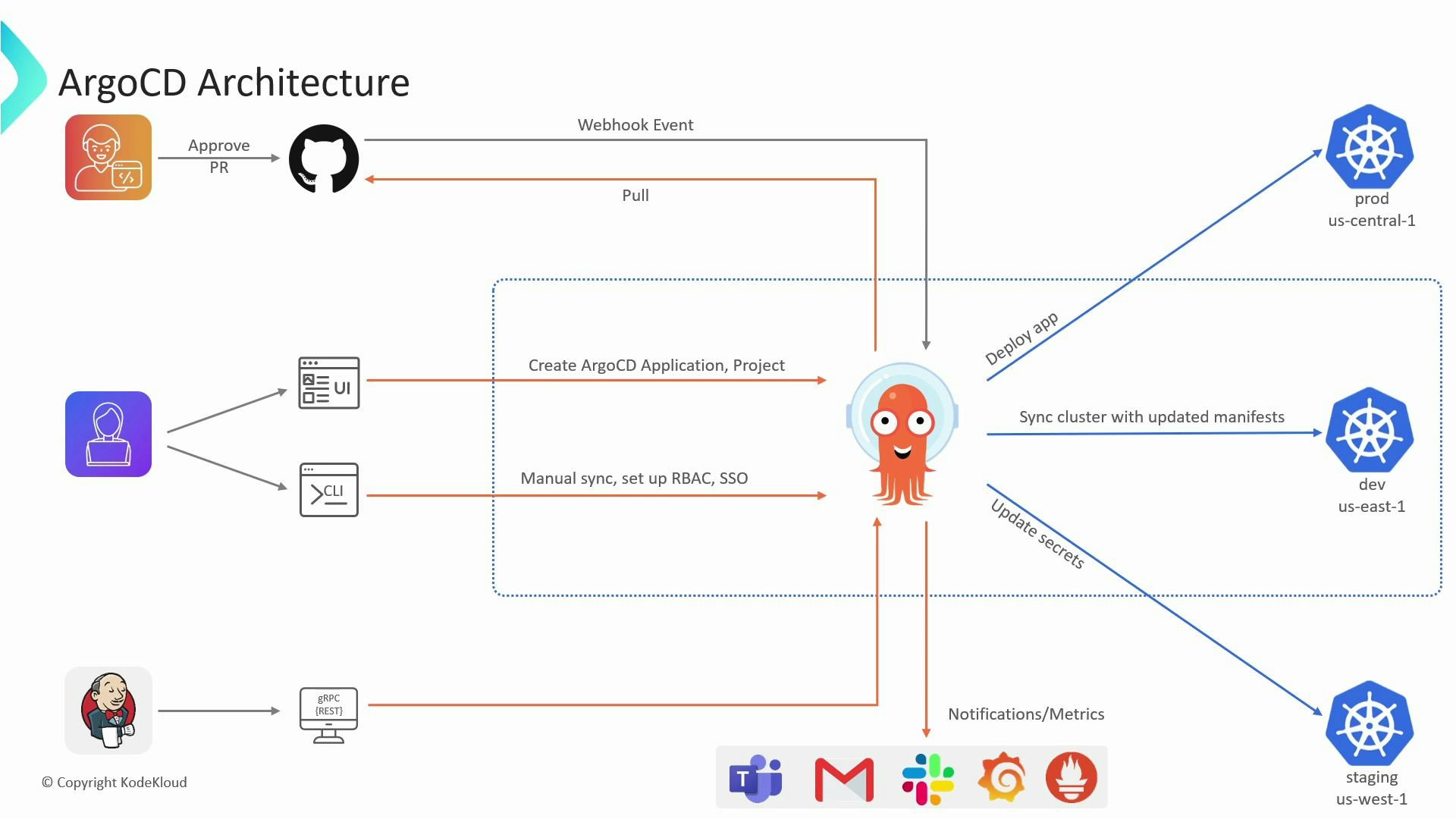
- ArgoCD reads Application manifests that reference Git repositories and target clusters.
- The repo-server clones the repository and renders manifests for the specified revision (branch, tag, commit).
- The application-controller compares the rendered desired state with the live cluster resources.
- If divergence (drift) is detected, the controller either:
- Enqueues a sync operation (automatic sync policy), or
- Marks the Application as OutOfSync for an operator to manually sync (manual policy).
- During sync, ArgoCD applies the manifests to the target cluster and can perform pruning (remove resources no longer in Git) and self-heal (auto-correct drift).
- Polling vs. webhook: ArgoCD can poll Git repositories on a periodic interval, but configuring webhooks on your Git provider (GitHub, GitLab, Bitbucket) reduces latency by informing ArgoCD immediately when changes occur.
- Webhook flow:
- Developer pushes/merges to Git.
- Git provider sends webhook to ArgoCD.
- ArgoCD refreshes its cache and triggers reconciliation for affected Applications.
Store cluster credentials and Git access tokens securely. Avoid committing tokens or kubeconfig files into repositories. Use Kubernetes secrets, sealed-secrets, or external secret managers (Vault, AWS Secrets Manager, etc.) to protect sensitive credentials.
Typical actors and integrations
Best practices and tips
- Model each deployable component as an ArgoCD Application and group related Applications into Projects for access control and separation.
- Use Git branching strategies (feature, release, main) and tie ArgoCD Applications to specific branches or tags for predictable deployments.
- Enable webhooks for faster continuous delivery; rely on Prometheus metrics and Grafana dashboards for operational visibility.
- Official ArgoCD documentation: https://argo-cd.readthedocs.io/
- GitOps principles: https://www.gitops.tech/
- Prometheus: https://prometheus.io/
- Grafana: https://grafana.com/
- Dex (SSO connector): https://github.com/dexidp/dex