

post { always { ... } } block.
Below is a minimal workflow that shows an onExit handler named cleanup. The primary work deliberately fails (exit code 1) so you can verify the exit handler still executes.
Use
onExit to centralize cleanup and notification logic. Inspect {{workflow.status}} to run conditional actions (for example, send alerts on Failure or perform extra validation on Succeeded).What each template does
Explanation:
entrypoint: main— workflow starts at themaintemplate.onExit: cleanup— ensures thecleanuptemplate runs when the workflow finishes, irrespective of success or failure.do-work— the container task that demonstrates a failing step.cleanup— exit handler that reads{{workflow.status}}and conditionally performs actions.
Viewing results
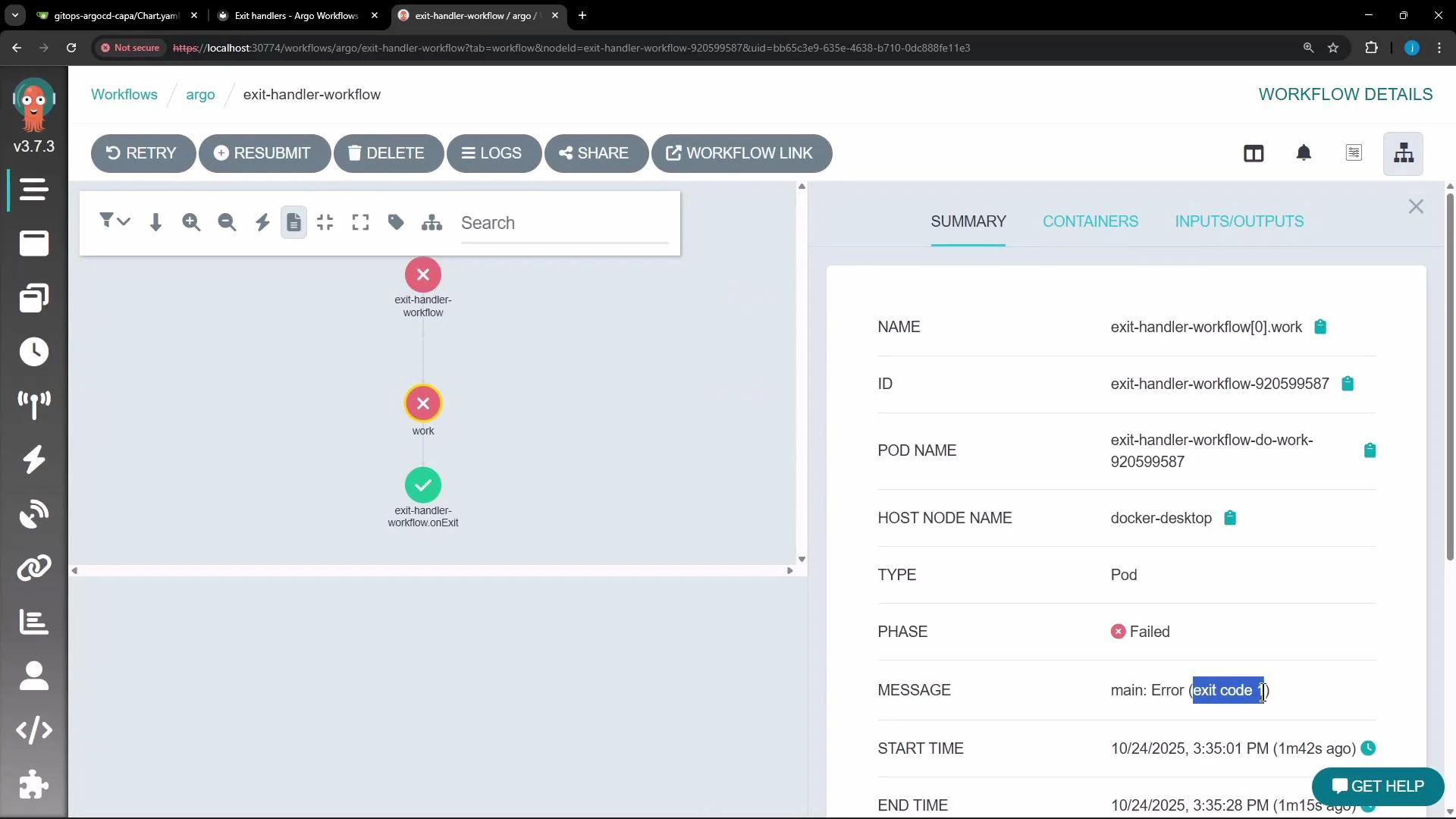
Even when a step fails, the exit handler still runs. In the Argo UI you can see the failedwork step and the exit-handler node (typically displayed in green to indicate it completed). The screenshot below shows the failed work step and the exit-handler node along with pod details.
cleanup logs printed after the workflow fails:
echo commands with real integrations: Slack notifications, posting status to a webhook, cleaning up cloud resources, or triggering recovery workflows. When designing critical cleanup actions, make them idempotent so repeated runs are safe.
Although
onExit executes in normal success and failure scenarios, extreme outages (for example: controller crashes, severe cluster failures, or lost persistence) may prevent the exit handler from running. For critical cleanup, combine onExit with idempotent design or external watchdog processes.Practical tips
- Test exit handlers by forcing failures (exit codes) or injecting errors to ensure notifications and cleanups behave as expected.
- Use
{{workflow.status}},{{workflow.name}}, and other workflow variables to include contextual details in alerts. - Keep exit handlers small and focused; offload heavy or long-running recovery tasks to separate workflows or jobs to avoid unexpected interactions.
References
- Argo Workflows docs: https://argoproj.github.io/argo-workflows/
- Jenkins pipeline
postdirective: https://www.jenkins.io/doc/book/pipeline/syntax/#post - Example Slack incoming webhook: https://api.slack.com/messaging/webhooks