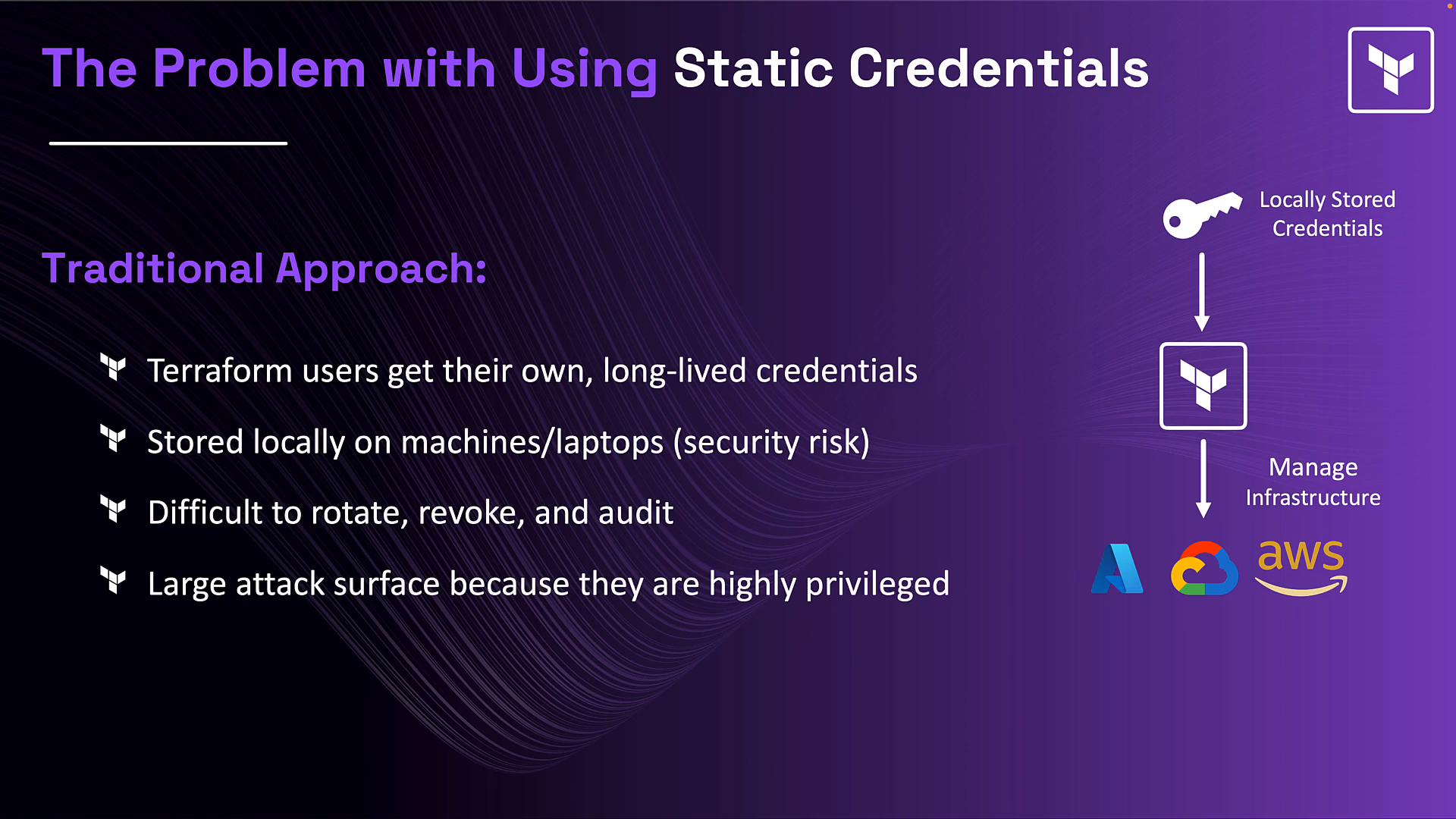
In this lesson we wrap up the Vault section by explaining a common production pattern used in enterprises: using HashiCorp Vault to generate dynamic, short-lived credentials for Terraform. This complements concepts you’ve already seen — sensitive variables, encrypted state, ephemeral values, and write-only arguments — and shows how to reduce credential sprawl and improve auditability. This is a high-level overview to help you understand how Terraform integrates with Vault. You do not need deep Vault expertise for the Terraform Associate exam, but you should understand the pattern and its benefits. The problem Traditionally, Terraform requires credentials to provision infrastructure. Teams often distribute long-lived credentials to each user (AWS access keys, Azure service principals, GCP service account keys, Kubernetes tokens, etc.). These credentials are frequently:
  • Highly privileged
  • Stored locally on developer machines or CI runners
  • Hard to rotate or revoke
  • Difficult to audit
If a user leaves or a credential is compromised, it can remain valid for months or years — increasing the attack surface. What if credentials were short-lived and generated on demand?
The image discusses issues with using static credentials in a traditional approach, highlighting risks such as local storage and difficulty in credential management. It suggests considering short-lived, on-demand generated credentials.
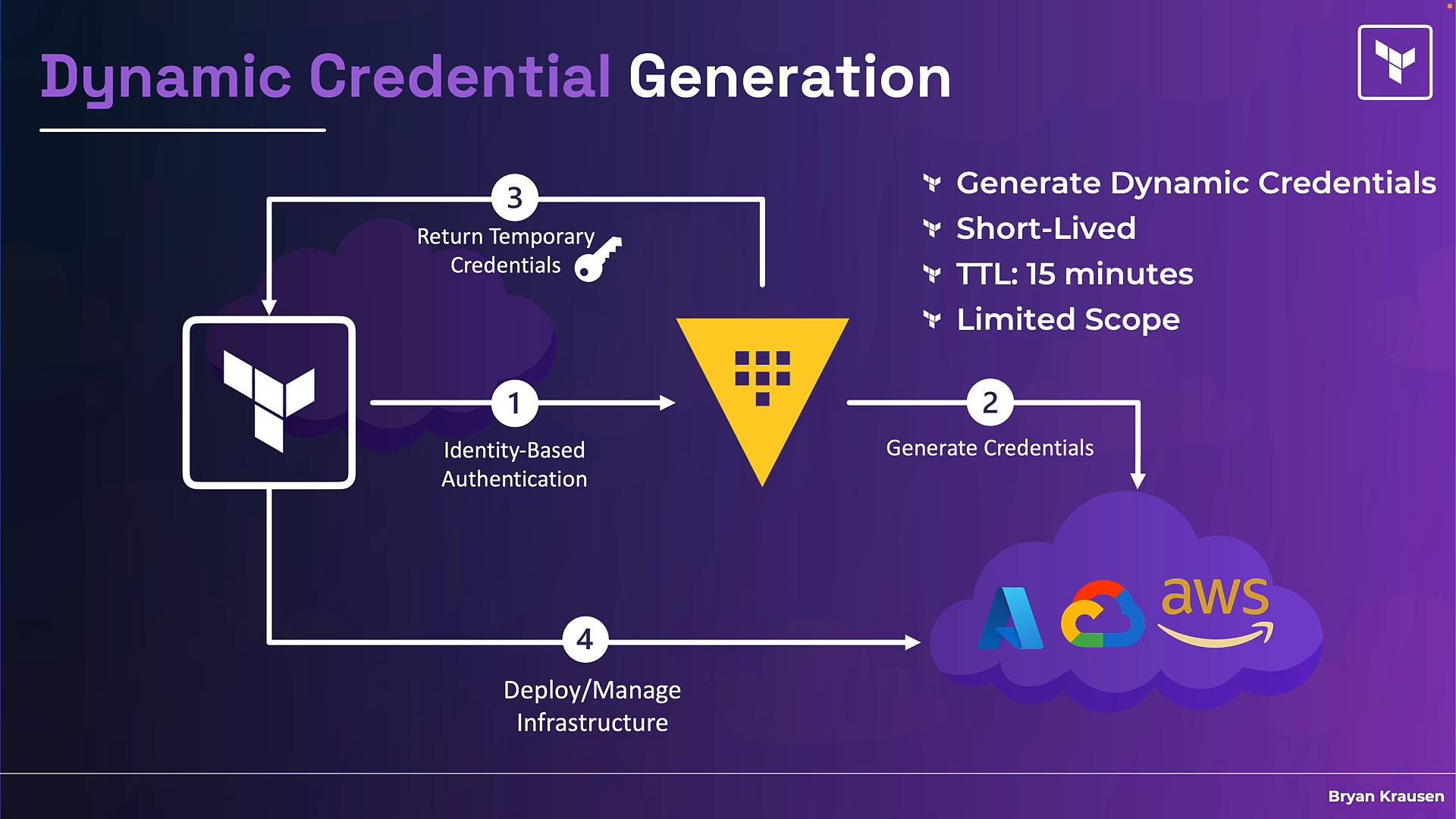
How Vault changes the model Vault enables dynamic credential generation so Terraform no longer needs long-lived platform credentials on every client. Typical flow:
  1. Terraform authenticates to Vault via an identity-based auth method (AWS Auth, Azure roles, Kubernetes service account token, etc.), chosen based on where Terraform runs.
  2. Vault uses the appropriate secrets engine (AWS, Azure, GCP, Kubernetes, etc.) to generate credentials on demand.
  3. Vault returns temporary credentials to Terraform.
  4. Terraform uses these temporary credentials to authenticate to the cloud provider for the current run.
These credentials are TTL-based (short-lived), scoped to least privilege via Vault roles, and can be revoked automatically when the TTL expires. Long-lived platform credentials remain stored only inside Vault; Terraform clients receive ephemeral credentials in memory during the run. Example Terraform flow and code Below is a consolidated illustrative example showing the pieces involved:
  • Vault provider configuration (how Terraform connects to Vault and authenticates).
  • An ephemeral construct that fetches dynamic credentials from Vault (conceptual in this example).
  • A cloud provider block that consumes the temporary credentials returned by that ephemeral construct.
  • A normal resource that is provisioned with those credentials.
Note: different environments use different Vault auth methods (AWS auth, Kubernetes, Azure, etc.). Not all providers expose ephemeral resource types — some expose data sources (for example data "vault_aws_access_credentials") or provider-specific constructs to obtain temporary credentials without persisting them to state. Check the provider docs for exact syntax.
provider "vault" {
  # Vault server address (e.g. https://vault.example.com:8200)
  address = "https://vault.example.com:8200"

  # Configure identity-based authentication (AWS auth, Kubernetes, Azure, etc.)
  # Example: authenticate via the appropriate auth method for wherever Terraform runs.
  # (Fill in according to your environment / Vault auth setup)
}

# Ephemeral resource that asks Vault's AWS secrets engine to generate temporary credentials.
# This resource is not written to state and returns credentials in memory for the current run.
ephemeral "vault_aws_access_credentials" "creds" {
  backend = vault_aws_secret_backend.aws.path
  role    = vault_aws_secret_backend_role.example.name
  type    = "creds"
  region  = "us-east-1"
}

# AWS provider configured to use the temporary credentials returned by the ephemeral resource.
provider "aws" {
  region     = "us-east-1"
  access_key = ephemeral.vault_aws_access_credentials.creds.access_key
  secret_key = ephemeral.vault_aws_access_credentials.creds.secret_key
}

# Example cloud resource provisioned using the temporary credentials.
resource "aws_instance" "main" {
  ami           = "ami-0c55b159cbfafe1f0" # replace with a valid AMI for your account/region
  instance_type = "t3.micro"
  # ... other config ...
}
How the lifecycle works
  • On terraform plan or terraform apply, Terraform authenticates to Vault using the configured auth method.
  • Terraform requests dynamic credentials from the relevant Vault secrets engine (e.g., AWS secrets engine).
  • Vault vends temporary credentials and returns them to Terraform; Terraform uses them for provider authentication during the run.
  • Credentials have a short TTL (minutes or tens of minutes). When the TTL expires Vault revokes the backend credential (in AWS, Azure, GCP, etc.), preventing later misuse even if the credentials were exposed.
Important properties of this pattern
  • Credentials are generated on demand and are short-lived (TTL-based).
  • Roles in Vault can scope credentials to least privilege.
  • Long-lived cloud credentials remain inside Vault; users do not hold platform secrets.
  • When using ephemeral resources or provider mechanisms that avoid persisting secrets, credentials can be kept out of Terraform state — they exist only in memory for the run.
  • Reduces credential sprawl, simplifies rotation/revocation, and reduces the attack surface.
Not all Terraform providers expose ephemeral resource types. Check the provider documentation to confirm whether ephemeral resources or equivalent data sources are available and how to reference them.
Avoid persisting dynamic credentials to state files or logs. If a provider does not support ephemeral constructs, carefully review how credentials are surfaced and ensure they are not saved to persistent state or exposed in CI logs.
Quick reference: components and responsibilities
ComponentResponsibilityExample or note
VaultCentralized secrets management, dynamic credential generation, policy enforcementSee Vault docs: https://www.vaultproject.io/docs
Vault secrets engineGenerates backend credentials (AWS, Azure, GCP, etc.)Configure the appropriate secrets engine for your cloud
Vault auth methodAuthenticates Terraform to Vault (Kubernetes, AWS, Azure, etc.)Choose based on where Terraform runs
Terraform Vault providerRetrieves credentials from Vaultprovider "vault" { ... }
Ephemeral/data constructReturns temporary credentials to Terraform without persisting to statedata "vault_aws_access_credentials" ... or provider-specific ephemeral block
Cloud providerUses temporary credentials for API callsprovider "aws" { access_key = ... secret_key = ... }
Why use this pattern?
  • Centralized secrets management and policy control via Vault.
  • Reduced attack surface because credentials are short-lived and revocable.
  • No local long-lived credential storage for developers or CI runners.
  • Easier to change access controls by updating Vault roles/policies without redistributing credentials.
What you need to know for the Terraform Associate exam Focus on the conceptual pattern:
  • Vault can generate dynamic, short-lived credentials for cloud platforms.
  • Terraform uses the Vault provider to retrieve those credentials.
  • Combining Vault with ephemeral resources or provider-specific mechanisms avoids writing credentials to state.
  • You do not need to be an expert in Vault; understand the integration and security benefits.
Conclusion The dynamic-credentials pattern—Vault generating temporary credentials on demand, Terraform retrieving them via the Vault provider (and ephemeral resources where available), and cloud providers using those credentials to provision infrastructure—is a mature approach to secrets management. It complements other best practices (sensitive variables, write-only arguments, encrypted state, avoiding secrets in Git). Each layer reduces risk; use them together to strengthen your security posture. References and further reading And that’s it for this lesson.

Watch Video