

terraform plan and terraform apply is a dependency graph — the resource graph — that Terraform constructs from your configuration. This graph determines the order and parallelism of operations, and understanding it explains much of Terraform’s behavior and helps with the HashiCorp Certified: Terraform Associate exam.
This lesson explains:
- How Terraform builds the resource graph
- The difference between implicit and explicit dependencies
- How Terraform schedules work (parallelism)
- When to use
depends_on
How Terraform builds the dependency graph
Terraform reads your configuration and constructs an internal dependency graph from attribute references between resources. It does not execute resources in the order they appear in files — it uses relationships inferred from references to compute the correct execution order. Key results:- Resource order in files does not dictate creation order.
- Splitting resources into multiple files does not change the graph or execution order.
- References such as
aws_subnet.example.vpc_id = aws_vpc.example.idcreate implicit dependencies.
- Resource order in your Terraform files does not determine creation order.
- The resource graph enables parallel execution. If two resources have no dependency between them, Terraform can create them concurrently. This parallelism greatly reduces total apply time for large deployments.
-
The graph shows when you need explicit dependencies (
depends_on). Most dependencies are implicit and inferred from attribute references. Usedepends_ononly when Terraform cannot infer ordering from attributes.
Dependencies: implicit vs explicit
Terraform recognizes two dependency types: implicit and explicit.Implicit dependencies
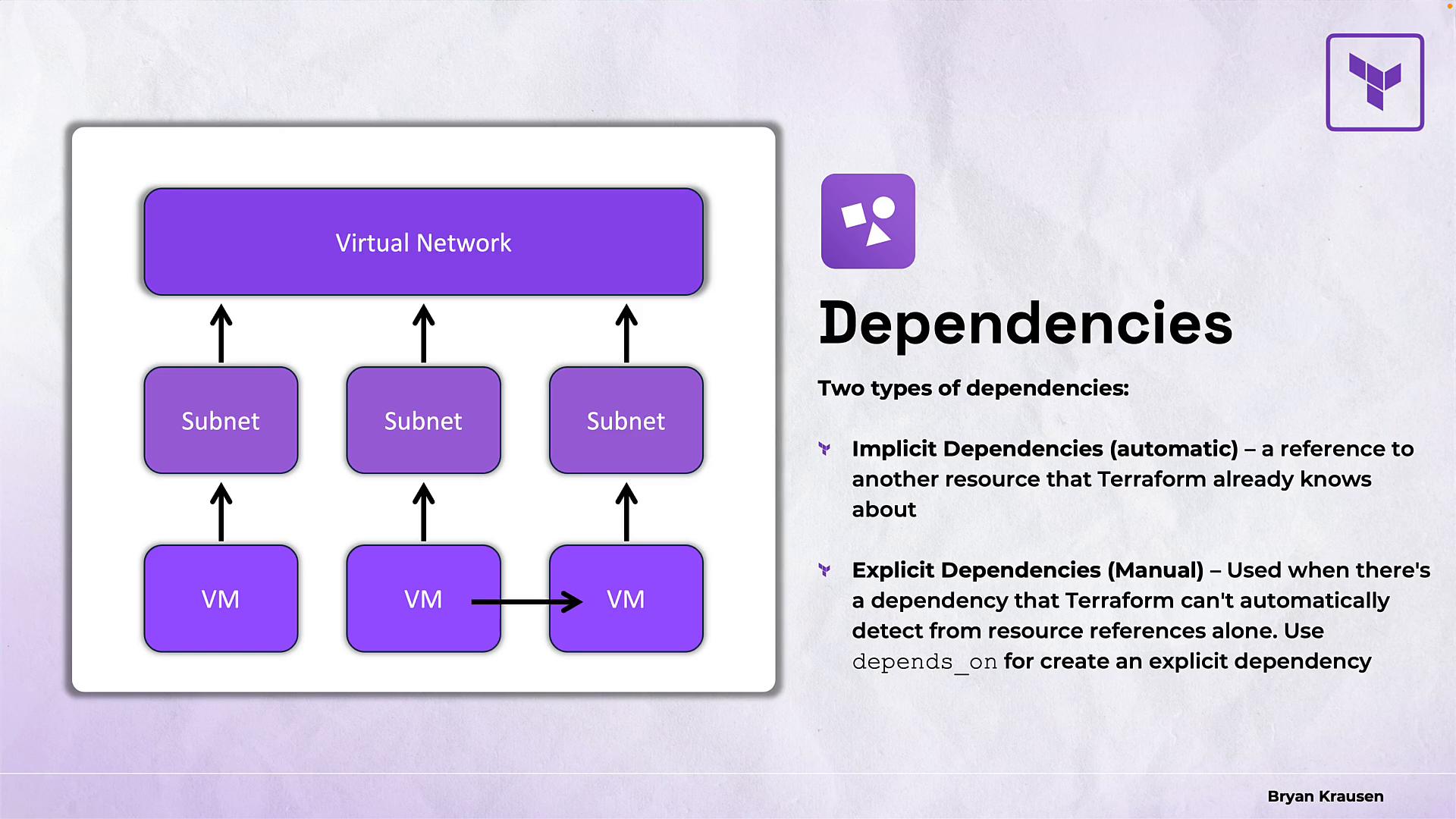
Implicit dependencies are automatically created when one resource refers to another resource’s attributes. Terraform infers the ordering from such references. Example topology (conceptual): one virtual network at the top → three subnets in the middle → three VMs at the bottom. Each subnet references the virtual network, and each VM references a subnet. Terraform infers the ordering: virtual network → subnets → VMs. In HCL, an implicit dependency looks like this:aws_subnet.example references aws_vpc.example.id and aws_instance.web references aws_subnet.example.id, Terraform automatically orders creation accordingly.
Explicit dependencies
Use explicit dependencies when Terraform cannot infer ordering from attribute references. Add thedepends_on meta-argument to force an ordering.
Example: if the web server must be created after a database for reasons not captured by attributes, use:
Explicit
depends_on is useful only when ordering cannot be inferred automatically from resource attributes. Overusing explicit dependencies reduces Terraform’s ability to parallelize operations.How Terraform walks the dependency graph (parallel execution)
Terraform traverses the graph and schedules resource operations as soon as their dependencies are satisfied. When multiple resources are ready, Terraform processes them concurrently, which increases throughput for large deployments. Default parallelism is 10 concurrent operations. You can override this with the-parallelism flag on plan, apply, or destroy:
- Lower parallelism if the provider API rate-limits requests.
- Set to 1 for debugging or when strictly sequential operations are required.
- Keep the default (10) for most real-world uses.
Quick reference for the exam and practical use
Additional resources
- Terraform documentation: https://www.terraform.io/docs
- Graph and planning concepts: https://www.terraform.io/cli/commands/plan
- Provider-specific considerations (APIs, rate limits) — check the provider documentation for best practices.
depends_on for edge cases. Use parallelism wisely based on provider limits and debugging needs.