

module block.
This guide explains how modules make your Terraform configurations more organized, reusable, and maintainable. Terraform block types (resources, data, providers, etc.) can be grouped into reusable components called modules. Modules simplify complex infrastructure by encapsulating patterns and exposing configurable inputs and outputs.
This lesson is a concise, high-level introduction to the module block and how to call modules from different sources.
Why use modules?
- Many applications require the same infrastructure building blocks (networking, databases, load balancers, TLS certificates, etc.). Modules let you avoid repeating that configuration across projects.
- Modules promote standardization and reduce duplication, making your infrastructure easier to maintain and audit.
- Use modules to enforce organizational best practices and to accelerate onboarding of new environments and applications.
- TLS certificate provisioning
- Load balancers and related listeners/target groups
- Message queuing or streaming infrastructure
- Kubernetes cluster provisioning
- Database clusters (RDS, Cloud SQL, etc.)
module blocks to that workload’s Terraform configuration and point each block at the shared module that creates the required infrastructure. You configure modules by passing input variables and integrate them by consuming module outputs.
The conceptual diagram below shows reusable modules shared between applications such as a Marketing Application and a GenAI Service. Each application references the modules it needs instead of duplicating resource definitions.
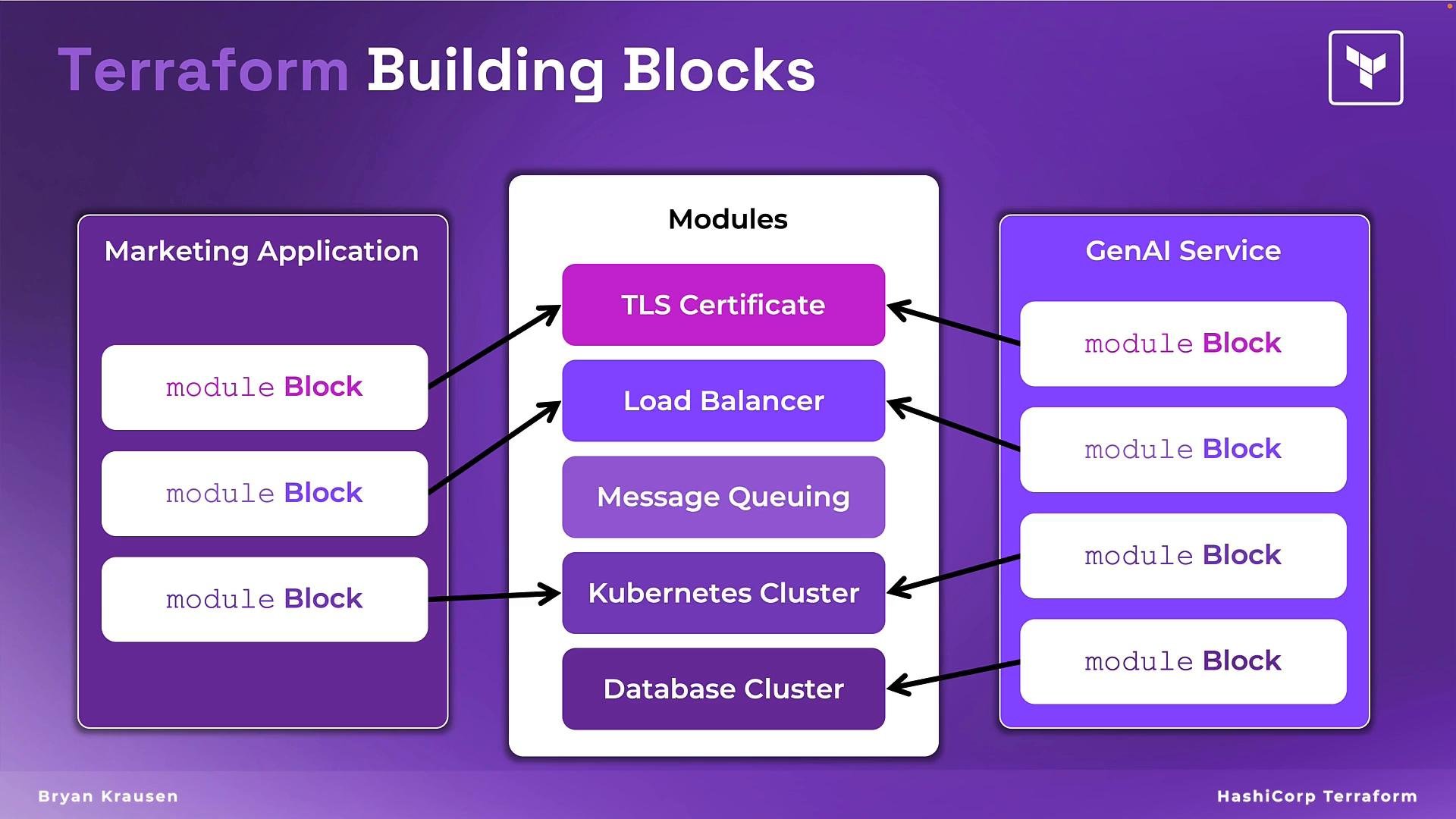
How module blocks work
- A
moduleblock calls an existing module (from a local path, the Terraform Registry, or a VCS repository) and integrates it into your configuration. - Modules group related resources into a single reusable component with defined inputs (
variables) and outputs. - Pass variables into a module to customize its behavior (for example, CIDR ranges, instance sizes, availability zones) and consume outputs (for example, subnet IDs or database endpoints) to connect resources across modules.
Benefits at a glance
Example: Using a VPC module from the Terraform Registry
Below is a samplemodule block that uses a popular AWS VPC module from the Terraform Registry. This is much simpler than writing all required networking resources yourself.
Key points about this example
sourcepoints to a module hosted on the Terraform Registry. You can also use local paths (e.g.,./modules/vpc) or VCS URLs (GitHub, GitLab).versionpins the Registry module release to ensure reproducible builds. For VCS sources, pin by using a tag, branch, or commit SHA.- The variables passed (
name,cidr,azs,private_subnets, etc.) map to the module’s input variables. Configure the module without changing its internal resources. - Reuse the module multiple times with different arguments to create distinct instances (e.g., separate VPCs per environment).
Modules often expose outputs (for example, subnet IDs, VPC IDs, or load balancer DNS names). Use these outputs in your root configuration to connect resources across modules instead of hard-coding values.
Best practices (summary)
- Design clear inputs and outputs for modules; keep the interface minimal and opinionated.
- Pin module versions when using the Registry and use semantic versioning to manage upgrades.
- Keep modules idempotent and document required variables and outputs.
- Prefer small, single-purpose modules that can be composed together.
- Store shared modules in a central registry or version-controlled repository for discovery and governance.
Summary
- The
moduleblock encapsulates reusable infrastructure patterns, making Terraform configurations more maintainable and consistent. - Modules can be sourced from the Terraform Registry, local paths, or VCS providers.
- Configure modules via inputs and wire them together using module outputs.
- Pin module versions to avoid unexpected changes and enable controlled upgrades.