

- What “module scope” means
- How to pass values into child modules
- How to return values from child modules to the root
- Practical examples and best practices
Project layout (overview)
Typical structure:- Root (parent) module
main.tf— module blocks and resourcesvariables.tf— input variables for the rootoutputs.tf— values exposed by the root
- Child module(s)
- Their own
main.tf,variables.tf, andoutputs.tf— logically isolated modules (e.g., networking, compute)
- Their own
Root module variables (example)
Define variables in the root module’svariables.tf:
Child module variables (example)
A child module declares its own inputs in itsvariables.tf:
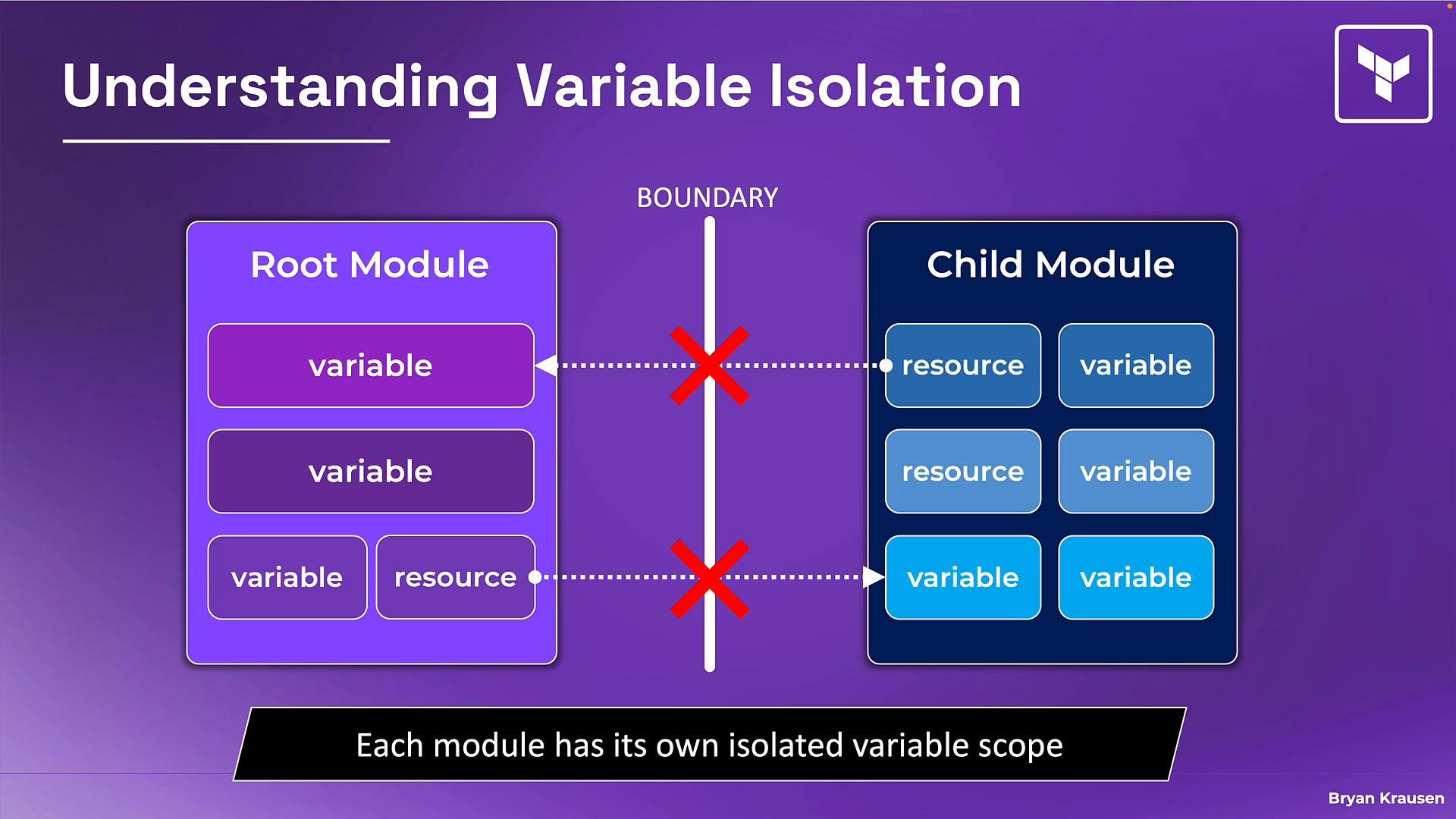
- Each module (root and child) has its own scope. Variables defined in the root (for example
environment) do not automatically become available inside a child module (which might expectenv). - Likewise, variables and resources inside a child module are not visible to the root unless the child explicitly exposes them via outputs.
- Think of modules like functions: they only receive what you explicitly pass in and return what you explicitly output.
Passing data into a child module (module block)
To feed values into a child module, declare the module block in the root module and assign arguments whose names match the child module’s variable names. Example: pass the rootenvironment into the child’s env:
var.env in resource blocks.
You can pass:
- a root variable (
var.*) - a resource attribute (
aws_subnet.my_subnet.id) - another module’s output (
module.network.subnet_id) - a literal/hard-coded value (
"prod")
Real-world example: calling a community VPC module
When consuming a module from the registry, pass in the expected inputs (names match the child module’s variables):- The child module defines the input variables (e.g.,
cidr,azs) in its ownvariables.tf. - If the child sets defaults for some variables, those defaults apply when you omit the corresponding argument in the module block.
Outputs: sending data from child back to root
To expose values from a child module back to the root, the child must declare outputs in itsoutputs.tf. The root can then access those values as module.<name>.<output_name>.
Child module example outputs.tf:
Common mistakes and how to avoid them
Best practices and checklist
- Treat modules as isolated units: nothing is shared implicitly.
- Always pass inputs explicitly via module block arguments.
- Expose only the necessary values using outputs in child modules.
- Use default values for non-critical settings to reduce boilerplate.
- Require explicit inputs for environment-specific values (names, CIDRs, accounts).
- Document module inputs and outputs in a README for each module.
- Does the child module declare a variable for each input you need?
- Are you passing values explicitly in the module block?
- Are any required values missing (no defaults)?
- Has the child module exposed required IDs/addresses via outputs?
Links and references
- Terraform Modules Documentation
- Terraform Registry — Public Modules
- Terraform Configuration Language (HCL) docs
- Terraform Associate Certification resource (example)
Modules are isolated by design. Always pass values explicitly (via module inputs) and expose values via outputs — this makes modules reusable and predictable.