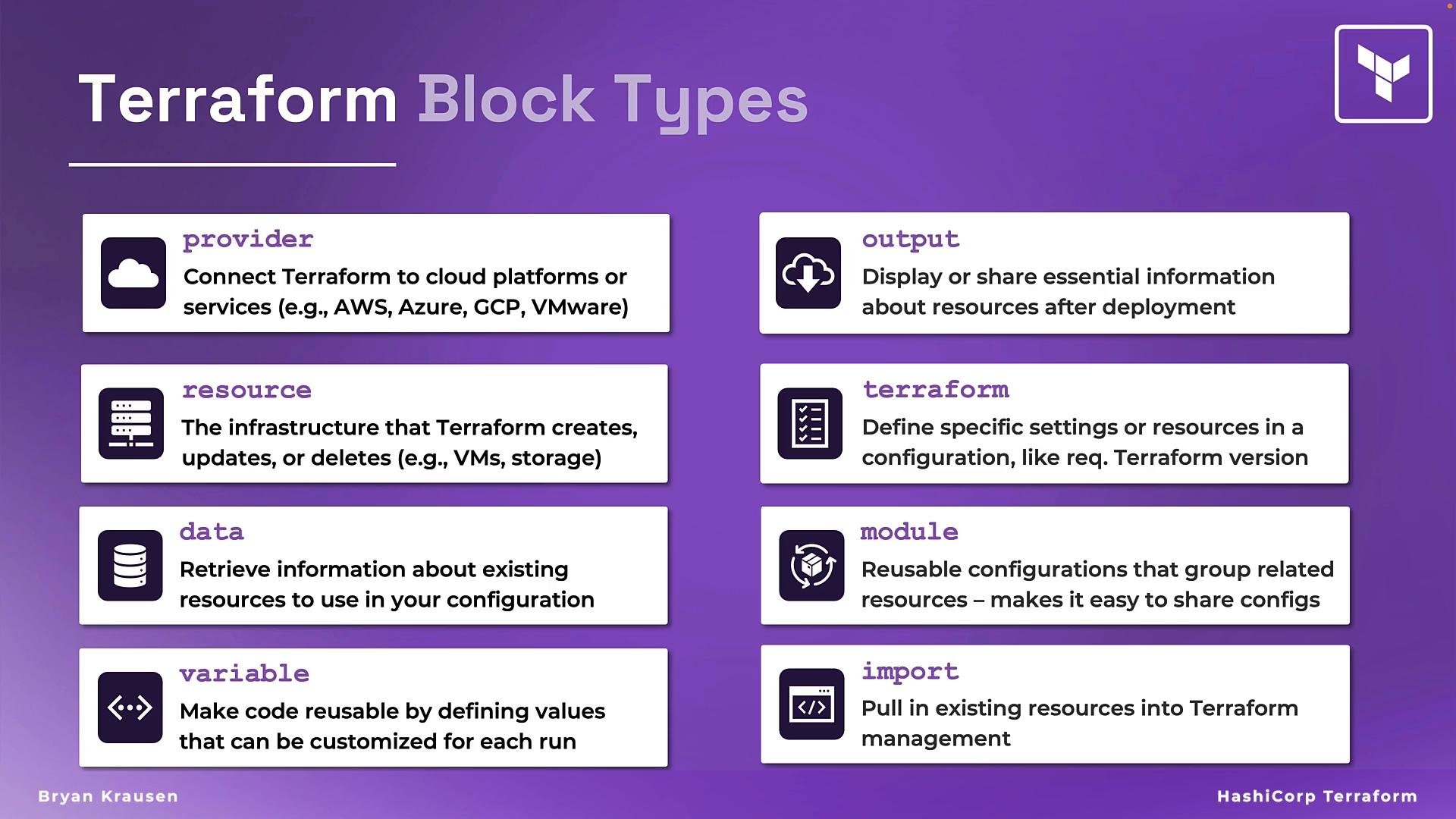
In this lesson you’ll learn why Terraform’s block-oriented syntax (HCL — HashiCorp Configuration Language) makes infrastructure-as-code easier to author, maintain, and reuse. HCL was designed to be both human-readable and machine-friendly, and Terraform’s block structure provides clear semantics, modularity, and composability for real-world infrastructure. Terraform language reference: https://developer.hashicorp.com/terraform/language

Why the block structure matters

  • Clear intent: Each block type has an explicit role (for example, provider vs resource), which makes configurations easier to read and reason about.
  • Modularity: Blocks compose naturally — use the right block types for discrete concerns and group them into modules.
  • Reusability: Consistent block patterns enable shareable modules, predictable behavior, and cleaner team collaboration.
  • Predictability: Meta-arguments and nested/dynamic blocks let you express common patterns (scaling, dependencies, lifecycle) declaratively.

Block anatomy (high level)

A Terraform block usually has three parts:
  1. Block type — e.g., resource, provider, module, variable.
  2. Optional labels — resource blocks often include a type and a name: resource "<TYPE>" "<NAME>".
  3. Block body — arguments and nested blocks inside { ... }.
Minimal example of a generic block:
<block_type> "<label1>" "<label2>" {
  # arguments and nested blocks
}
Blocks can also include meta-arguments such as count, for_each, depends_on, and lifecycle. Use nested blocks and dynamic blocks when you need to generate block content programmatically from data structures.

Quick reference: common block types

Block typePurposeExample
ProviderConnects Terraform to an external platform and configures credentials, region, etc.provider "aws" { region = "us-west-2" }
ResourceDeclares infrastructure objects Terraform manages (VMs, networks, storage, DNS, etc.).resource "aws_instance" "web" { ami = "ami-123" instance_type = "t3.micro" }
DataReads information about existing resources or external sources without creating them.data "aws_ami" "ubuntu" { most_recent = true }
VariableDeclares input variables to parameterize configurations.variable "instance_type" { type = string; default = "t3.micro" }
OutputExposes values from the applied configuration for other systems or users.output "instance_ip" { value = aws_instance.web.public_ip }
TerraformConfigures Terraform itself (required_providers, backend settings, etc.).terraform { required_providers { aws = { source = "hashicorp/aws"; version = "~> 4.0" } }; backend "s3" { bucket = "my-terraform-state" } }
ModuleGroups related resources and references reusable configurations via source.module "network" { source = "./modules/network"; cidr = "10.0.0.0/16" }

Examples and common patterns

Provider block (configure a cloud provider):
provider "aws" {
  region = "us-west-2"
  profile = "team-account"
}
Resource block (create an EC2 instance):
resource "aws_instance" "web" {
  ami           = "ami-0abcd1234efgh5678"
  instance_type = var.instance_type

  tags = {
    Name = "web-server"
  }
}
Data block (read the most recent Ubuntu AMI):
data "aws_ami" "ubuntu" {
  most_recent = true
  owners      = ["099720109477"] # Canonical
  filter {
    name   = "name"
    values = ["ubuntu/images/hvm-ssd/ubuntu-focal-20.04-amd64-server-*"]
  }
}
Variable and output blocks (parameterize and expose values):
variable "instance_type" {
  type    = string
  default = "t3.micro"
}

output "instance_ip" {
  value = aws_instance.web.public_ip
}
Terraform settings block (required providers + backend):
terraform {
  required_providers {
    aws = {
      source  = "hashicorp/aws"
      version = "~> 4.0"
    }
  }

  backend "s3" {
    bucket = "my-terraform-state"
    key    = "project/terraform.tfstate"
    region = "us-west-2"
  }
}
Module usage (reuse a network module):
module "network" {
  source = "git::https://github.com/example/terraform-modules.git//network"
  cidr   = "10.0.0.0/16"
}

Meta-arguments and advanced nesting

Common meta-arguments:
  • count — create multiple instances of a block.
  • for_each — iterate across maps/sets to create multiple resources with unique keys.
  • depends_on — explicitly express ordering dependencies.
  • lifecycle — fine-tune creation/update/delete behavior.
Example with for_each and lifecycle:
resource "aws_security_group" "sg" {
  for_each = toset(var.environments)

  name = "sg-${each.key}"

  lifecycle {
    prevent_destroy = true
  }
}
Dynamic blocks let you conditionally create nested blocks based on input data:
resource "aws_lb_listener" "http" {
  dynamic "default_action" {
    for_each = var.create_redirect ? [1] : []
    content {
      type = "redirect"
      redirect {
        protocol = "HTTPS"
        port     = "443"
      }
    }
  }
}

Importing existing resources into state

Terraform does not have an “import block.” The import workflow is:
  1. Add a matching resource block to your configuration that reflects the existing external object.
  2. Run: terraform import <resource_address> <external_id>
  3. Run terraform plan and update your configuration fields to match the imported resource attributes.
See the official docs for details: https://developer.hashicorp.com/terraform/cli/import

Scope and next steps

This overview covers the most commonly used block types and patterns. Terraform also includes other constructs such as locals, provisioners, provider-specific nested blocks, and advanced patterns for module composition. Explore individual reference pages and tutorials for in-depth examples and best practices.
This lesson provided a conceptual overview of Terraform’s block structure and the primary block types you’ll use. For hands-on examples, syntax rules, and advanced patterns for each block type, consult the official Terraform language documentation and provider-specific guides.

Watch Video