Welcome back. In this lesson we’ll explore Terraform data sources — the read-only constructs that let your configuration query and consume existing infrastructure instead of creating it. Data sources are essential when part of your environment is managed outside of your Terraform code, or when you need to discover objects (VPCs, clusters, images, namespaces, etc.) dynamically. By the end of this lesson you will know:
  • What a data source is and when to use it
  • How to author data source blocks
  • How to reference attributes returned by data sources in other resources
Why use data sources?
  • Avoid hard-coding provider-specific IDs (VPC IDs, ARNs, resource group names).
  • Resolve dependencies on existing infrastructure that Terraform does not manage.
  • Make modules and configurations reusable across environments.
When Terraform normally creates and manages resources, it uses resource blocks. But Terraform can also query existing resources — which is crucial when infrastructure already exists or is managed elsewhere (on-premises, manually created, or in another team’s account). Examples include VM images, Kubernetes clusters, cloud databases, storage accounts, or network VPCs. For example, picture a team deploying a new containerized application into an existing Azure Kubernetes Service (AKS) cluster. Instead of re-declaring the cluster in Terraform, you can look it up with a data source and reference the attributes you need (API server endpoint, resource IDs, etc.) to configure deployments, network rules, or outputs. Example: standard Azure resource blocks (these are resource declarations — not data sources):
resource "azurerm_resource_group" "prd" {
  name     = "example-resources"
  location = "West Europe"
}

resource "azurerm_virtual_network" "dv" {
  name                = "example-network"
  resource_group_name = azurerm_resource_group.prd.name
  location            = azurerm_resource_group.prd.location
  address_space       = ["10.0.0.0/16"]
}

resource "azurerm_mssql_database" "db1" {
  name      = "example-db"
  server_id = "server_db"
  collation = "SQL_Latin1_General_CP1_CI_AS"
}
Instead of re-declaring an AKS cluster, use a data source to look it up:
data "azurerm_kubernetes_cluster" "aks" {
  name                = "prod-cluster"
  resource_group_name = "prod-group"
}
On-premises and multi-provider scenarios
  • VMware/VMware vSphere: Query datacenters, clusters, resource pools, and datastores before deploying VMs.
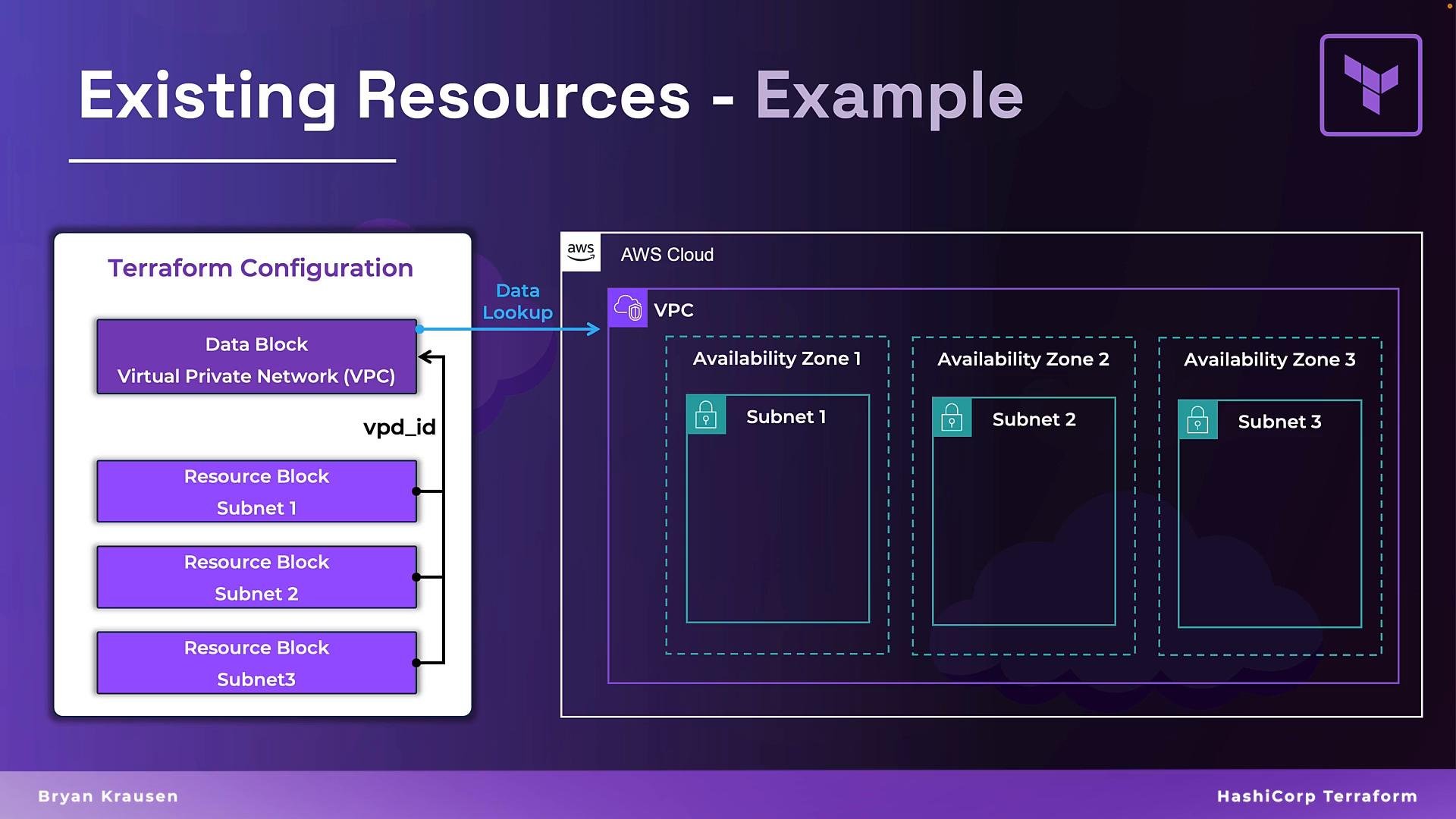
  • AWS: Look up a VPC by tag or name to get its ID for subnet or route table creation.
  • Kubernetes: Query an existing namespace or service account to attach resources to it.
The image illustrates a Terraform configuration example for managing existing AWS cloud resources, showing a VPC and associated subnets across multiple availability zones.
This lookup happens during terraform plan and terraform apply. Terraform queries the provider API in real time to populate data source attributes, so you avoid hard-coded IDs, ARNs, or other brittle values. Key points about data sources
FeatureDescriptionExample usage
Read-onlyData sources never create or modify provider-side resourcesQuery the VPC ID for subnet creation
Dependency resolutionProvide attribute values that other resources depend onUse an existing database server ID when creating a database schema
Reduce hard-codingReplace literal IDs and ARNs with discovered attributesReplace vpc-012345 with data.aws_vpc.prd.id
Data sources let Terraform read existing objects (resources, accounts, namespaces, etc.) and expose their attributes for use elsewhere in your configuration. They are read-only and will not create or change provider-side resources.
A visual summary of the data block and its purposes:
The image is an informative graphic about Terraform's "Data Block," explaining its purpose in accessing existing resources, resolving dependencies, and avoiding hardcoding values. It features icons and text on a purple background with a blank space to the right.
Data source syntax and examples A data source block uses the data keyword and two labels, similar to how resource blocks are structured:
  • First label: the provider-specific type (for example, aws_vpc, azurerm_resource_group, kubernetes_namespace)
  • Second label: your local name (a descriptive identifier, such as prd, dev, app)
Minimal AWS VPC data source example:
data "aws_vpc" "prd" {
  filter {
    name   = "tag:Name"
    values = ["prd-vpc"]
  }
}
Then reference it inside another resource, e.g., creating a subnet with the VPC ID returned by the data source:
resource "aws_subnet" "pub" {
  vpc_id            = data.aws_vpc.prd.id
  cidr_block        = "10.0.6.0/24"
  availability_zone = "us-west-2a"
}
Other provider-specific examples:
data "azurerm_resource_group" "dev" {
  name = "dev-resource-group"
}

data "kubernetes_namespace" "app" {
  metadata {
    name = "customer-app"
  }
}
Each data source supports different arguments (filters, name attributes, metadata blocks, etc.). Always consult the Terraform Registry for the provider-specific data source documentation. Referencing attributes returned by a data source After Terraform queries a data source, it exposes attributes you can reference elsewhere. The reference format is: data.<TYPE>.<NAME>.<ATTRIBUTE>
  • data — indicates a data source
  • <TYPE> — the data source type (e.g., aws_vpc)
  • <NAME> — your local data source name (e.g., prd)
  • <ATTRIBUTE> — the attribute you want (e.g., id, cidr_block, arn)
Example JSON-like illustration of attributes from data.aws_vpc.prd:
{
  "arn": "arn:aws:ec2:us-west-2:123456789012:vpc/vpc-0abcd123efgh5678",
  "cidr_block": "10.0.0.0/16",
  "default": false,
  "dhcp_options_id": "dopt-0abcdef1234567890",
  "enable_dns_hostnames": true,
  "enable_dns_support": true,
  "id": "vpc-0abcd123efgh5678",
  "instance_tenancy": "default",
  "ipv6_association_id": null,
  "ipv6_cidr_block": null,
  "main_route_table_id": "rtb-0abcdef1234567890",
  "owner_id": "123456789012",
  "tags": {
    "Name": "prd-vpc"
  }
}
Common attribute references:
  • VPC ID: data.aws_vpc.prd.id
  • CIDR block: data.aws_vpc.prd.cidr_block
  • ARN: data.aws_vpc.prd.arn
  • Owner account: data.aws_vpc.prd.owner_id
You can use a single data source multiple times across your configuration. Define it once; Terraform queries it during planning and apply and you can reference its attributes wherever needed. Consolidated examples for multiple providers
# AWS VPC lookup by tag
data "aws_vpc" "prd" {
  filter {
    name   = "tag:Name"
    values = ["prd-vpc"]
  }
}

# Azure resource group lookup
data "azurerm_resource_group" "dev" {
  name = "dev-resource-group"
}

# Kubernetes namespace lookup
data "kubernetes_namespace" "app" {
  metadata {
    name = "customer-app"
  }
}
Referencing attributes when creating resources:
# Use VPC ID to create an AWS subnet
resource "aws_subnet" "pub" {
  vpc_id     = data.aws_vpc.prd.id
  cidr_block = "10.0.6.0/24"
}
Best practices and tips
  • Use filters or explicit names in data sources to reduce accidental matches.
  • Prefer data sources in modules when the module must integrate with already existing infrastructure.
  • Be mindful of provider API rate limits: data sources are called during plan and apply.
  • If attributes change outside Terraform, re-running terraform plan will reflect the new values (depending on provider behavior).
Summary
  • Data sources are read-only constructs that let you query existing infrastructure and expose attributes to your Terraform configuration.
  • Use data sources to avoid hard-coded IDs and to resolve dependencies on existing resources.
  • Each provider documents supported arguments and returned attributes in the Terraform Registry — check it for the exact schema.
Links and references You’ll practice using data sources in hands-on exercises to gain practical experience working with real-world Terraform configurations.

Watch Video