This lesson walks through the three primary Azure OpenAI REST API endpoints — completions, embeddings, and chat completions — showing typical request/response formats, key parameters, and practical tips for calling the APIs from curl or Postman. Quick overview:
  • Completion endpoint: generate text continuations from a prompt.
  • Embeddings endpoint: convert text into numeric vectors for semantic tasks (search, clustering, similarity).
  • Chat completion endpoint: structured multi-turn conversational interface using role-based messages.
Endpoint summary
EndpointPurposeTypical Request URL
CompletionsGenerate single-turn text continuationshttps://<your-endpoint>.openai.azure.com/openai/deployments/<deployment-name>/completions
EmbeddingsProduce vector embeddings for semantic taskshttps://<your-endpoint>.openai.azure.com/openai/deployments/<deployment-name>/embeddings
Chat completionsMulti-turn conversational responses using messageshttps://<your-endpoint>.openai.azure.com/openai/deployments/<deployment-name>/chat/completions

Completion endpoint

Use the completions endpoint to generate text continuations from a prompt. Replace <your-endpoint> and <deployment-name> with values from your Azure AI Foundry deployment. URL:
https://<your-endpoint>.openai.azure.com/openai/deployments/<deployment-name>/completions
Request body example:
{
  "prompt": "Suggest a creative title for a blog about cloud security.",
  "max_tokens": 10
}
Response example:
{
  "id": "5678...",
  "object": "text_completion",
  "created": 1679001781,
  "model": "gpt-4",
  "choices": [
    {
      "text": "Shielding the Cloud: Security in the Digital Era",
      "index": 0,
      "logprobs": null,
      "finish_reason": "stop"
    }
  ]
}
Key notes:
  • The generated text is in choices[0].text.
  • max_tokens caps the response length. Tokens are the billing and length units used by the models.
  • You can control generation randomness and style with parameters like temperature and top_p.

Embeddings endpoint

Use embeddings to convert text into numeric vectors. Store and compare these vectors (e.g., cosine similarity) for semantic search, recommendation, or clustering. URL:
https://<your-endpoint>.openai.azure.com/openai/deployments/<deployment-name>/embeddings
Request body example:
{
  "input": "Cybersecurity is essential for protecting sensitive business data."
}
Response example:
{
  "object": "list",
  "data": [
    {
      "object": "embedding",
      "embedding": [
        0.02837654923,
        -0.0146752345,
        0.0456789345
      ],
      "index": 0
    }
  ],
  "model": "text-embedding-ada-002"
}
Key notes:
  • data[0].embedding is the numeric vector representation.
  • Embeddings are commonly stored in vector databases (e.g., Pinecone, FAISS, Azure Cognitive Search) for fast similarity search.

Chat completion endpoint

Chat completions support multi-turn conversational flows using role-based messages (system, user, assistant). URL:
https://<your-endpoint>.openai.azure.com/openai/deployments/<deployment-name>/chat/completions
Request body example:
{
  "messages": [
    { "role": "system", "content": "You are a helpful assistant for IT professionals." },
    { "role": "user", "content": "What are the key benefits of zero-trust security?" }
  ]
}
Response example:
{
  "id": "unique_id",
  "object": "chat.completion",
  "created": 1679001781,
  "model": "gpt-4",
  "usage": {
    "prompt_tokens": 80,
    "completion_tokens": 120,
    "total_tokens": 200
  },
  "choices": [
    {
      "message": {
        "role": "assistant",
        "content": "Zero-trust security ensures continuous verification, limits access to only authorized users, and minimizes risk by enforcing strict identity authentication and least-privilege access."
      },
      "finish_reason": "stop",
      "index": 0
    }
  ]
}
Key notes:
  • Assistant replies appear in choices[0].message.content.
  • The usage object shows token counts for prompt, completion, and total (useful for cost tracking).
  • Chat completions are optimized for multi-turn interactions; maintain the messages array to preserve conversation context.
Not all models support every API type (completions, embeddings, chat). Check the model catalog in your Azure AI Foundry portal to confirm which models support which inference tasks before calling an endpoint.

Inspecting models and deployments in Azure AI Foundry

Review the model catalog in Azure AI Foundry to pick the right model for your task (for example, embeddings vs chat). Filter by inference task to narrow the available models.
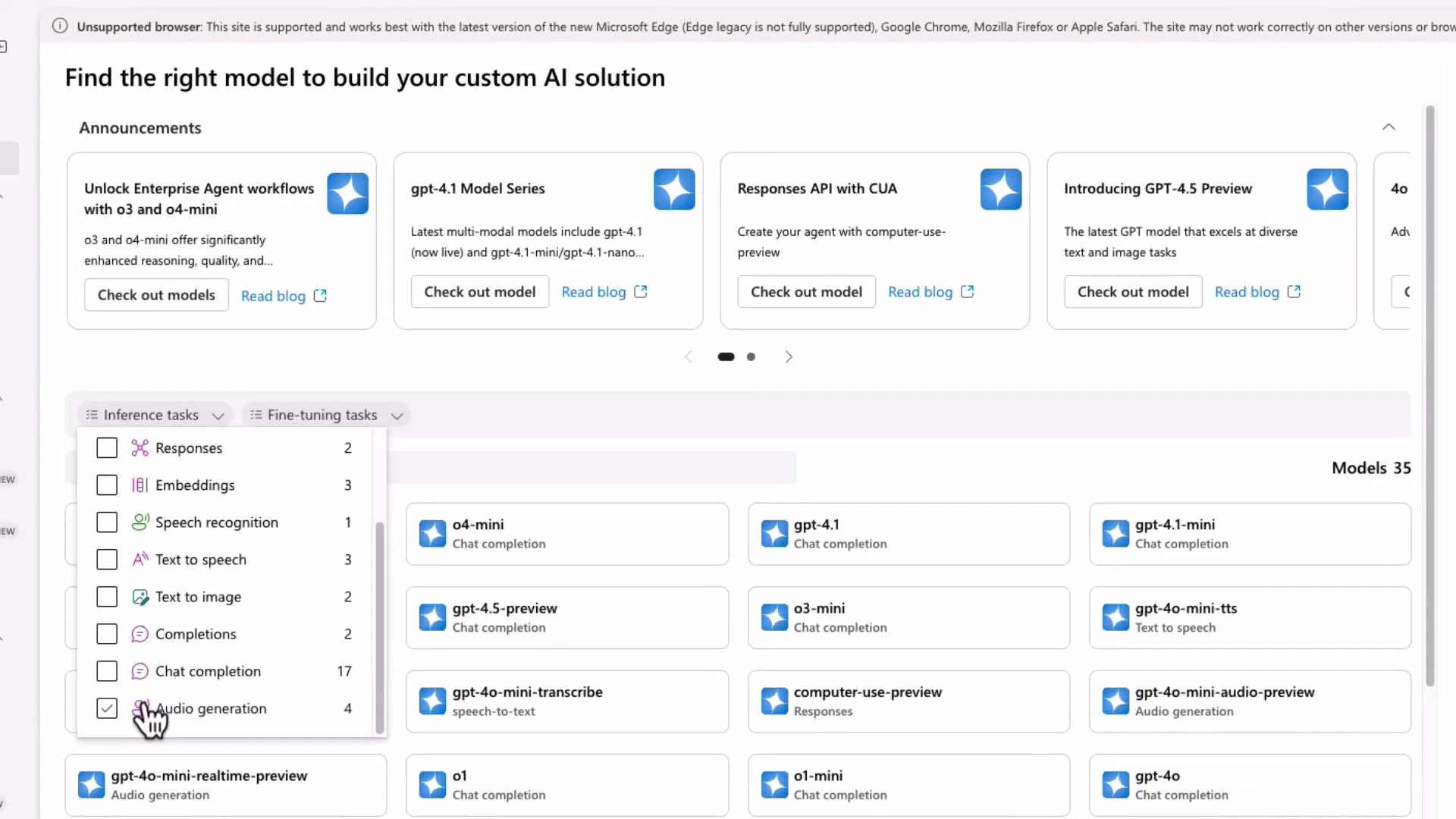
A web dashboard for choosing AI models, showing announcement cards at the top and a grid of model tiles (e.g., o4-mini, gpt-4.1, gpt-4o-mini). A filter menu for inference tasks is open on the left with "Audio generation" checked.
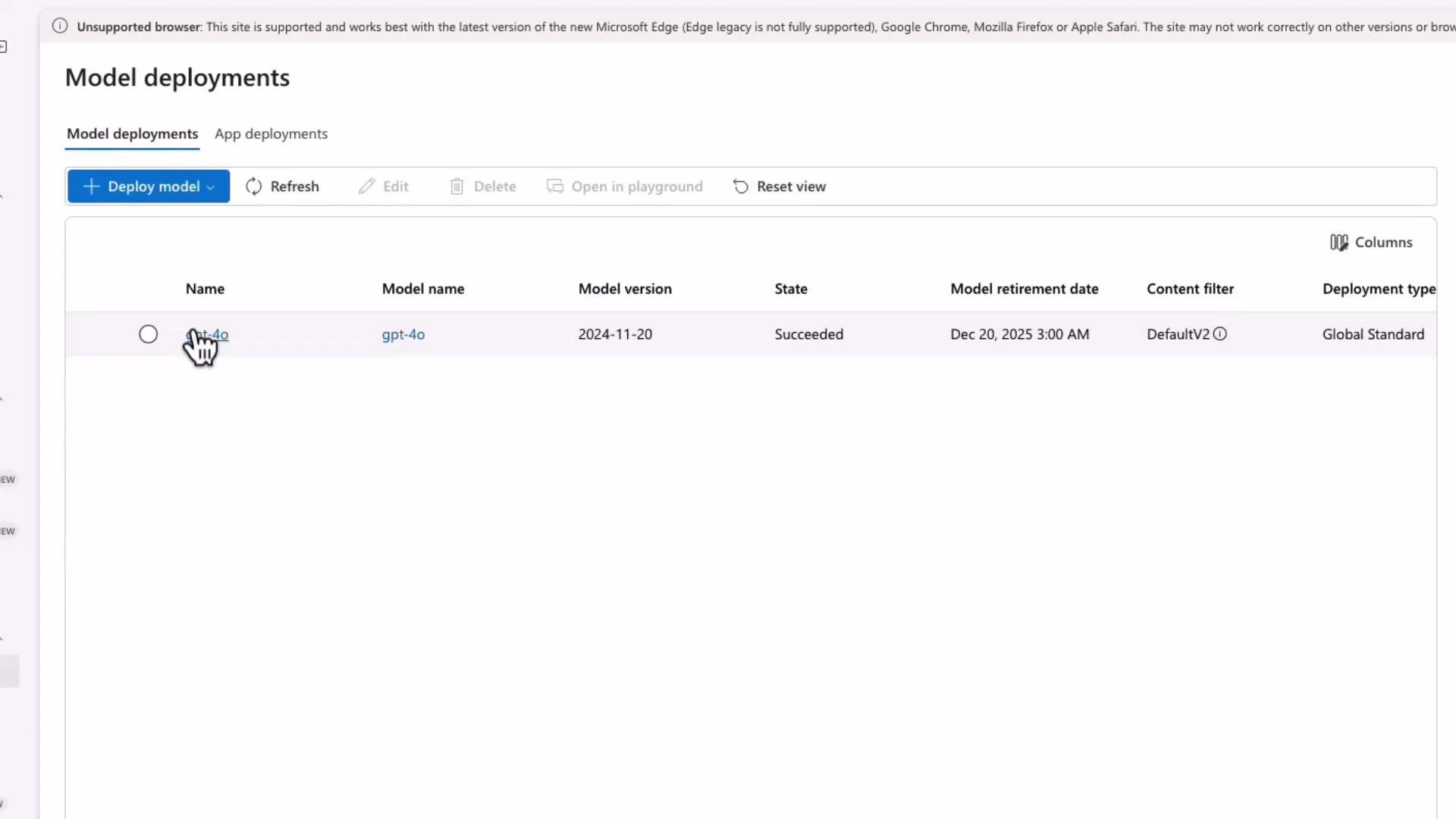
After deploying a model, open the deployment to view its REST target URI and configuration details (deployment name, model version, and state).
A screenshot of a "Model deployments" admin page showing a single deployed model entry for "gpt-4o" (model version 2024-11-20) with state "Succeeded" and a retirement date of Dec 20, 2025. A cursor hand is hovering over the model name and the UI shows options like "Deploy model", "Refresh" and "Reset view."
Notes:
  • The deployment page displays the REST endpoint you will call from applications or tools like Postman and curl.
  • Use a clear, consistent deployment name — this name appears in the request URL path.

Example: calling the chat completion endpoint with curl / Postman

Set your API key in your shell or PowerShell environment. Bash (Linux/macOS):
export AZURE_API_KEY="<your-api-key>"
PowerShell (Windows):
$Env:AZURE_API_KEY = "<your-api-key>"
Example curl request (replace <your-endpoint>, <deployment-name>, and choose the correct api-version):
curl -X POST "https://<your-endpoint>.openai.azure.com/openai/deployments/<deployment-name>/chat/completions?api-version=2024-12-01" \
  -H "Content-Type: application/json" \
  -H "api-key: $AZURE_API_KEY" \
  -d '{
    "messages": [
      {
        "role": "user",
        "content": "I am going to Paris, what should I see?"
      }
    ],
    "max_tokens": 512,
    "temperature": 1,
    "top_p": 1
  }'
Tips for Postman:
  • Add the Content-Type: application/json header (Postman will do this automatically for JSON bodies).
  • Add an api-key header with your Azure API key.
  • All inference requests (completions, embeddings, chat/completions) require POST.
Sample (abridged) response for the Paris query:
{
  "id": "chatcmpl-BO3j0mAR7oiozlyVFlatZQRB9NsF",
  "object": "chat.completion",
  "created": 1745073890,
  "model": "gpt-4o-2024-11-20",
  "choices": [
    {
      "message": {
        "role": "assistant",
        "content": "Paris is often referred to as the City of Light. Highlights include the Eiffel Tower, the Louvre, Notre-Dame, Montmartre, and the Seine riverbanks. Consider strolling the Champs-Élysées, visiting the Musée d'Orsay, and sampling pastries at local pâtisseries. For a unique view, take an evening Seine river cruise to see the city illuminated."
      },
      "finish_reason": "stop",
      "index": 0
    }
  ]
}
Keep your API key secure. Never commit keys to source control or expose them in client-side code. Rotate keys regularly and restrict usage with appropriate IAM policies.

Final notes and best practices

  • Confirm the model you plan to use supports the required API type (completion, embedding, or chat).
  • Use max_tokens, temperature, and top_p to control response length and randomness.
  • Track token usage via the response usage object to monitor costs.
  • For streaming responses, advanced control, or SDK usage, consult the official docs and your Foundry deployment settings.
Links and references This lesson covered REST endpoints, example request/response payloads, deployment inspection, and practical tips for invoking Azure OpenAI with curl and Postman.

Watch Video