

Overview
Fine-tuning a QnA knowledge base combines three complementary approaches:- Implicit learning: automatic alternate phrasing detection.
- Explicit learning: using user feedback to reinforce correct answers.
- Synonyms: mapping equivalent terms to improve intent matching.
Implicit learning (automatic alternate phrasing)
Implicit learning runs behind the scenes to detect alternate phrasings users might use for the same question. For instance, when a user asks, “How do I change my flight?”, the system may propose variations such as “Can I modify my booking?” or “I need to update my reservation.” Language Studio surfaces these suggested alternates so you can review and accept them into your knowledge base. Example of a suggestion (as shown in Language Studio):Accepting implicit suggestions reduces manual work and helps the system generalize to real user language patterns without you adding every alternate phrasing.
Explicit learning (user feedback)
Explicit learning collects confirmatory signals from users. When the system returns multiple candidate answers, and a user selects one, that selection is stored as feedback. Over time, feedback helps the model rank the correct answer higher for similar queries by linking the feedback to the matched answer ID. Example: the answered entry returned to the user:Collecting user feedback can involve personal data. Ensure you follow your organization’s privacy policy and any applicable legal requirements before storing or sending identifiable feedback.
Synonyms for better matching
Define synonyms to treat different words or phrases as equivalent for intent matching. This is especially useful for domain-specific vocabulary (e.g., “reschedule”, “modify”, “change” for flight updates). Example synonyms configuration:Where to fine-tune in Language Studio
After deploying your knowledge base, use Language Studio to review and refine content. The primary areas to manage fine-tuning are:
In the Review Suggestions (or similar) section, alternate phrasing suggestions appear once the system has observed enough interactions. Initially you may see no suggestions; they populate as user traffic and feedback increase.
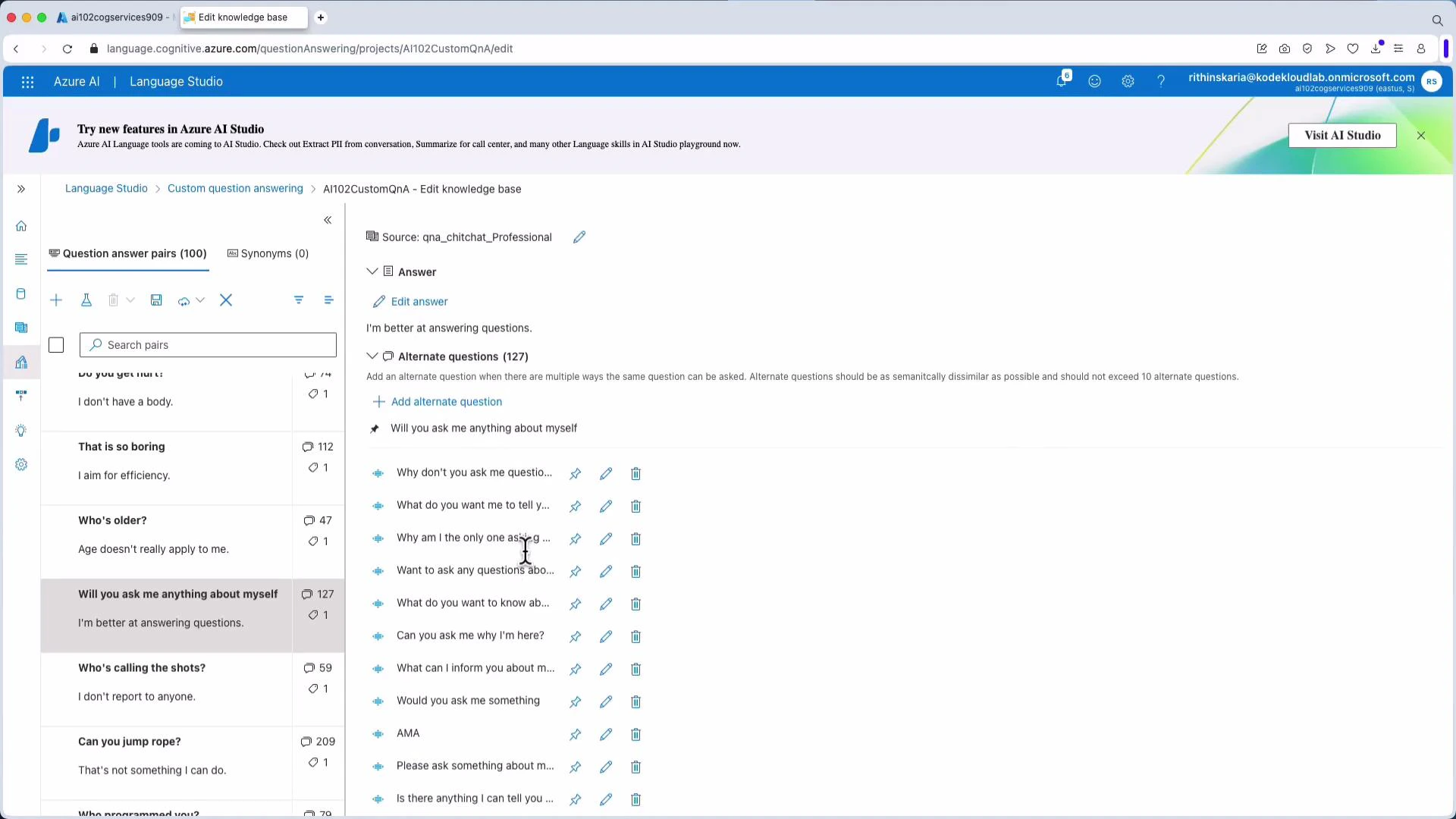
Where to perform manual edits in the editor view:
- Add alternate questions for an existing answer (e.g., add “Define Cognitive Services” as an alternate phrasing for “What is Cognitive Services?”).
- Remove or pin alternate questions to control which variants are preferred.
- Configure follow-up prompts or multi-turn dialog behavior to handle compound queries.
Best practices
- Start with a focused set of high-confidence Q&A pairs and grow coverage iteratively.
- Combine synonyms with alternate questions to capture both word-level and phrase-level variants.
- Regularly review suggestion history and feedback telemetry to find gaps or misclassifications.
- Automate feedback submission where appropriate, but always respect privacy and consent.
Links and references
- Azure AI Language Studio - Custom Question Answering
- Collecting and submitting user feedback
- Synonyms and language normalization guidance