

Overview
ARM templates let you specify the desired resources without dictating the deployment procedure—similar to writing HTML to create content while letting the browser handle rendering. By defining your infrastructure declaratively, Azure Resource Manager automatically creates and configures your resources, ensuring consistency and reducing human error.Basic Structure
Below is an example of a basic ARM template structure:Benefits of ARM Templates
- Declarative Automation: List the resources to be created, and let Azure handle the deployment.
- Consistency and Reusability: Ensure each environment is set up consistently with standardized templates.
- Reduced Human Error: Automated deployments decrease the likelihood of manual mistakes.
- Modular Design: Link smaller templates to a parent template to manage and deploy complex environments more efficiently.
Consider using parameters and variables to enhance template reusability and simplify management.
Deployment Approaches
ARM templates can be structured in several ways to meet different deployment requirements:1. Single Template for Multiple Resources
Deploy a multi-tier application—for instance, an app service, a virtual machine, and a database—by defining all components within a single ARM template. This approach allows internal referencing, such as linking a SQL database to an app service.2. Linked Templates (Nested Deployment)
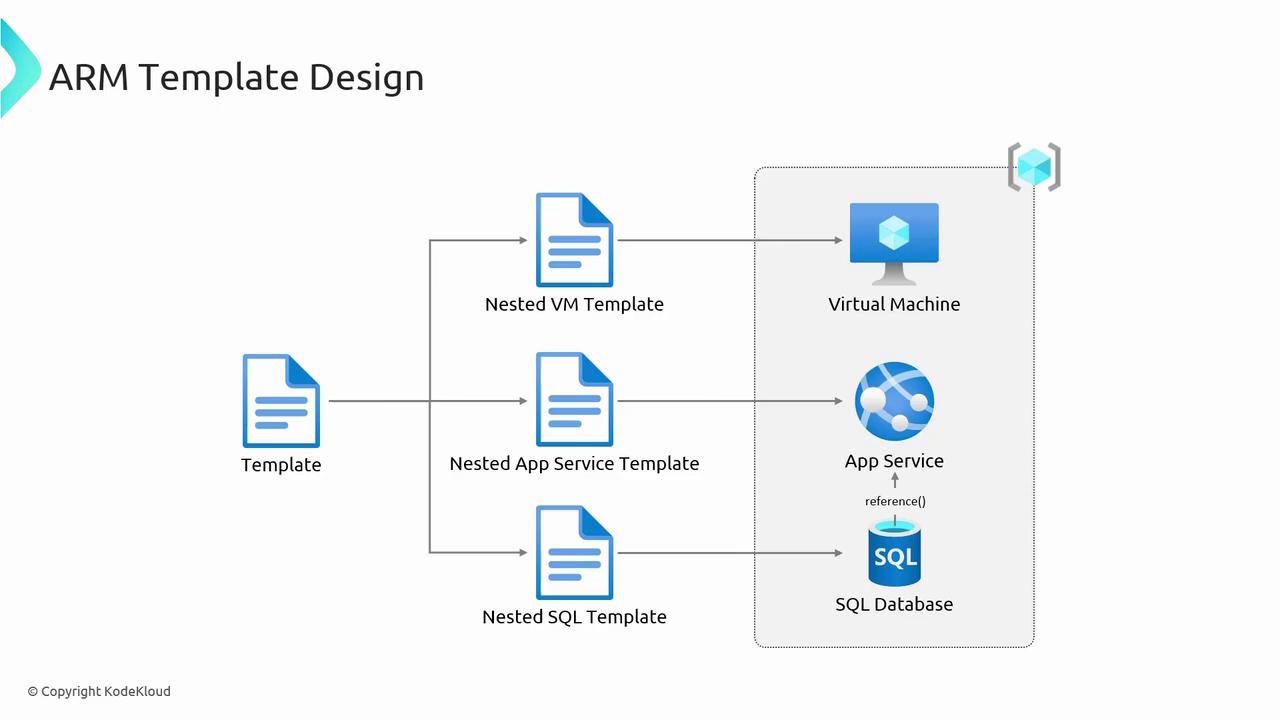
Using linked or nested templates is another effective strategy. In this approach, you might combine:- A main template that orchestrates the overall deployment.
- A nested template for deploying VMs.
- A nested template for deploying App Services.
- A nested template for deploying SQL databases.
3. Individual Templates per Resource Group
For scenarios where resources are grouped into different Resource Groups by type or project, you can maintain a separate ARM template for each resource group. This approach is best for logically separated deployments, while the linked template approach is more efficient when managing a large number of interconnected resources.For larger deployments, the linked (nested) template approach is generally more efficient, whereas a single comprehensive template works well for one or two resources.