

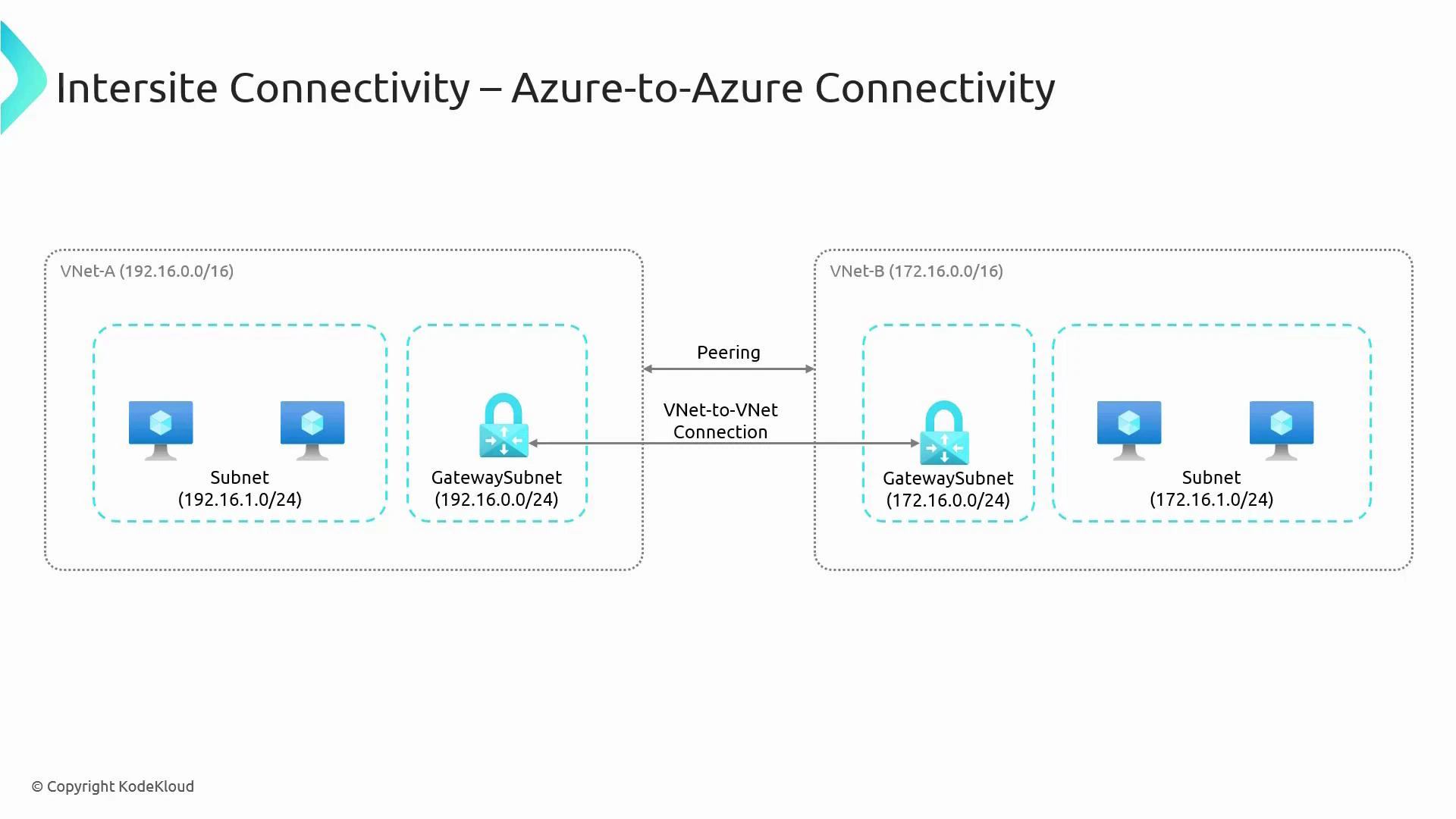
- Azure-to-Azure connectivity (VNet-to-VNet)
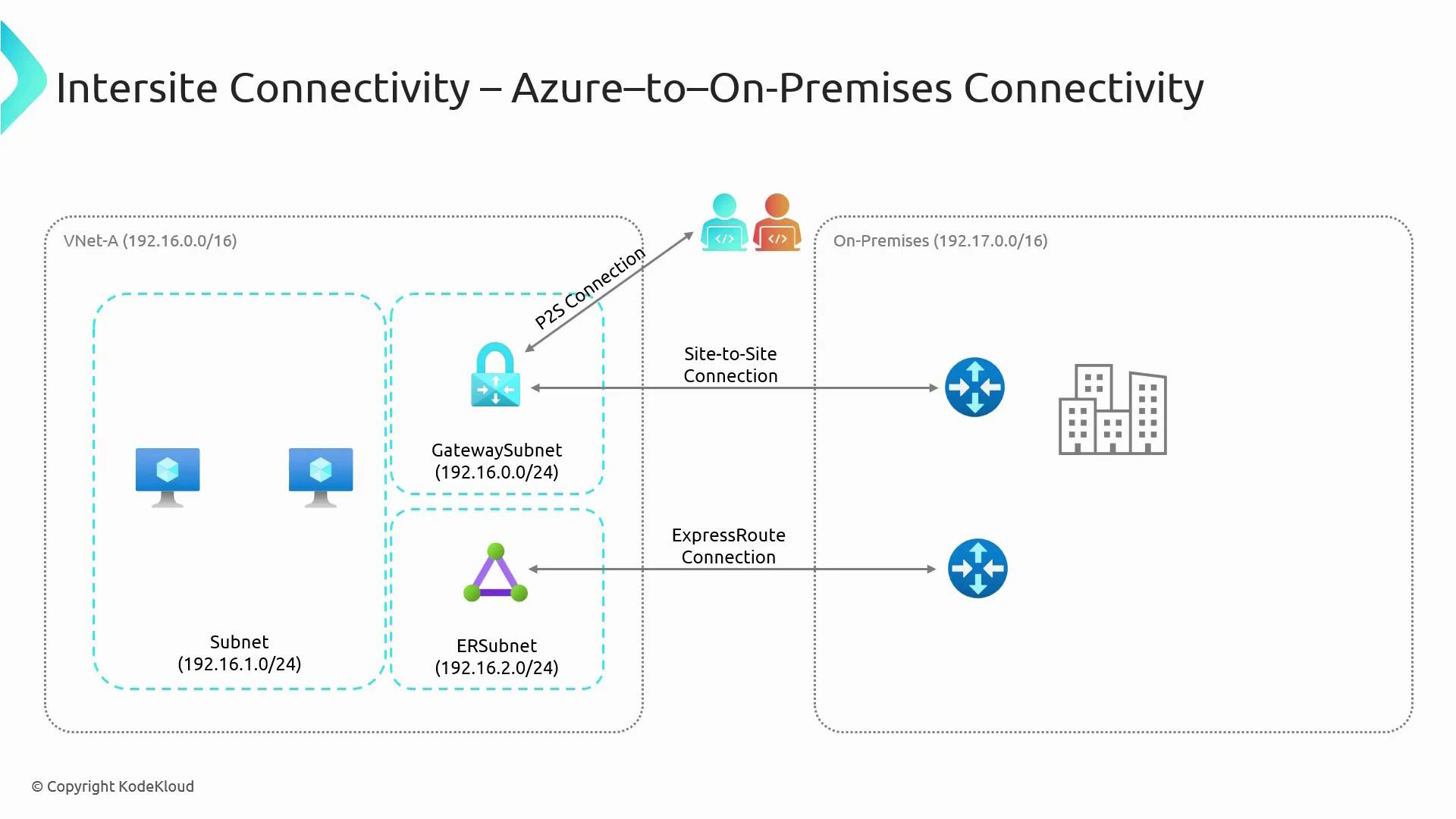
- Azure-to-on-premises connectivity
Azure-to-Azure connectivity
Two common ways to connect separate VNets (for example, VNet-A and VNet-B) are VNet Peering and VPN Gateway (VNet-to-VNet).- By default VNets are isolated. To enable communication you must explicitly connect them.
- Consider region, throughput needs, whether traffic must traverse the public internet, and whether you require encryption in transit for your selection.
When to choose which:
- Choose VNet Peering when both VNets are in Azure and you want the lowest latency and highest throughput without extra gateway costs.
- Choose VPN Gateway (VNet-to-VNet) when you need encryption across the public internet, or you must use a gateway topology (for example, transitive scenarios with on-premises integration).
Azure-to-on-premises connectivity
Connecting Azure VNets to your on-premises network typically uses one of the following methods: Site-to-Site VPN, ExpressRoute, or Point-to-Site (P2S) VPN. Each approach addresses different needs for performance, security, and cost.
Guidance:
- Use Site-to-Site VPN when you need encrypted connectivity quickly or cost-effectively.
- Use ExpressRoute when you require predictable performance, large bandwidth, and a private, SLA-backed link.
- Use P2S for remote-user access to resources in Azure without exposing your on-premises network.
Key operational notes:
- GatewaySubnet: When deploying any Azure VPN Gateway (VNet-to-VNet, Site-to-Site, or Point-to-Site), create a subnet named exactly
GatewaySubnet. Size it according to the gateway SKU you choose. See Azure VPN Gateway guidance: https://learn.microsoft.com/azure/vpn-gateway/vpn-gateway-about-gateway-subnet. - VNet Peering: Uses Azure’s private backbone, requires non-overlapping address spaces, and provides low-latency/high-throughput connectivity without explicit gateways.
- ExpressRoute: Provides a private circuit via connectivity providers—better throughput and latency than internet VPNs but requires provider setup and higher cost.
Important caveats:
- VNet Peering does not encrypt traffic across public internet because peering traffic stays on Azure’s backbone; if you require encryption end-to-end, use VPN Gateway (IPsec/IKE) or implement application-level encryption.
- Address space overlap prevents peering and can complicate routing for all connection types—plan IP addressing to avoid conflicts.
Quick decision checklist
- Need lowest latency and highest bandwidth within Azure? -> VNet Peering
- Need encrypted site-to-site connectivity across the internet? -> VPN Gateway (Site-to-Site or VNet-to-VNet)
- Need a private, high-throughput connection with SLA? -> ExpressRoute
- Need secure remote access for individual users? -> Point-to-Site VPN
References and further reading
- Azure VPN Gateway documentation: https://learn.microsoft.com/azure/vpn-gateway/
- VNet Peering documentation: https://learn.microsoft.com/azure/virtual-network/virtual-network-peering-overview
- ExpressRoute documentation: https://learn.microsoft.com/azure/expressroute/
- IPsec/IKE overview: https://learn.microsoft.com/azure/vpn-gateway/vpn-gateway-about-ipsec