

Benefits of Azure Storage accounts
-
High availability and durability
Azure Storage supports several replication options so you can match durability and availability to your business needs. Data can be replicated within a region or across regions to protect against datacenter or regional failures. -
Security by default
All data written to Azure Storage is encrypted at rest using Storage Service Encryption. For access control, Azure Storage supports storage account keys, Shared Access Signatures (SAS), and Azure Active Directory (now Microsoft Entra ID).Microsoft Entra ID is the new name for Azure Active Directory; it is the recommended mechanism for fine-grained, identity-based access to storage. -
Scalability and simplified management
Storage is platform-managed and will automatically scale capacity and throughput to meet demand, reducing operational overhead. -
Multiple access methods and tooling
Data can be accessed via HTTPS and managed with Azure SDKs (for .NET, Java, Python, JavaScript, Go, and others), Azure PowerShell, Azure CLI, or the REST APIs. -
Performance tiers
Choose from:- Standard — cost-effective for general-purpose workloads (often HDD or network-backed).
- Premium — SSD-backed for low latency and high throughput workloads such as databases and high-performance compute.
Types of data commonly stored
-
VM disks
Virtual machine disks are now typically implemented as managed disks—platform-managed resources that remove the need to directly manage page blobs in your storage account. Managed disks simplify scalability, availability, and lifecycle for VM storage. -
Unstructured data (Blobs)
Blob Storage is optimized for unstructured binary and text data: documents, images, media files, backups, and application assets. Blob containers organize blobs and can scale to store massive datasets. -
Structured data (Tables)
Table Storage offers a simple, scalable NoSQL key/attribute store for structured, non-relational data such as user profiles, device state, and application metadata.
Storage services
Azure Storage provides multiple service types, each optimized for specific patterns and workloads:-
Containers (Blob Storage)
Containers are logical groupings for blobs. Use Blob storage to hold documents, images, videos, and other unstructured files. Each file is a blob inside a container, which behaves like a directory within your storage account. For example, a media-hosting application might store user-uploaded images and videos as blobs inside a container.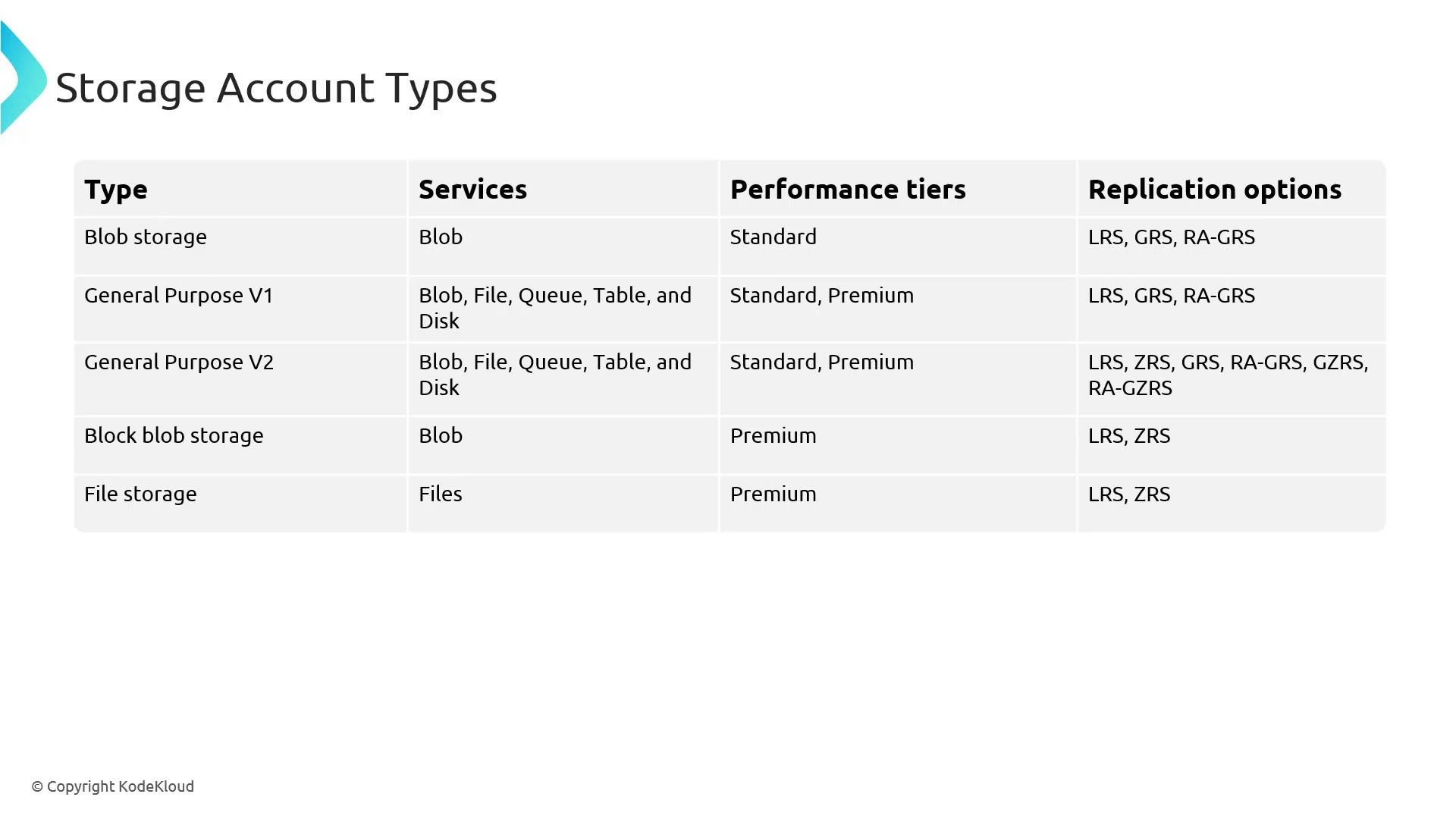
-
Azure Files
Azure Files provides fully managed SMB (and in some SKUs NFS) file shares that behave like a traditional file server. Use Azure Files for lift-and-shift applications, shared user directories, or any scenario that needs a mounted file share across multiple VMs. -
Table Storage
Table Storage is a NoSQL key/attribute store for structured, non-relational datasets. An entity in a table is similar to a row in a relational database and is ideal for scalable application metadata, telemetry, or user profiles. -
Queue Storage
Queue Storage is a simple, durable message queue accessible over authenticated HTTP/HTTPS. It’s designed to decouple application components and provide load-leveling, for example, enqueueing background processing tasks (video encoding, email jobs, etc.).
Storage account types
Azure provides several storage account types tailored to different workloads. Choose the account type based on the services you need, required performance tier, and replication options:
I understand replication abbreviations (
LRS, GRS, RA-GRS, ZRS, etc.) can be confusing — a brief summary is provided below.
Replication options (quick reference)
Quick comparisons and guidance
- Use GPv2 for new projects unless you have a specific need for a legacy account type or premium-only capacity.
- Choose Premium accounts (Block Blob or FileStorage) for workloads requiring consistently low latency and high throughput.
- Prefer managed disks for VM storage to simplify disk lifecycle, backups, and scaling.
- Evaluate replication based on your RTO/RPO requirements: LRS for cost-sensitive scenarios, ZRS for regional resiliency, and GRS/RA-GRS/GZRS for cross-region disaster protection.
Links and references
- Azure Storage documentation
- Azure Storage replication overview
- Microsoft Entra ID (Azure AD) documentation