

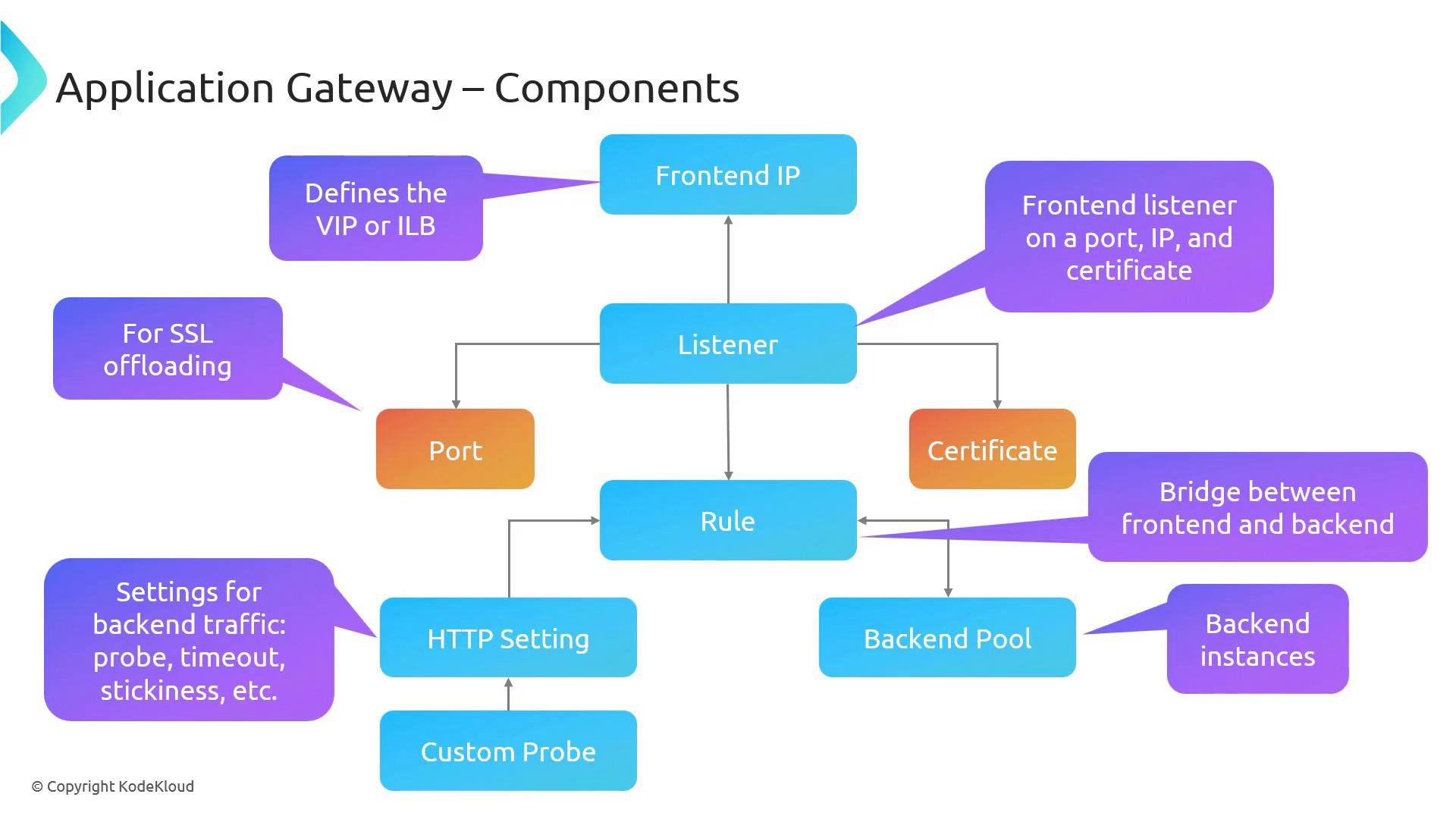
Frontend IP
- The frontend IP is the entry point for incoming traffic.
- It can be a public IP for internet-facing applications or a private IP for internal-only applications.
- A private frontend uses an IP address from the virtual network. In Azure contexts you may also see references to a VIP (Virtual IP) — see virtual IP addresses.
- “ILB” typically refers to an Azure Internal Load Balancer (internal load balancer), which is a different resource type; sometimes people use the term informally when discussing internal-facing endpoints.
Listener
- A listener is bound to a frontend IP and a specific port (for example,
80or443) and waits for incoming connections. - The listener is defined by:
- Frontend IP (public or private)
- Port (e.g.,
80,443) - Optional SSL certificate when serving HTTPS
- When an SSL certificate is attached to a listener, the Application Gateway can perform SSL termination (SSL offloading), relieving backend servers from encrypting and decrypting HTTPS traffic.
A listener is not actively polling the frontend IP. It is bound to a frontend IP and port — the arrow in diagrams represents that binding. Traffic that arrives on the configured frontend IP and port is routed to the bound listener.
Certificate
- SSL/TLS certificates are associated with HTTPS listeners to enable secure communication.
- When a certificate is attached to a listener, the Application Gateway uses it to decrypt incoming HTTPS requests.
- Depending on your configuration, the gateway can either:
- Re-encrypt traffic to the backend (end-to-end TLS), or
- Forward traffic to the backend over HTTP (SSL offloading).
If you choose SSL offloading (terminate TLS at the Application Gateway), ensure this meets your security and compliance requirements. For full end-to-end encryption, configure the gateway to use HTTPS to backend servers and install the necessary certificates on those backends.
Rule
- Rules determine how the Application Gateway handles incoming requests and link listeners to backend resources.
- Types of rules:
- Basic (listener -> backend pool)
- Path-based rules (route based on URL path)
- Host-based routing (route based on host header)
- Rules reference backend pools and HTTP settings so the gateway knows where to send matched traffic.
HTTP settings
- HTTP settings control how the Application Gateway communicates with backend servers.
- Typical HTTP settings include:
- Backend protocol and port (
HTTPorHTTPS, e.g.,80,443) - Backend response timeouts
- Cookie-based session affinity (if needed)
- Which health probe to use for health checks
- Backend protocol and port (
- Rules reference HTTP settings to determine request forwarding behavior.
Health probes (Custom probe)
- Health probes let the Application Gateway monitor backend server availability and responsiveness.
- Use the default probe behavior or configure a custom probe with:
- Path (e.g.,
/health) - Interval and timeout
- Expected status codes (e.g.,
200–399)
- Path (e.g.,
- Probe results affect load balancing decisions: unhealthy instances are excluded from traffic routing until they recover.
Backend pool
- The backend pool contains the endpoints that serve your application:
- Virtual machines or VM scale sets
- App Service instances (by hostname/FQDN)
- Other IP-based endpoints
- The Application Gateway load-balances requests to healthy backend instances according to configured rules and HTTP settings.
Quick reference table
How the components interact (sequence)
- Client connects to the Application Gateway’s Frontend IP.
- The Listener bound to that Frontend IP and port accepts the connection (and terminates TLS if configured).
- The Rule associated with the Listener determines routing — possibly using path or host headers.
- The Rule references an HTTP setting which tells the gateway how to communicate with the backend (protocol, port, timeouts).
- The backend pool contains the target instances. The gateway forwards requests to healthy instances as determined by Health probes.
- Depending on HTTP settings, the gateway may re-encrypt traffic to the backend for end-to-end TLS.
Links and references
- Azure Application Gateway overview
- Listeners — configuration overview
- Virtual IP addresses (VIP)
- Internal load balancer (ILB)
- Application Gateway probes overview
- Azure App Service overview