

Azure Front Door
- Global, edge-native application delivery network that provides fast, reliable content delivery and global load balancing via the Microsoft Global Edge Network.
- Operates at Layer 7 (HTTP/HTTPS) and supports:
- Global anycast-based routing
- SSL termination (SSL offload)
- Path-based and multi-site routing
- Routing to multiple backend pools
- Optional Web Application Firewall (WAF)
- Common use cases: global web applications or microservices requiring low-latency global entry, CDN-like caching/optimizations, and application-layer routing.
Azure Traffic Manager
- DNS-based traffic-routing service that returns DNS responses to direct clients to endpoints; it does not proxy or terminate traffic.
- Protocol-agnostic because it operates at the DNS level (does not inspect or modify traffic).
- Routing methods include Priority, Weighted, Performance, Geographic, Multivalue, Subnet, and nested profiles for complex topologies.
- Can target endpoints in Azure, other clouds, or on-premises — any publicly resolvable endpoint.
- Common use cases: global DNS-level distribution, cross-region failover, geographic routing, and directing clients based on latency.
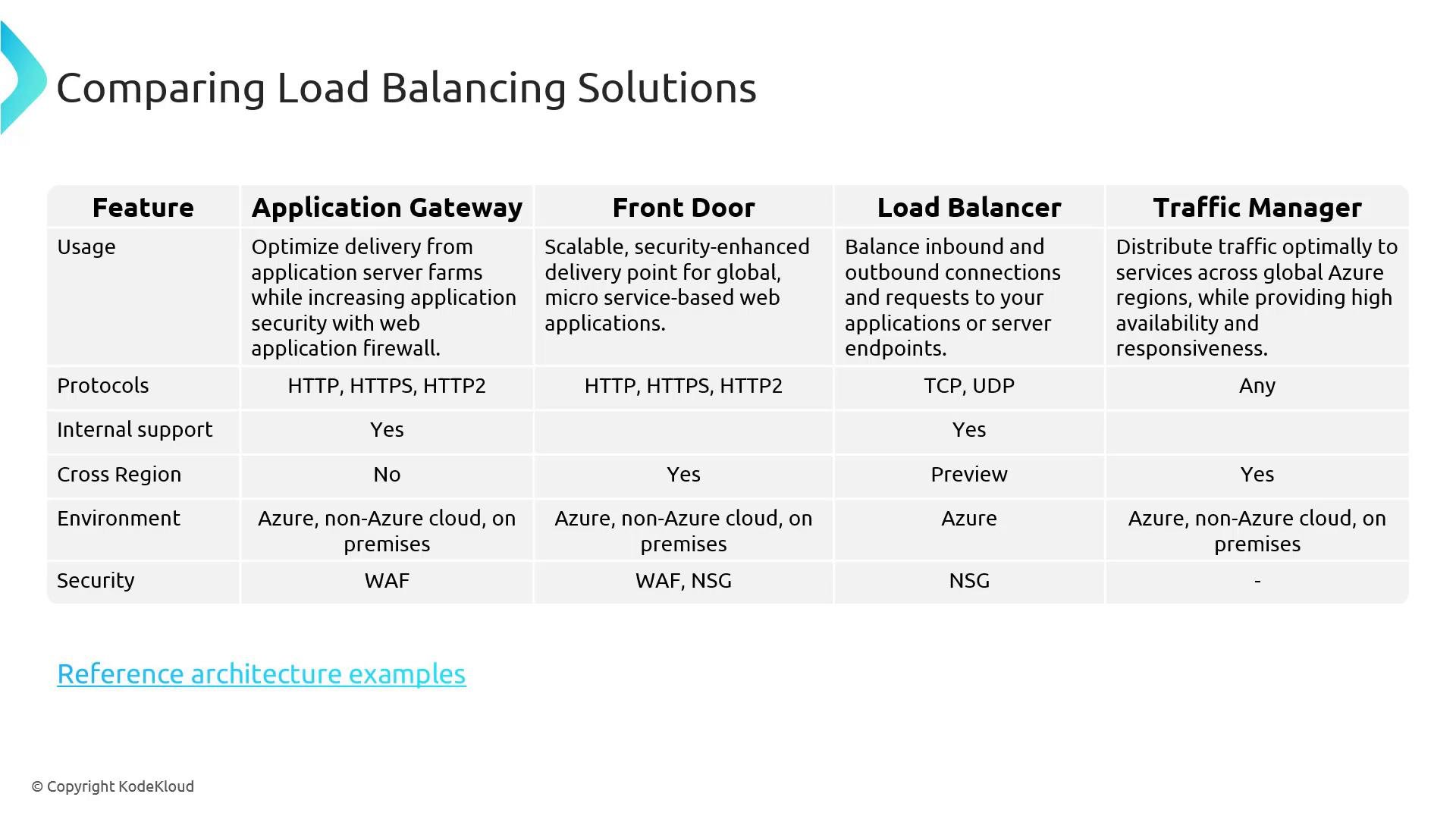
Key differences — quick summary
Protocol support
- Application Gateway and Front Door: HTTP, HTTPS, HTTP/2 (application-layer).
- Azure Load Balancer: TCP and UDP (transport-layer).
- Traffic Manager: Protocol-agnostic (returns DNS responses only).
Scope and cross-region behavior
- Application Gateway: deployed in a region and scoped to a virtual network.
- Front Door: global, using Microsoft’s edge locations for routing.
- Load Balancer: typically regional — consult Azure docs for global load-balancing features.
- Traffic Manager: global DNS routing; the resource metadata lives in a region but routing is global.
Environment and security
- Application Gateway, Front Door, Traffic Manager: can be used with Azure-hosted and external endpoints (public endpoints required for non-Azure resources).
- Load Balancer: targets backend resources within Azure (VMs, VM scale sets, NICs, IPs).
- Security:
- Application Gateway & Front Door: offer WAF for application-layer protection. Combine with Network Security Groups (NSGs) for backend protection.
- Load Balancer: relies on NSGs and other Azure network controls (no built-in WAF).
- Traffic Manager: has no traffic-inspection features since it only returns DNS answers.
When to choose which service
- Use Application Gateway when you need a regional, application-layer proxy with WAF and advanced routing (path-based routing, cookie affinity) for web servers hosted in a VNet.
- Use Front Door when you need a global entry point with edge caching, low-latency global routing, SSL offload, and WAF for multi-region web apps.
- Use Azure Load Balancer when you need high-performance, low-latency Layer 4 distribution for TCP/UDP workloads inside Azure.
- Use Traffic Manager when you want DNS-based routing across regions or providers for failover, geo-routing, or latency-based redirection without proxying traffic.
See Microsoft’s load-balancing guidance and decision flowcharts for detailed reference architectures and scenario-based recommendations: https://learn.microsoft.com/en-us/azure/architecture/best-practices/load-balancing
- Azure Front Door: https://learn.microsoft.com/azure/frontdoor/
- Application Gateway: https://learn.microsoft.com/azure/application-gateway/
- Azure Load Balancer: https://learn.microsoft.com/azure/load-balancer/
- Azure Traffic Manager: https://learn.microsoft.com/azure/traffic-manager/