

- Path-based routing (route requests to different backends based on URL path).
- Host-based routing (serve multiple sites behind a single gateway using host headers).
- URL redirection and rewrite.
- SSL/TLS termination (offload TLS at the gateway) and end-to-end TLS options.
- HTTP header and cookie rewrite rules.
- Custom error pages and response manipulation.
- Web Application Firewall (WAF) integration for protection against OWASP top threats.
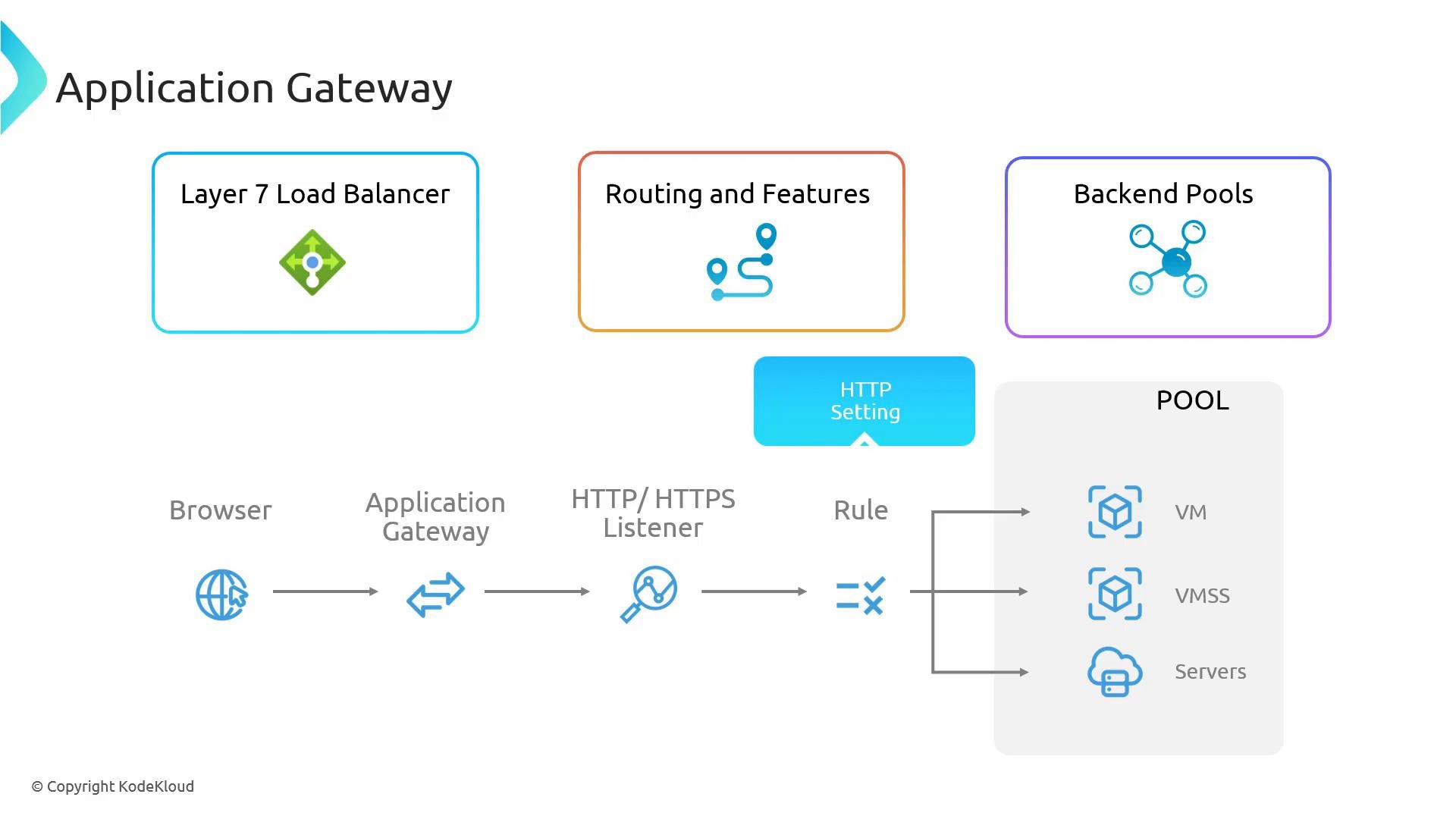
Azure Application Gateway operates at Layer 7 (the application layer), enabling routing decisions based on HTTP attributes such as path, host, and headers. In contrast, Azure Load Balancer operates at Layer 4 (transport layer) and routes purely on IP and port.
- Fine-grained control over HTTP(S) traffic.
- Support for App Service, VMs, VM scale sets, and external IP-based backends.
- SSL offload and header/content manipulation for modern web scenarios.
- Integration with WAF for protection and compliance.
Supported backend targets
Traffic workflow (request flow)
-
User request
A client (typically a browser) sends an HTTP/HTTPS request for a resource. -
Arrival at Application Gateway
The request reaches the Application Gateway public (or internal) frontend IP where listeners are bound. -
Listener interception
A listener configured on the gateway accepts connections on a specific IP, port, protocol, and optional host name. Listeners define how the gateway receives incoming traffic. -
Routing rules evaluation
The gateway matches the incoming request against routing rules. Rules can be simple (forward to a backend) or advanced (path-based, host-based, redirects, or rewrite directives). -
HTTP settings applied
Once a rule matches, the gateway applies HTTP settings that control communication with backend servers—these include:- Backend protocol (HTTP/HTTPS)
- Backend port
- Timeout values
- Cookie-based affinity (session stickiness)
- Header or cookie rewrite rules
-
Forward to backend pool
The gateway forwards the request to the selected backend pool, which is a named collection of backend targets (VMs, VMSS instances, App Service, or IPs). -
Load balancing at backend
Requests are distributed across backend instances (round-robin by default). You can enable cookie-based affinity to keep subsequent requests from the same client routed to the same backend instance. -
Response processing and return
The backend returns a response to the Application Gateway. The gateway can inspect or modify the response (for example, rewrite headers or replace error pages) before returning it to the client.
Configuration tips
- Use path-based routing for microservices to map URL paths to specific backend pools.
- Use host-based routing to host multiple domains behind a single gateway.
- Enable WAF in prevention mode to block suspicious requests; start in detection mode to tune rules.
- Use custom probes to check application-specific health endpoints (e.g.,
/healthz) instead of relying on TCP-only probes. - Offload TLS at the gateway when you want to reduce CPU load on backend servers; use end-to-end TLS if backend encryption is required.
- Azure Application Gateway documentation
- Azure Load Balancer documentation
- Azure Application Gateway WAF overview