

- Map developers to environments,
- Define a Condition that detects Production,
- Use that Condition to toggle the S3 PublicAccessBlockConfiguration with the !If intrinsic,
- Create a public-read bucket policy only when the stack is in Production.
New AWS accounts enable S3 Block Public Access by default; account-level or existing bucket-level settings may differ. The PublicAccessBlockConfiguration flags (BlockPublicAcls, BlockPublicPolicy, IgnorePublicAcls, RestrictPublicBuckets) are boolean. Setting a flag to true enforces blocking behavior; setting it to false permits that type of public access. For CloudFormation docs, see Template Anatomy.
-
Mappings and Parameters
- DevMap maps developer names to two values: Field (role) and Env (environment).
- The InputDeveloperName parameter selects the mapping entry; the mapped Env determines whether this is Production or another environment (e.g., “Testing/development”).
- InputBucketName is the S3 bucket name provided at stack creation.
-
Condition (IsProd)
- IsProd uses !Equals with !FindInMap to check whether the selected developer’s Env equals “Production”.
- IsProd evaluates to true only when the mapping indicates a Production environment for the chosen developer.
-
PublicAccessBlockConfiguration controlled by !If
- The bucket’s PublicAccessBlockConfiguration property is set using the !If intrinsic:
- If IsProd is true: all flags are false — public access is allowed (Policy-level control can then grant s3:GetObject).
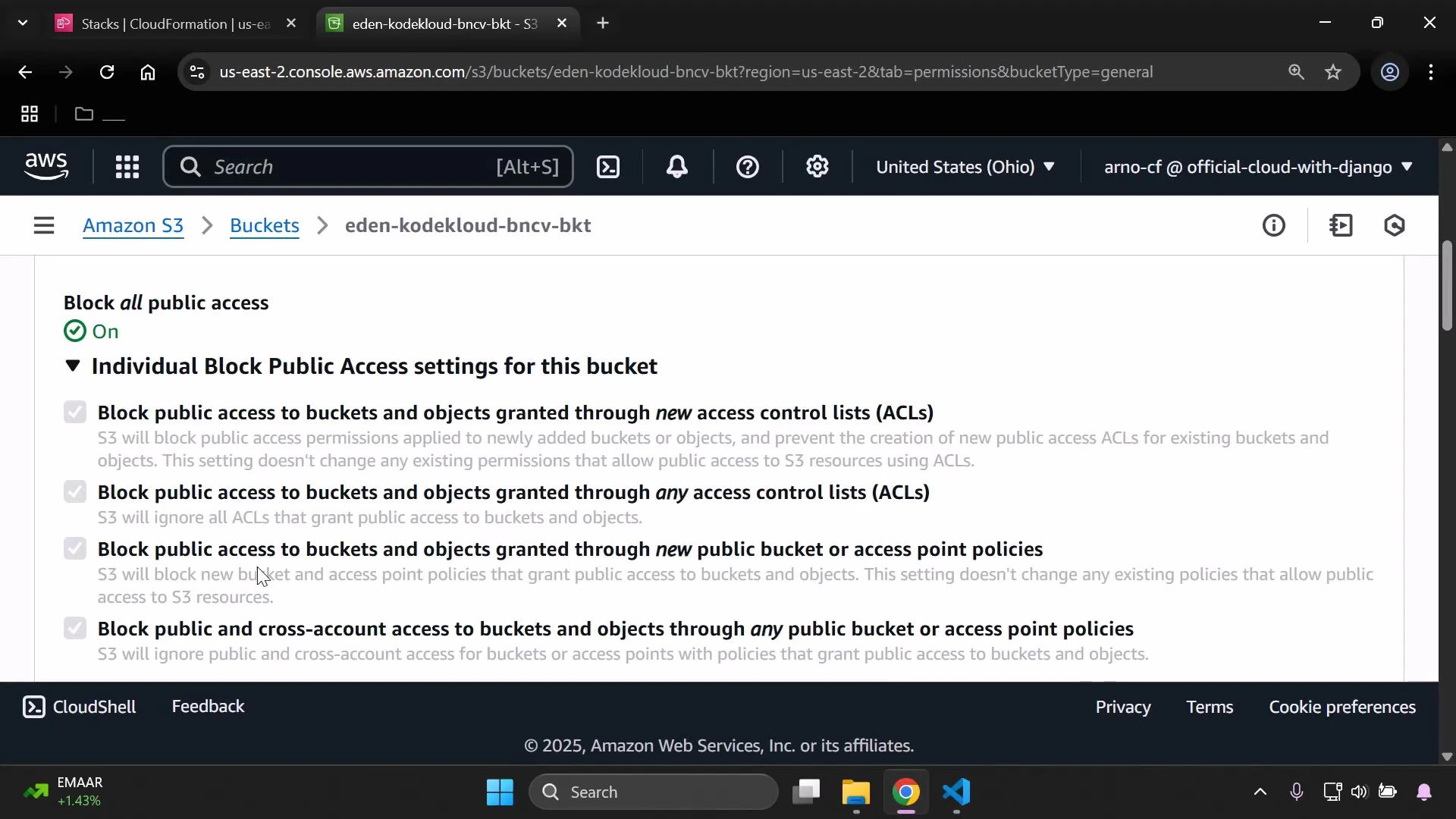
- If IsProd is false: all flags are true — public access is blocked (recommended secure default).
- Using !If ensures the block settings change automatically with the Condition and avoids manual edits per environment.
- The bucket’s PublicAccessBlockConfiguration property is set using the !If intrinsic:
-
Bucket policy created conditionally for Production
- The AWS::S3::BucketPolicy resource includes Condition: IsProd, so the policy only exists when IsProd is true.
- When present, the policy allows anonymous principals () to perform s3:GetObject on objects in the bucket (arn:aws:s3:::$/).
- This creates a dual-layer control: bucket-level public access blocking and an explicit policy granting public read only in Production.
Testing and expected S3 console behavior
- If PublicAccessBlockConfiguration flags are true (blocking enabled), the S3 console Permissions page will show “Block all public access: On” and list the four block options as checked.
- If you run the template for a developer mapped to Production (IsProd == true), the flags will be set to false and the conditional public-read bucket policy will be created.
Enabling public access and attaching a policy that grants s3:GetObject to ”*” makes your objects publicly readable. Confirm this is intentional before enabling in Production. Review your account-level Block Public Access settings as well — they may override bucket-level changes.
- CloudFormation template anatomy: https://docs.aws.amazon.com/AWSCloudFormation/latest/UserGuide/template-anatomy.html
- S3 PublicAccessBlockConfiguration: https://docs.aws.amazon.com/AWSCloudFormation/latest/UserGuide/aws-properties-s3-bucket-publicaccessblockconfiguration.html
- S3 Block Public Access (console docs): https://docs.aws.amazon.com/AmazonS3/latest/userguide/access-control-block-public-access.html