

Place Outputs at the bottom of the template (after Resources). Always provide a Description for each output and use intrinsic functions (for example
!GetAtt, !Join, and !Ref) to compute values that consumers can rely on.- Mappings
- Parameters
- Conditions
- Two resources (an S3 bucket and its bucket policy)
- Two Outputs: the S3 bucket ARN and a combined developer/bucket label
- Expose computed or derived values for use by other stacks, tools, or people.
- Make stack artifacts discoverable without inspecting resource definitions.
- Support cross-stack references when used together with Export/Import (not shown in this example).
Detailed explanation of the Outputs
-
BucketArn
- Description: A concise, human-readable description.
- Value: Uses
!GetAtt MyS3Bucket.Arnto retrieve the bucket’s ARN from the logical resource MyS3Bucket.
-
DeveloperBucketLabel
- Description: A combined label for easier identification.
- Value: Uses
!Jointo concatenateInputDeveloperNameandInputBucketNamewith" - "as the separator:!Join [ " - ", [ !Ref InputDeveloperName, !Ref InputBucketName ] ].
- Save your template file.
- In the CloudFormation console choose your stack and select Update stack.
- Choose Replace current template → Upload a template file (or paste the template).
- Continue through the update steps and submit.
- After the update finishes, open the stack and select the Outputs tab to view output keys, their descriptions, and values.
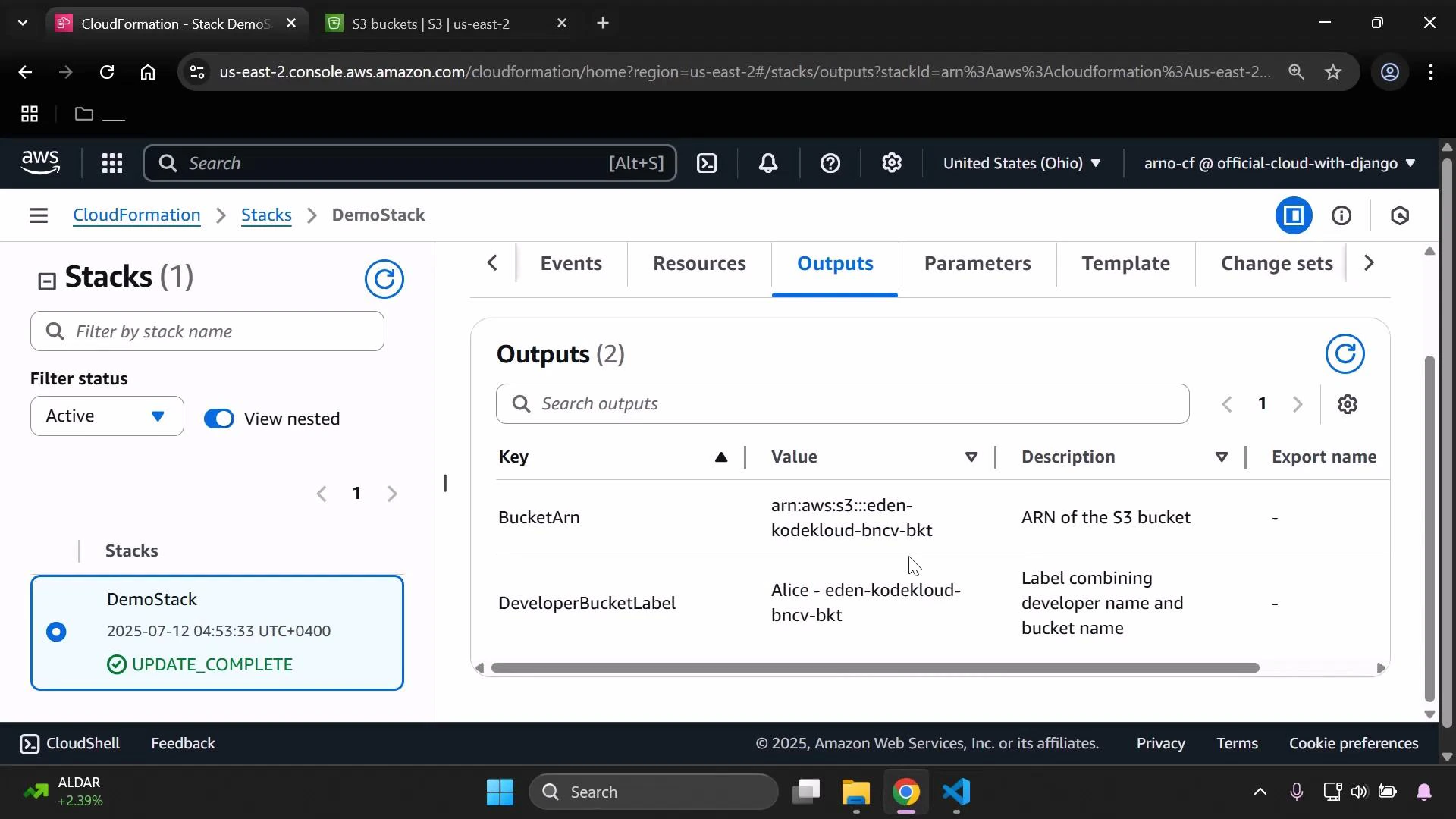
- JSON/table output using the CLI:
- aws cloudformation describe-stacks —stack-name DemoStack —query “Stacks[0].Outputs” —output table
- Use clear, descriptive output names and descriptions so teammates and automation can understand what each output represents.
- Avoid exposing secrets, credentials, or sensitive data in Outputs—Outputs are visible at the stack level.
- If you need to share values between stacks, use Outputs with the Export property to enable cross-stack references.
Do not place sensitive secrets or credentials in Outputs. Outputs are viewable by anyone with access to the CloudFormation stack and can be logged or exposed by tools that read stack outputs.
- CloudFormation Outputs documentation
- AWS CloudFormation User Guide
- Amazon S3 documentation
- AWS CLI documentation