

When to use each
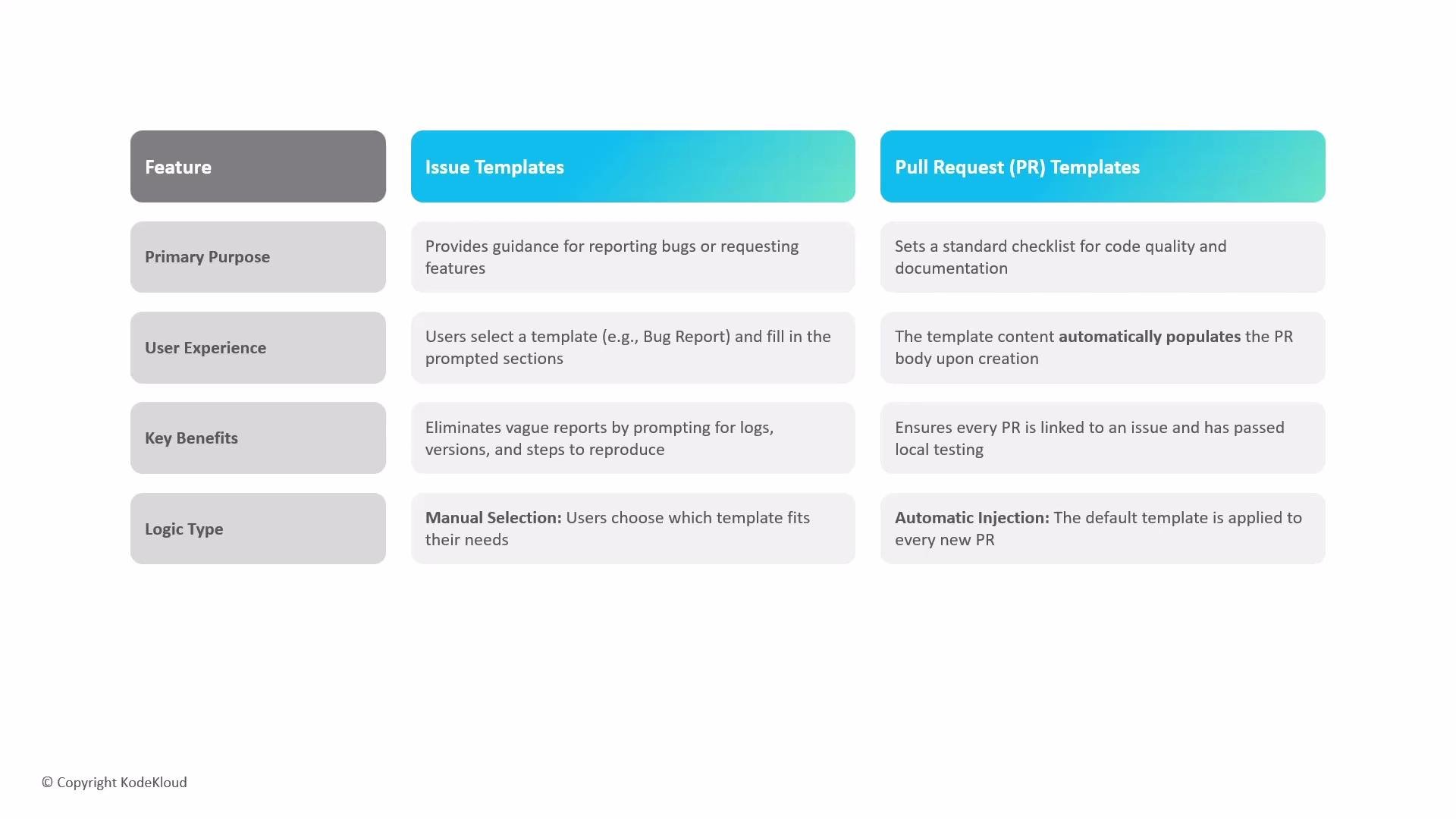
Use issue templates when you need structured input from reporters (e.g., bug reports, feature requests, or support questions). Use pull request templates when you want every proposed change to follow a checklist that enforces testing, documentation, changelog updates, and links to related issues.
To summarize: issue templates help you clearly understand the problem being reported; pull request templates help you assess and trust the proposed solution. Together, they streamline contributions and protect the project’s health.
Technical requirements and where to put templates
GitHub only recognizes templates that meet a few repository and location rules. Follow these to ensure templates appear when contributors create issues or pull requests.Default branch
Templates must exist on the repository’s default branch (for example,main). If templates live only on feature branches, they will not be available to contributors.
Always commit template files to the repository’s default branch (e.g.,
main or master). Templates on non-default branches will be ignored by GitHub.Recognized locations
GitHub scans the following locations (checked in the repository’s default branch):- Repository root (e.g.,
PULL_REQUEST_TEMPLATE.md) .githubdirectory (recommended)docsdirectory
Filenames and casing
Filenames are not case-sensitive. For example,PULL_REQUEST_TEMPLATE.md and pull_request_template.md are equivalent.
File formats
- Markdown (
.md) is supported for both issue and pull request templates. - Structured issue forms use YAML (
.ymlor.yaml) and must be placed in.github/ISSUE_TEMPLATE/. These forms let you define fields, types, and validation to guide reporters more strictly. - When using multiple issue templates, include a
config.ymlinside.github/ISSUE_TEMPLATE/to control the template chooser, contact links, and whether blank issues are allowed.
If you provide multiple issue templates, include a
config.yml file inside .github/ISSUE_TEMPLATE/ to control which templates are shown and whether GitHub displays an issue form or a template chooser.Example templates
Here are common examples you can copy and adapt.- Simple pull request template (
.github/PULL_REQUEST_TEMPLATE.md):
- Multiple issue templates with configuration (
.github/ISSUE_TEMPLATE/config.ymland.github/ISSUE_TEMPLATE/bug_report.md):
.github/ISSUE_TEMPLATE/config.yml:
.github/ISSUE_TEMPLATE/bug_report.md:
Best practices summary
- Use issue templates when you expect diverse reporter input (bugs, feature requests, security reports).
- Use pull request templates to enforce a consistent submission checklist and tie PRs to issues.
- Store templates on the repository’s default branch and in one of the recognized locations (
root,.github, ordocs). - When offering multiple issue templates, include
.github/ISSUE_TEMPLATE/config.ymlto control presentation and contact links. - Prefer structured issue forms (YAML) when you need validation and typed fields; use Markdown templates for flexible, free-form input.