

Overview
There are two main GitHub Enterprise deployment options:- GitHub Enterprise Server
- GitHub Enterprise Cloud
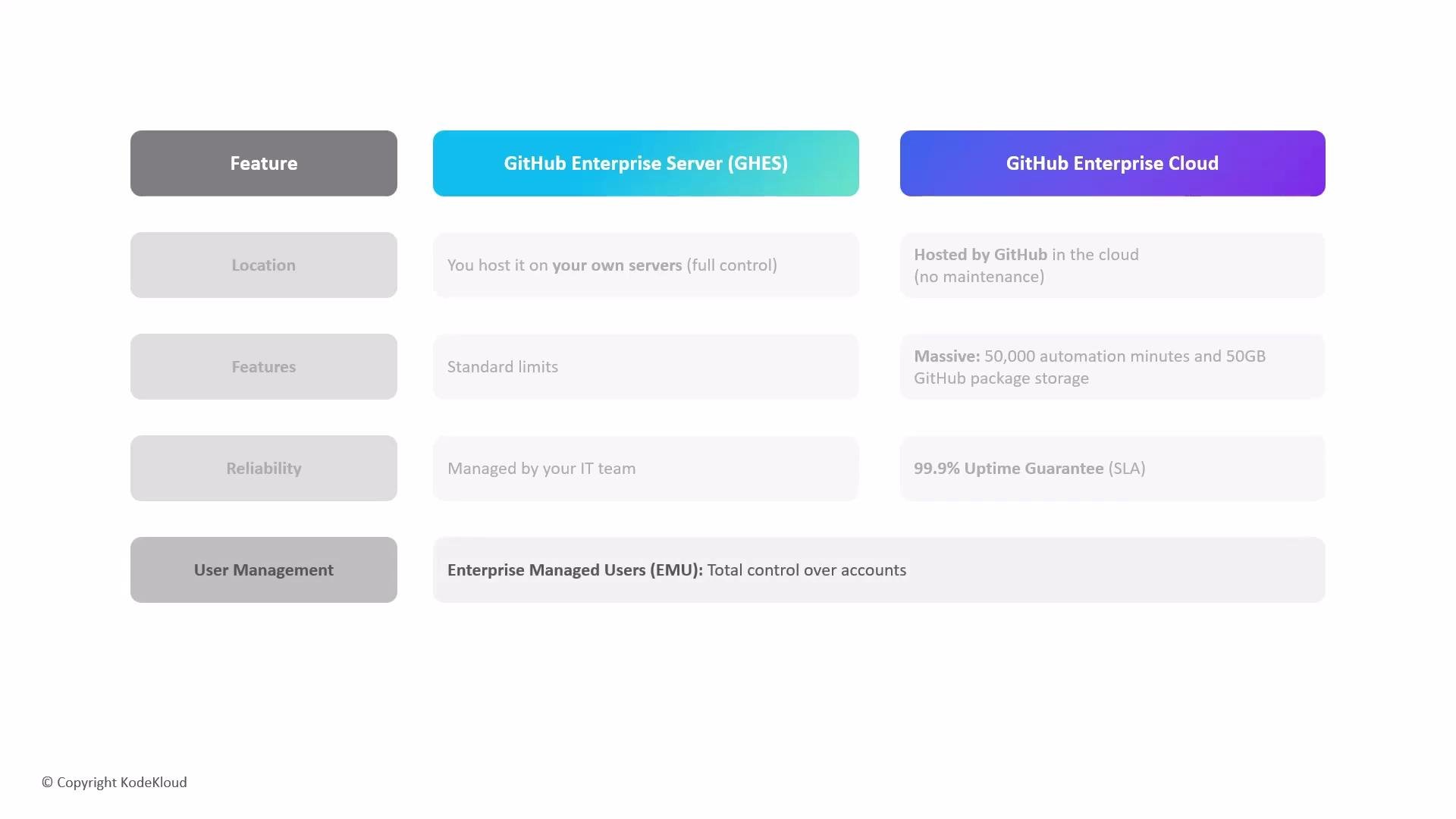
- GitHub Enterprise Server is self-hosted on your infrastructure (on-premises or IaaS). It gives you full control over hardware, networking, backups, compliance controls, and update cadence.
- GitHub Enterprise Cloud is hosted and operated by GitHub (built on GitHub.com). It delivers a managed, multi-tenant cloud experience with built-in scalability and many cloud-first features.
Feature comparison
Why choose GitHub Enterprise Cloud?
Key cloud-specific advantages often included or available with enterprise plans:- Large automation capacity: enterprise plans commonly include significant allocations of GitHub Actions minutes for CI/CD workflows (examples vary by plan).
- Generous GitHub Packages storage: enterprise plans frequently include substantial package storage (for example, 50 GB in many offerings).
- Service-level agreement (SLA): enterprise-tier accounts typically receive high-availability SLAs (for example, 99.9% uptime).
- Centralized administration: enterprise dashboards simplify billing, security policy enforcement, and governance across multiple organizations and teams.
Identity and account management differences
A major cloud-only capability is Enterprise Managed Users. These are company-owned GitHub accounts that your organization controls on GitHub Enterprise Cloud. They simplify provisioning, access control, and offboarding. Key characteristics:- Centralized provisioning and deprovisioning: organizations can create and remove accounts to control onboarding/offboarding.
- Federated sign-in: integrates with enterprise identity providers and SSO systems (SAML, OAuth) so developers authenticate with corporate credentials.
- Immediate access revocation: when an employee leaves, the organization can quickly disable or delete the managed account to revoke access.
Add-ons and extras
Some premium services are add-ons and are billed separately from core enterprise plans.- GitHub Copilot: an AI coding assistant offered as an add-on. Organizations purchase Copilot seats and manage them through enterprise billing and provisioning controls.
Choosing between Server and Cloud
Consider these high-level criteria when deciding:-
Choose GitHub Enterprise Server when:
- You require strict data residency or on-premises deployments.
- You need full infrastructure control for compliance or custom integrations.
- You want to control upgrade and patch schedules.
-
Choose GitHub Enterprise Cloud when:
- You prefer a managed, scalable service with built-in automation.
- You want centralized administration, enterprise identity features, and vendor-managed availability.
- You want to reduce operational burden and leverage cloud-native capabilities.
Choose GitHub Enterprise Server when you need full control over infrastructure, strict data residency, or customized compliance requirements. Choose GitHub Enterprise Cloud when you prefer a managed, scalable service with built-in automation, centralized administration, and cloud identity features.