

- GitHub.dev (web editor): A fast, browser-only editor that’s optimized for quick edits, code reviews, and small tasks. It runs entirely in the browser with no backend compute or persistent environment.
- GitHub Codespaces (cloud IDE): A full remote development environment that provisions a VM and containerized workspace. It supports building, running, testing, and debugging code with much of the same experience you’d have locally.
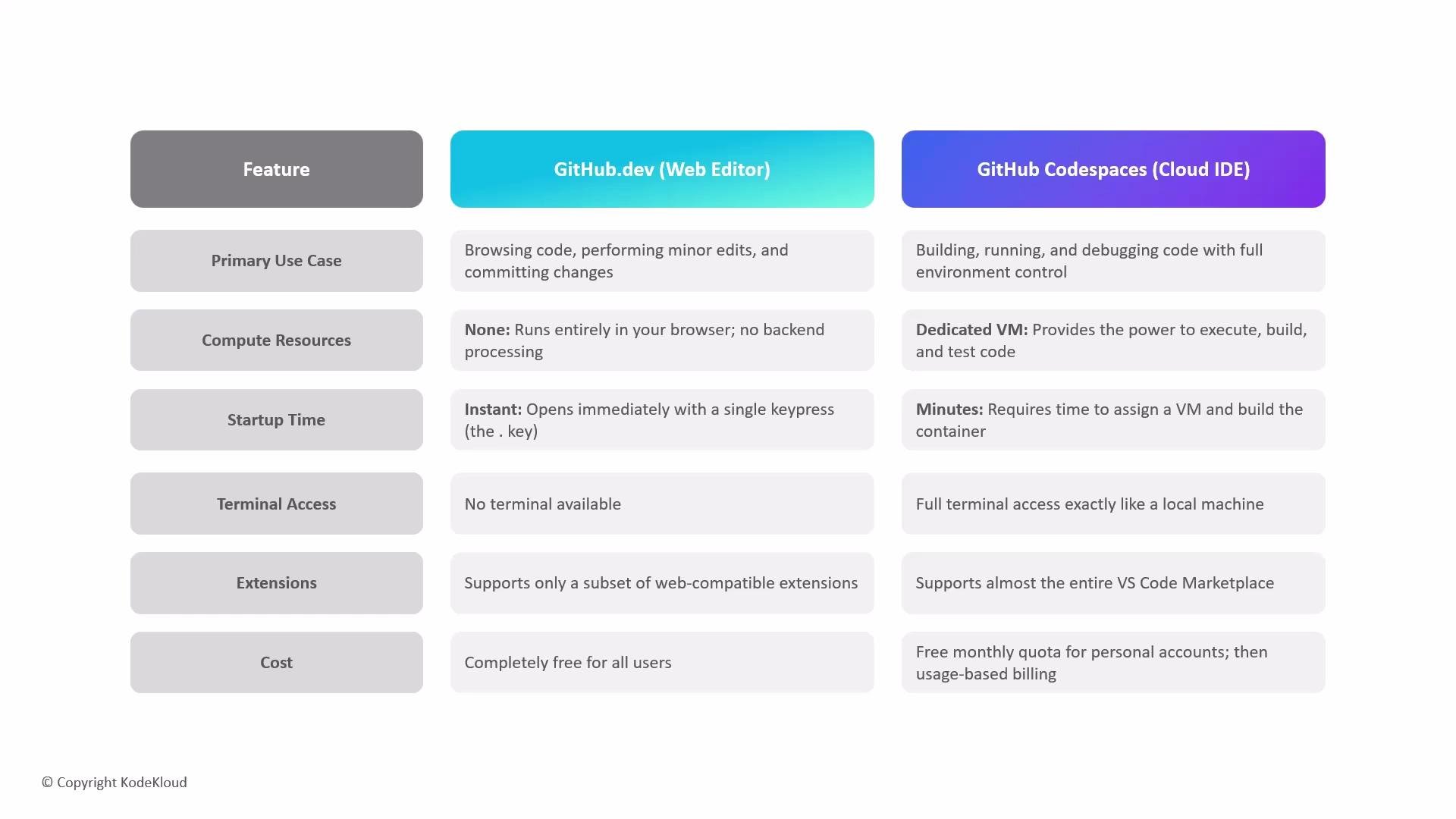
- Use GitHub.dev for fast, “drive-by” edits: typo fixes, quick code tweaks, and lightweight reviews where you don’t need to run code.
- Use Codespaces when you need a reproducible, persistent environment: building the project, running tests, debugging with breakpoints, using a full terminal, or relying on workspace containers and additional compute.
Use GitHub.dev for immediate, lightweight edits. Use Codespaces when you need persistent, reproducible environments with full terminal and debugging support.
- GitHub Codespaces overview: https://docs.github.com/en/codespaces
- GitHub web-based editor (github.dev): https://docs.github.com/en/repositories/working-with-files/using-the-web-based-editor
- VS Code Marketplace: https://marketplace.visualstudio.com/vscode