In this article we explore Azure NAT Gateway — the managed service that provides secure, scalable outbound internet access for resources inside an Azure Virtual Network. See the official docs for full reference: Azure NAT Gateway. Why use NAT Gateway? When many virtual machines or instances require outbound access (OS updates, package repositories, external APIs, telemetry), assigning a public IP to each resource creates operational and security problems:
  • SNAT port exhaustion: Azure uses source NAT (SNAT) for outbound connections. Many VMs or many simultaneous connections can exhaust ephemeral ports and cause outbound failures.
  • Increased attack surface: More public IPs means more surface area to manage and secure.
  • Unpredictable source IPs: Different source addresses make whitelisting at external services cumbersome.
NAT Gateway centralizes outbound connectivity through one or more managed public IP addresses (single public IP or public IP prefix), reducing these risks and simplifying operations.
Use NAT Gateway when you need predictable, private, and highly scalable outbound connectivity from subnets without assigning public IPs to individual VMs.
How it works (conceptual)
  • Attach a NAT Gateway to one or more subnets in your virtual network.
  • All outbound SNAT traffic from resources in that subnet is translated to the NAT Gateway’s public IP(s).
  • Resources inside the subnet do not require individual public IP addresses for outbound access.
  • NAT Gateway is fully managed and elastically scales to reduce the risk of SNAT port exhaustion.
Key benefits
BenefitWhat it providesExample / Why it matters
Centralized outboundManage public IPs in a single placeEasier operations and auditing
Predictable source IPsOutbound traffic uses NAT Gateway IP(s)Simplifies whitelisting at partner APIs
Improved securityVMs remain private (no public IPs required)Less direct exposure to internet threats
Managed scalingAzure handles SNAT capacityLower chance of port exhaustion during traffic spikes
Important note about inbound traffic NAT Gateway focuses exclusively on outbound connectivity. For inbound connectivity (for example, web traffic to your VMs), you must use a Standard Load Balancer, Application Gateway, or assign public IPs directly to your resources. NAT Gateway can coexist with these inbound services.
NAT Gateway provides outbound connectivity only — it does not accept inbound connections. Use a Load Balancer, Application Gateway, or public IPs to enable inbound access.
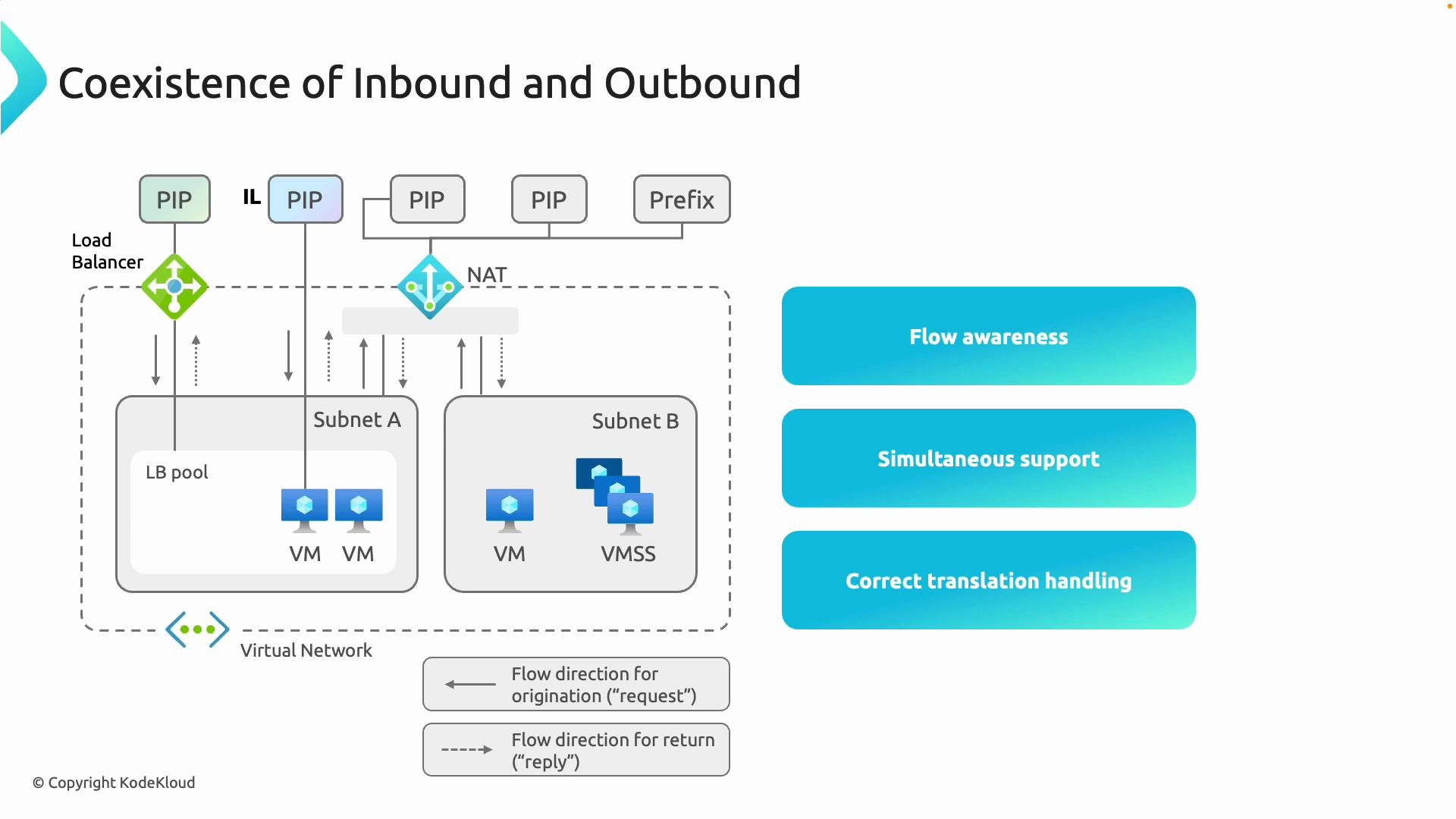
Coexistence with Load Balancer (flow awareness) A common production architecture requires both inbound and outbound connectivity:
  • Inbound: A Standard Load Balancer or Application Gateway receives client requests and forwards them to VMs.
  • Outbound: NAT Gateway provides predictable, managed SNAT for any outbound connections initiated by those same VMs.
Azure maintains connection state and flow awareness so replies are routed correctly regardless of whether the initial flow was inbound or outbound. This enables scenarios where VMs accept inbound connections and independently initiate outbound connections without conflicting SNAT behavior. Why not rely on Load Balancer for outbound? Although a Standard Load Balancer can provide outbound connectivity using a public frontend, it is not purpose-built for high-scale outbound SNAT translation. Using the Load Balancer frontend for heavy outbound workloads can still lead to SNAT port exhaustion and less predictable source IP behavior. NAT Gateway is designed to handle large-scale outbound SNAT translation for subnets. Quick examples Azure CLI (create a NAT Gateway and associate with subnet)
# Create a public IP (or public IP prefix) first
az network public-ip create \
  --resource-group myRG \
  --name myNatPublicIP \
  --sku Standard \
  --allocation-method Static

# Create NAT Gateway
az network nat gateway create \
  --resource-group myRG \
  --name myNatGateway \
  --public-ip-addresses myNatPublicIP \
  --idle-timeout 4

# Associate NAT Gateway to a subnet
az network vnet subnet update \
  --resource-group myRG \
  --vnet-name myVnet \
  --name mySubnet \
  --nat-gateway myNatGateway
Terraform (minimal snippet)
resource "azurerm_public_ip" "nat_ip" {
  name                = "nat-ip"
  resource_group_name = azurerm_resource_group.rg.name
  location            = azurerm_resource_group.rg.location
  allocation_method   = "Static"
  sku                 = "Standard"
}

resource "azurerm_nat_gateway" "example" {
  name                = "example-nat"
  resource_group_name = azurerm_resource_group.rg.name
  location            = azurerm_resource_group.rg.location
  sku_name            = "Standard"
  public_ip_address_ids = [azurerm_public_ip.nat_ip.id]
}

resource "azurerm_subnet_nat_gateway_association" "example" {
  subnet_id       = azurerm_subnet.app_subnet.id
  nat_gateway_id  = azurerm_nat_gateway.example.id
}
Best practices
  • Attach a NAT Gateway to any subnet whose resources require reliable outbound access without public IPs.
  • Use Standard SKU public IPs or public IP prefixes for predictable address space and scale.
  • Monitor SNAT usage and connection metrics in Azure Monitor to detect unusual patterns.
  • Combine NAT Gateway with inbound services (Load Balancer, Application Gateway) when you need both directions of connectivity.
Summary Azure NAT Gateway is the recommended solution when you need:
  • Centralized, predictable outbound internet access from subnets.
  • A managed approach that reduces SNAT port exhaustion risk.
  • To keep virtual machines private while allowing them to reach external services.
  • To work seamlessly alongside Load Balancer or Application Gateway for inbound scenarios.
For step-by-step deployment guidance, sample templates, and pricing details, refer to the official documentation: Azure NAT Gateway documentation. Further reading and references