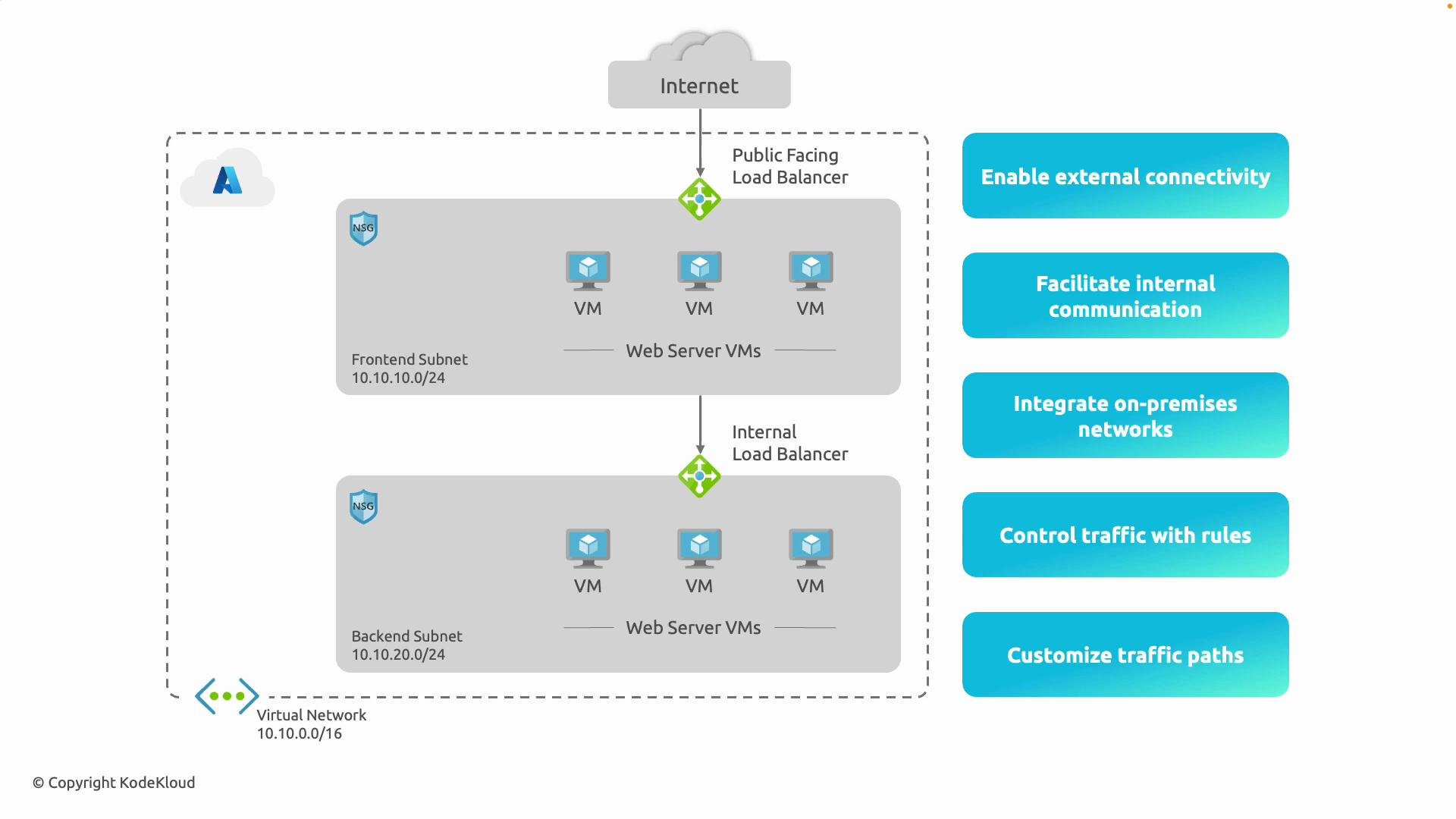
Having defined what an Azure Virtual Network (VNet) is, this document outlines how VNets support cloud architectures. VNets are the foundation for isolating and controlling communication between resources, for connecting to the internet, and for integrating with on-premises networks. Below are the primary capabilities, practical examples, and short CLI snippets to help you implement them. Quick links and references:

High-level summary (at a glance)

CapabilityPurposeKey Azure services
External connectivityAllow selected resources to be reachable from the internet or to access the internetPublic IP, Azure Load Balancer, Application Gateway, NAT Gateway
Internal communication (east–west)Private, low-latency communication between resources inside a VNet or peered VNetsInternal Load Balancer (ILB), VNet peering
Hybrid connectivityExtend or integrate on-premises networks with AzureVPN Gateway (site-to-site), ExpressRoute
Traffic control & securityFilter and inspect traffic, enforce access policiesNSGs, Azure Firewall, WAF (Application Gateway)
Custom routing & inspectionDirect traffic through appliances or on-premises for inspection/egress controlUser-defined routes (UDRs), Network Virtual Appliances (NVAs), forced tunneling

1. External connectivity (internet-facing scenarios)

Azure VNets let you expose resources to the internet when required and manage outbound internet access from private subnets. Key points:
  • Assign public IPs to VMs, or use a public-facing Load Balancer / Application Gateway in a front-end subnet for scalable, internet-facing services.
  • For controlled outbound connectivity from private subnets, deploy NAT Gateway or Azure Firewall to provide stable SNAT addresses and logging.
  • Use Application Gateway + WAF to protect HTTP/S workloads while exposing a secure public endpoint.
Typical examples:
  • Host web servers in a front-end subnet reachable via a public Load Balancer or Application Gateway.
  • Use NAT Gateway or Azure Firewall to centralize outbound internet egress from private subnets for auditing and control.
Quick CLI examples:
  • Create a VNet with a frontend subnet:
az network vnet create \
  --name MyVNet --resource-group MyRG \
  --address-prefix 10.10.0.0/16 \
  --subnet-name frontend --subnet-prefix 10.10.10.0/24
  • Create a NAT Gateway and associate it with a subnet:
az network nat gateway create --resource-group MyRG --name MyNat --public-ip-addresses MyPublicIP
az network vnet subnet update --resource-group MyRG --vnet-name MyVNet --name frontend --nat-gateway MyNat

2. Internal communication (east–west traffic)

Not all resources should or need to be internet-facing. VNets (and peered VNets) enable secure, private communication using private IPs. Key points:
  • Subnets in the same VNet or in peered VNets communicate directly without traversing the internet.
  • Internal Load Balancer (ILB) distributes traffic between tiered services (e.g., web -> app -> database) while keeping traffic private.
  • Traffic stays on Microsoft’s backbone network, minimizing latency and exposure.
Example:
  • Front-end VMs send requests to back-end application or database VMs through an ILB so traffic never leaves Azure’s private network.

3. Integration with on-premises networks (hybrid connectivity)

Azure supports hybrid cloud architectures with secure, routed connectivity to your data center. Options:
  • VPN Gateway for encrypted IPsec/IKE site-to-site tunnels over the public internet.
  • ExpressRoute for a dedicated private circuit to Azure (lower latency, higher throughput, does not traverse the public internet).
  • Once connected, you can manage routes so on-premises and Azure subnets communicate like a contiguous network while maintaining access controls.
Example:
  • Host core services in an on-premises datacenter and extend application tiers to Azure. Use VPN Gateway for smaller deployments or ExpressRoute for production-grade, high-throughput workloads.
Plan IP addressing and routing carefully for hybrid setups. Overlapping IP ranges between on-premises and Azure or misconfigured UDRs can break connectivity or create security gaps. Validate CIDR ranges and route propagation before production rollouts.

4. Controlling traffic with security rules

Azure provides layered controls to filter and log traffic:
  • Network Security Groups (NSGs): stateful Access Control Lists you can apply to subnets or NICs to allow/deny traffic by port, protocol, and IP ranges.
  • Azure Firewall: managed, stateful firewall with centralized policy, threat intelligence, and consolidated logging.
  • Application Gateway WAF: protects HTTP/S workloads from common web exploits (SQL injection, XSS, etc.).
Common patterns:
  • Allow inbound HTTP (80) and HTTPS (443) to the web tier while blocking other inbound traffic.
  • Restrict RDP/SSH access to specific bastion hosts or limited source IP ranges.
  • Use Azure Firewall or an NVA to inspect outbound traffic and enforce application-level controls.
NSG example: allow HTTP inbound to a subnet
az network nsg rule create \
  --resource-group MyRG --nsg-name MyNSG --name Allow-HTTP \
  --priority 100 --protocol Tcp --direction Inbound --access Allow \
  --destination-port-ranges 80

5. Customizing traffic paths (routing and appliances)

Control how traffic flows between subnets, to the internet, or back to on-premises.
  • User-defined routes (UDRs) let you override Azure’s system routes by applying custom route tables to subnets.
  • Routes can direct traffic to virtual appliances (firewalls, proxies, NVAs) for inspection or to route traffic back on-premises (forced tunneling).
  • Combine route tables and NVAs to build inspection paths before egress to the internet.
Scenarios:
  • Route all outbound traffic from a subnet through Azure Firewall or an NVA to enforce inspection and logging.
  • Send traffic for specific destinations to an NVA for threat inspection, DPI, or WAN optimization.
Create a route table and custom route example:
az network route-table create --resource-group MyRG --name MyRouteTable
az network route-table route create \
  --resource-group MyRG --route-table-name MyRouteTable --name ToFirewall \
  --address-prefix 0.0.0.0/0 --next-hop-type VirtualAppliance --next-hop-ip-address 10.10.20.4
az network vnet subnet update --resource-group MyRG --vnet-name MyVNet --name backend --route-table MyRouteTable

Common terms (brief)

  • NSG: Network Security Group — subnet or NIC-level, stateful filtering.
  • UDR: User-Defined Route — custom route table attached to a subnet.
  • ILB: Internal Load Balancer — load balancer that only handles internal/private traffic.
  • VPN Gateway: Managed resource for site-to-site VPN connectivity.
  • ExpressRoute: Dedicated private connection between your network and Azure datacenters.
A diagram of an Azure virtual network showing frontend (10.10.10.0/24) and backend (10.10.20.0/24) subnets with a public-facing load balancer from the Internet to frontend VMs and an internal load balancer to backend VMs. Network security groups are shown and blue callouts list benefits like enabling external connectivity, internal communication, and traffic control.
Azure Virtual Networks let you expose only what you need, keep the rest private, connect on-premises and cloud resources securely, and apply routing/security controls to enforce your network design.
Next, virtual network address spaces and how to plan them are covered.