Explains Azure Web Application Firewall default rule set, managed rule groups, and demo showing Front Door WAF blocking XSS attacks and tuning options
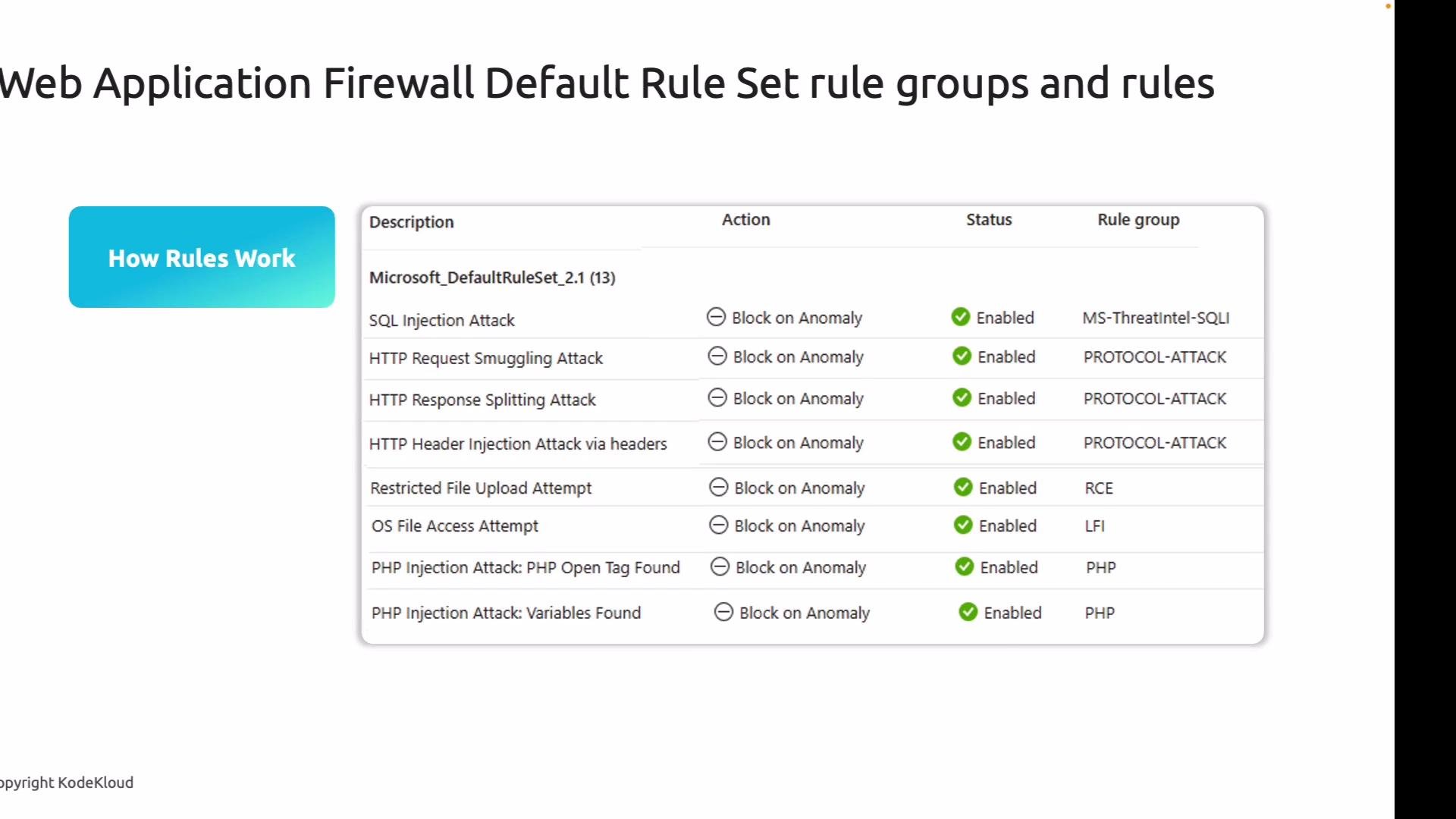
Azure Web Application Firewall (WAF) — Default Rule Set (DRS), rule groups, and rules.Azure WAF includes a Microsoft-managed Default Rule Set (DRS) that’s built on the OWASP Core Rule Set and updated regularly. The DRS provides immediate, out-of-the-box protection for common web attacks so you don’t need to manually create protections for every threat pattern.Key protections in the Default Rule Set include:
Attack class
What it protects against
Cross‑Site Scripting (XSS)
Reflective and stored XSS where user input is returned unsanitized
SQL Injection
Malicious SQL fragments injected into parameters
PHP injection
PHP code injection attempts
Java-related attacks
Java-specific request payload exploits
Remote Command Execution (RCE)
Payloads attempting to execute system commands
Local/Remote File Inclusion (LFI/RFI)
Attempts to include files from local or remote sources
Session fixation
Attacks targeting session identifiers
Protocol attacks
HTTP request smuggling, response splitting, and similar anomalies
Each rule in the DRS matches a specific signature or pattern. When a request matches a rule, the WAF applies the configured action (for example, Block or Log). Administrators can enable/disable individual rules or entire rule groups to tune protection to application requirements.
Rules are organized into groups by attack category (for example: SQL injection, protocol attacks, RCE). This grouping makes it simple to enable or disable whole categories—useful when parts of the application stack (e.g., PHP) are not in use—while keeping baseline protections for other threats.Think of the Default Rule Set as the first line of defense for most common attack patterns. You may still need custom rules for business-specific scenarios (for example, geofencing or rate limiting), but managed rules significantly reduce exposure with minimal configuration.In this walkthrough we demonstrate how the managed Default Rule Set blocks a basic Cross‑Site Scripting (XSS) exploit by placing Azure Front Door (AFD) with a WAF policy in front of vulnerable App Service web apps.I created two intentionally vulnerable App Service web apps that reflect user input back into the page without proper sanitization. Both instances exhibit a simple XSS vulnerability.
Because of the vulnerability, injecting one of these payloads into a comment/name field triggers script execution in the browser:
I also deployed a second identical web app in another region to simulate a global application behind Front Door; the same payloads work there as well.
Next, place Azure Front Door in front of both App Services and attach a WAF policy to the Front Door endpoint.You can deploy the vulnerable apps with an automation script (not shown here) that creates the App Services used in this lesson. After the apps exist, create an AFD profile and add a WAF policy. I used the Front Door Quick Create flow to speed the demo: I selected the Premium tier and set my primary App Service as the origin. During Front Door creation you can either attach an existing WAF policy or create a new standalone policy that can be reused across profiles.
I created a new WAF policy called “WAF01” during Front Door creation.
After the profile was created, I added the secondary App Service to the Front Door origin group so Front Door could route traffic to either instance based on proximity and health.
Updating an origin group can take a short time. After propagation, the secondary app becomes reachable via Front Door.
Open the standalone WAF policy resource to inspect managed rules, custom rules, diagnostic settings, and associations. A standalone WAF policy can be attached to multiple Front Door profiles, enabling centralized policy management.
From the WAF policy blade you can:
Toggle between Detection and Prevention modes
Review and tune managed rules
Add custom rules evaluated prior to managed rules
Enable logging/diagnostics (stream to Azure Monitor or Event Hub)
View and manage associations with Front Door profiles
Under Manage rules you can inspect the Default Rule Set provided by Microsoft. The rules are grouped into categories such as Bot detection, PHP, protocol protections, Java, LFI, XSS, SQL injection, and RCE—which makes coverage visible and tunable.
In this policy, Cross‑Site Scripting rules are enabled by default as part of the managed rule set. You can create custom rules on top of the managed rules to address business-specific scenarios (rate limiting, geofencing, IP restrictions, etc.). Custom rules are evaluated before managed rules, so use them to allow or block traffic that would otherwise be handled by the DRS.Now test the Front Door endpoint by opening the Front Door URL in a browser. Note that Front Door will route requests to the nearest healthy origin; if you encounter HTTPS certificate validation errors when Front Door is configured with App Service origins, you can temporarily disable certificate validation for the origin to troubleshoot.
By default the WAF policy was created in Detection mode (logging only). For the demo switch the policy to Prevention mode so matching requests are actively blocked. If you want visibility into matched detections, enable diagnostics to stream logs to Azure Monitor or Event Hub.
Detection mode logs matching requests but does not block them. Switch to Prevention mode to actively block malicious requests; enable diagnostics for visibility into matches and blocks.
With the policy in Prevention mode, submit the same XSS payloads via the Front Door endpoint. The requests that trigger managed rules will be blocked and return a 403 Forbidden response. Use browser devtools or a network capture to inspect the request and the WAF response headers.
When you inspect the blocked event in the portal or logs, you can see which managed rule matched and triggered the block. In this example the rule detected script blocks and identified the request as an XSS attempt; the WAF prevented the request from reaching the backend.This demonstrates how Microsoft’s managed Default Rule Set provides immediate protection against common attack patterns like XSS—reducing risk with minimal configuration.Remember: while managed rules cover most general threats, you may still need custom rules for specific business requirements (for example, only allow traffic from particular countries or block specific IP ranges). Custom rules give you precise control and are evaluated before managed rules.Creating and tuning custom rules (geofencing, rate limiting, IP restrictions, and exceptions) will be covered in a follow-up article.References and further reading: