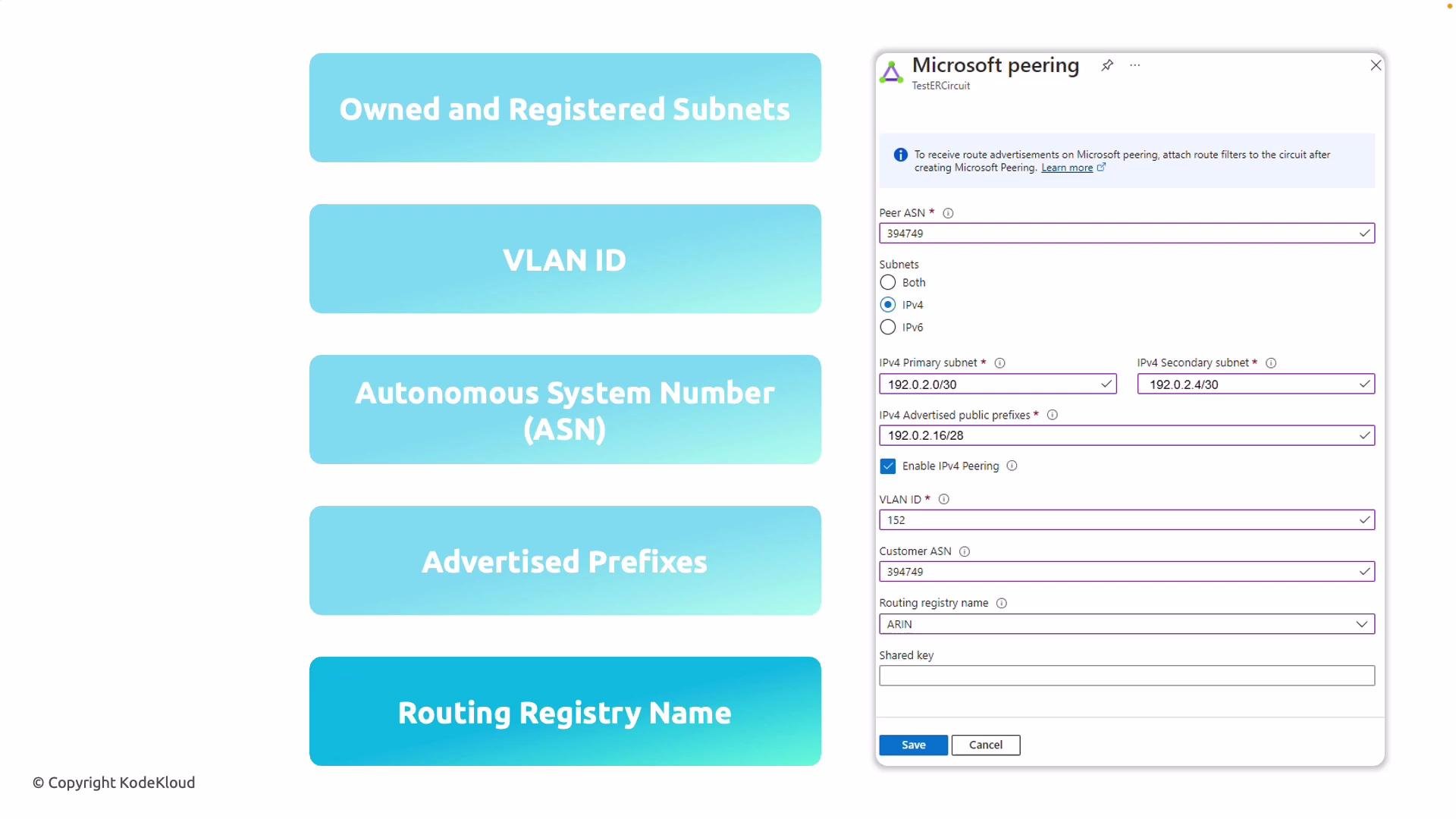
Required configuration items — quick reference
| Item | Purpose | Notes |
|---|---|---|
| Two public IP subnets | BGP session endpoints for primary and secondary links | Must be publicly routable and owned by your org |
| VLAN ID | Separates traffic on the ExpressRoute link | Provided when configuring the peering on the ExpressRoute circuit |
| Autonomous System Number (ASN) | Identifies your network in BGP | Use your public ASN |
| Public IP prefixes to advertise | Routes Microsoft should learn for return traffic | Must be registered in a routing registry (IRR) |
| Routing registry name | Where your prefixes are registered | Examples: ARIN, RIPE, APNIC |
- Two public IP subnets that you own and that are registered in an Internet Routing Registry (IRR). These subnets must be publicly routable (no RFC 1918 private ranges) and registered under your organization in an IRR.
- One subnet is used for the primary link and the other for the secondary link (redundancy).
- A VLAN ID for the ExpressRoute peering to separate traffic on the link.
- Your Autonomous System Number (ASN) for BGP.
- All public IP prefixes you plan to advertise to Microsoft (the prefixes you want Microsoft to route to you).
- The routing registry where your prefixes are registered (for example, ARIN, RIPE, APNIC).

How Microsoft Peering differs from Private Peering
-
Microsoft Peering
- Provides access to Microsoft public services and Azure public endpoints over ExpressRoute.
- Requires publicly routable prefixes that you advertise to Microsoft and IRR registration to verify ownership.
- Uses public IP addressing for the BGP session endpoints.
-
Private Peering
- Connects to Azure Virtual Networks (VNets) and private Azure services using private IP addressing.
- Does not require public IP prefixes or IRR registration; it uses private address space.
- Typically used for direct access to VNets, services hosted in those VNets, or private endpoints.
| Feature | Microsoft Peering | Private Peering |
|---|---|---|
| Target services | Microsoft public services, Azure public endpoints | Azure VNets and private Azure services |
| IP addressing for BGP | Public IPs | Private IPs |
| Prefix registration required | Yes — IRR registration | No |
| Typical use case | Access Microsoft 365, Dynamics 365, public Azure PaaS | Connect to VNets, private workloads |
Ensure the prefixes you plan to advertise are already registered in an Internet Routing Registry (IRR) under your organization and that you own the address space; Microsoft will verify ownership against the specified registry before completing the peering.
Do not use private (RFC 1918) address ranges for Microsoft Peering. Microsoft Peering requires publicly routable, registered prefixes and public IP subnets for the BGP session.
Next steps — configuration checklist
- Prepare and register the public prefixes in the appropriate routing registry (ARIN, RIPE, APNIC, etc.).
- Reserve two public subnets for the primary and secondary ExpressRoute links; confirm they are reachable and registered under your ASN.
- Gather your ASN, VLAN ID, and the routing registry name.
- In the Azure portal, configure the ExpressRoute circuit’s Microsoft Peering section:
- Enter your ASN, VLAN ID, primary and secondary IPv4 subnets, and the advertised prefixes.
- Specify the routing registry where the prefixes are registered.
- Wait for Microsoft to verify prefix ownership. After verification, Microsoft will provision the peering.
- Validate BGP session establishment and that routes are being exchanged correctly.
Links and references
- ExpressRoute overview: https://learn.microsoft.com/azure/expressroute/
- Internet Routing Registry (IRR): https://www.irr.net/
- RFC 1918 (private address space): https://datatracker.ietf.org/doc/html/rfc1918
- ARIN: https://www.arin.net/
- RIPE: https://www.ripe.net/
- APNIC: https://www.apnic.net/