

- Frontend IP (public or private)
- Listener (binds IP, port, protocol, and certificate for HTTPS)
- Routing rules (basic or path-based)
- Backend pool (VMs, VMSS, App Services, IPs)
- HTTP settings (backend protocol, port, affinity, probes)
- Health probes (default or custom)
- Optional Web Application Firewall (WAF)
Detailed component descriptions
Frontend IP
- The frontend IP configuration is the gateway’s external or internal address. Choose a Public IP for internet-facing services; use a Private IP in a virtual network for internal applications.
- A listener binds the selected frontend IP, frontend port (commonly
80or443), and protocol (HTTP/HTTPS). For HTTPS listeners, upload or reference an SSL certificate to perform TLS termination (SSL offloading) at the gateway. If you need end-to-end TLS, use HTTPS in the HTTP settings and deploy the necessary trust certificates on the gateway so it can validate backend TLS.
- Routing rules map a listener to backend pools and HTTP settings. Rules can be:
- Basic: all traffic from the listener forwards to a single backend pool.
- Path-based: route requests to different backend pools based on URL path segments (for example,
/api-> API pool,/static-> CDN or storage fronting).
- Backend pools contain the endpoints that will serve requests: VM NICs, VM scale set instances, public/private IP addresses, or App Services. Use health probes to ensure only healthy endpoints receive traffic.
- HTTP settings determine how Application Gateway communicates with backend endpoints. Key fields include:
- Backend protocol:
HTTPorHTTPS - Backend port: e.g.,
80or443 - Cookie-based affinity: enable if session stickiness is required
- Connection draining: allow existing requests to complete during scale down or maintenance
- Probe association: reference a custom probe if your application requires a specific health endpoint
- Backend protocol:
- WAF is optional. Select the WAF-enabled SKU to enable OWASP-based protection and managed rule sets. If WAF is not required, use the Standard_v2 SKU for features such as autoscaling and zone redundancy without the application-layer protection.
- Health probes keep track of backend instance health. You can use:
- Default probe: built-in checks suitable for simple backends
- Custom probe: define
HTTP/HTTPS, host header, path (for example/health), interval, timeout, and unhealthy threshold
- After creating a custom probe, associate it with the HTTP settings that your routing rules use. Only backends that pass the probe will receive traffic.
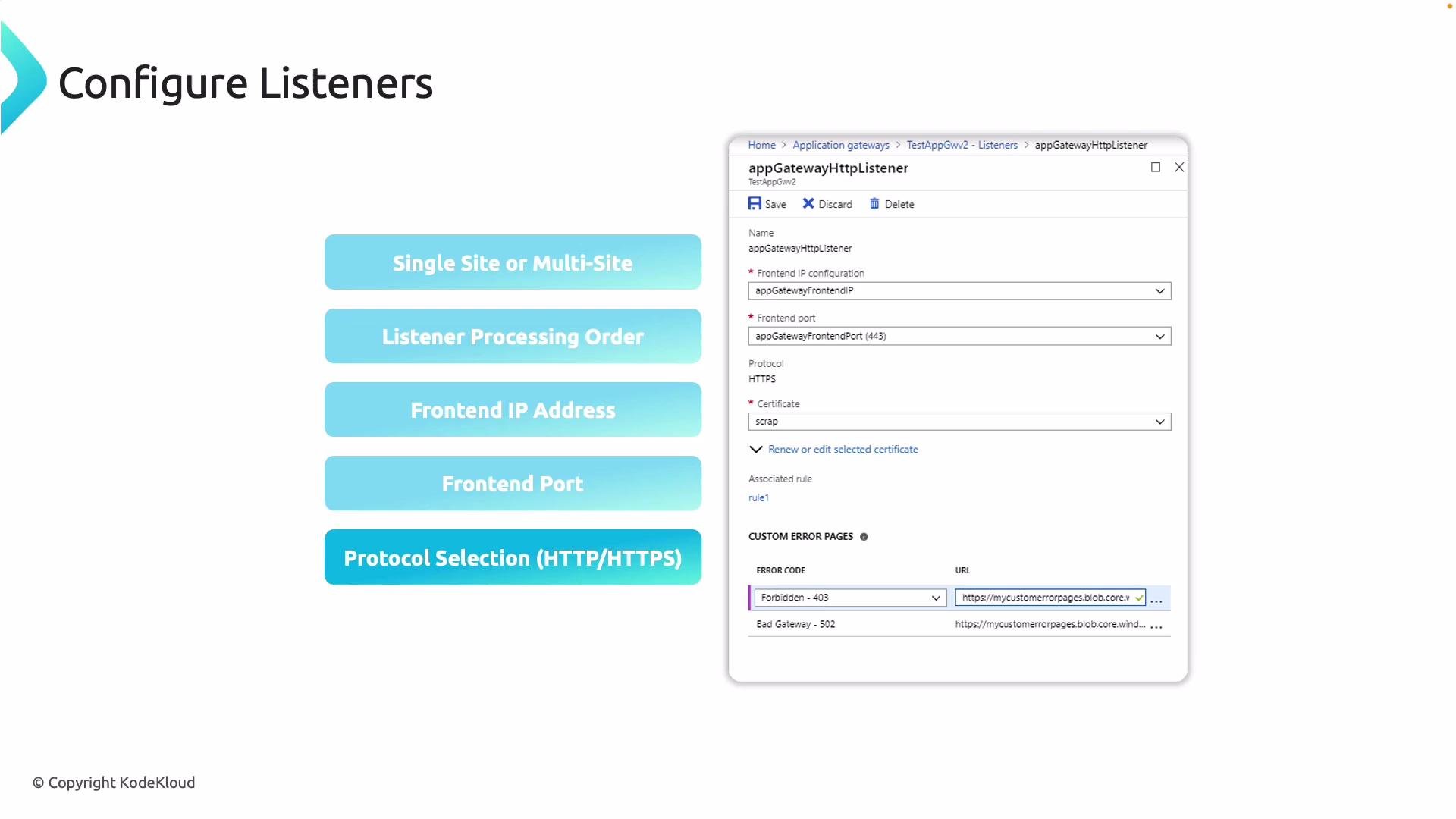
- Listener type:
- Basic (single-site) listener – for single domain scenarios.
- Multi-site (host-based) listener – supports multiple host names (domains) on the same frontend IP and port.
- Frontend IP: pick the Public/Private IP configuration the listener should bind to.
- Frontend port: commonly
80(HTTP) or443(HTTPS). - Protocol:
HTTPorHTTPS. ForHTTPS, upload or attach an SSL certificate to terminate TLS at the gateway. - End-to-end TLS: if required, set HTTP settings to use
HTTPSand supply backend trust certificates so the gateway can validate backend certificates. - Rule priority and processing order: ensure path-based rules and multiple listeners are ordered correctly so requests match the intended rule. Explicit path rules should be more specific than catch-all rules.
- Use the default built-in probe behavior for simple backends.
- Create a custom probe to specify:
- Protocol:
HTTPorHTTPS - Host name or host header
- Request path (for example,
/healthor/status/ready) - Probe interval and timeout
- Unhealthy threshold (how many failures before marking an instance unhealthy)
- Expected status codes or match criteria (for advanced matching in v2 SKUs)
- Protocol:
When creating custom probes, remember to match the probe’s host header and path to something the backend understands (for example, a dedicated health endpoint). Then reference that probe from the HTTP settings used by the routing rule.
- Microsoft Docs: Azure Application Gateway overview
- Microsoft Docs: Configure health probes for Application Gateway
- Microsoft Docs: Application Gateway listener and routing rules