

168.63.129.16, best practices, and common use cases.
How internal name resolution works
When you use Azure Private DNS zones, name resolution for private resources follows this flow:- A VM (or any resource) in a virtual network sends a DNS query for a private name, for example
sql.kodekloud.com. - The Azure platform DNS endpoint at
168.63.129.16receives the query. If the Private DNS zone forkodekloud.comis linked to the VM’s VNet and the record exists, Azure DNS returns the private IP, e.g.,10.0.0.4. - The VM connects to the returned private IP. Traffic stays within Azure and never traverses the public internet.
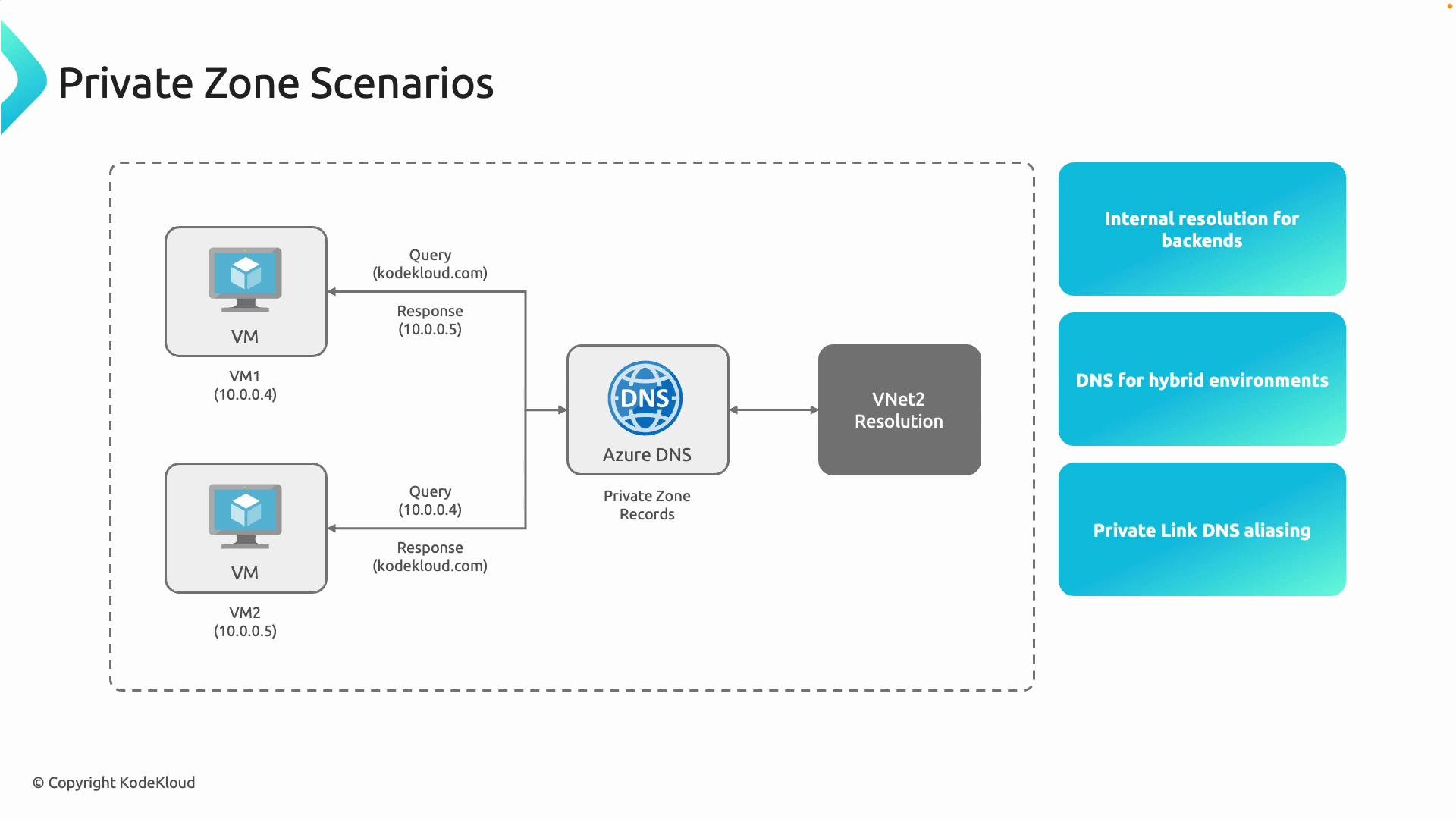
Key capabilities and common use cases
- Centralized name resolution across VNets: Create one Private DNS zone and link multiple VNets using virtual network links so resources in different VNets resolve internal names without duplicate zones.
- Hybrid connectivity: Forward queries from on-premises to Azure DNS (via a DNS forwarder VM or Azure DNS Private Resolver) over VPN/ExpressRoute to resolve Azure-only names from on-premises.
- Private endpoints for PaaS: When you create private endpoints for PaaS services, Azure can automatically add DNS records to your Private DNS zone for private access.
Virtual network links
Virtual network links are required for a VNet to resolve names in a Private DNS zone. Without a link, the VNet cannot see the zone. Use links to:- Grant multiple VNets visibility to a single zone (centralized resolution).
- Control registration behavior (auto-registration of records from VMs is configurable per link).
- Break down isolation between VNets for DNS while retaining network separation.
When creating a virtual network link, consider whether you want automatic virtual machine registration. Enable auto-registration only if you want VMs in that VNet to create A records automatically in the zone.
Reserved platform IP: 168.63.129.16
Azure reserves168.63.129.16 as a platform-managed IP reachable from all VMs. It’s used for multiple platform functions:
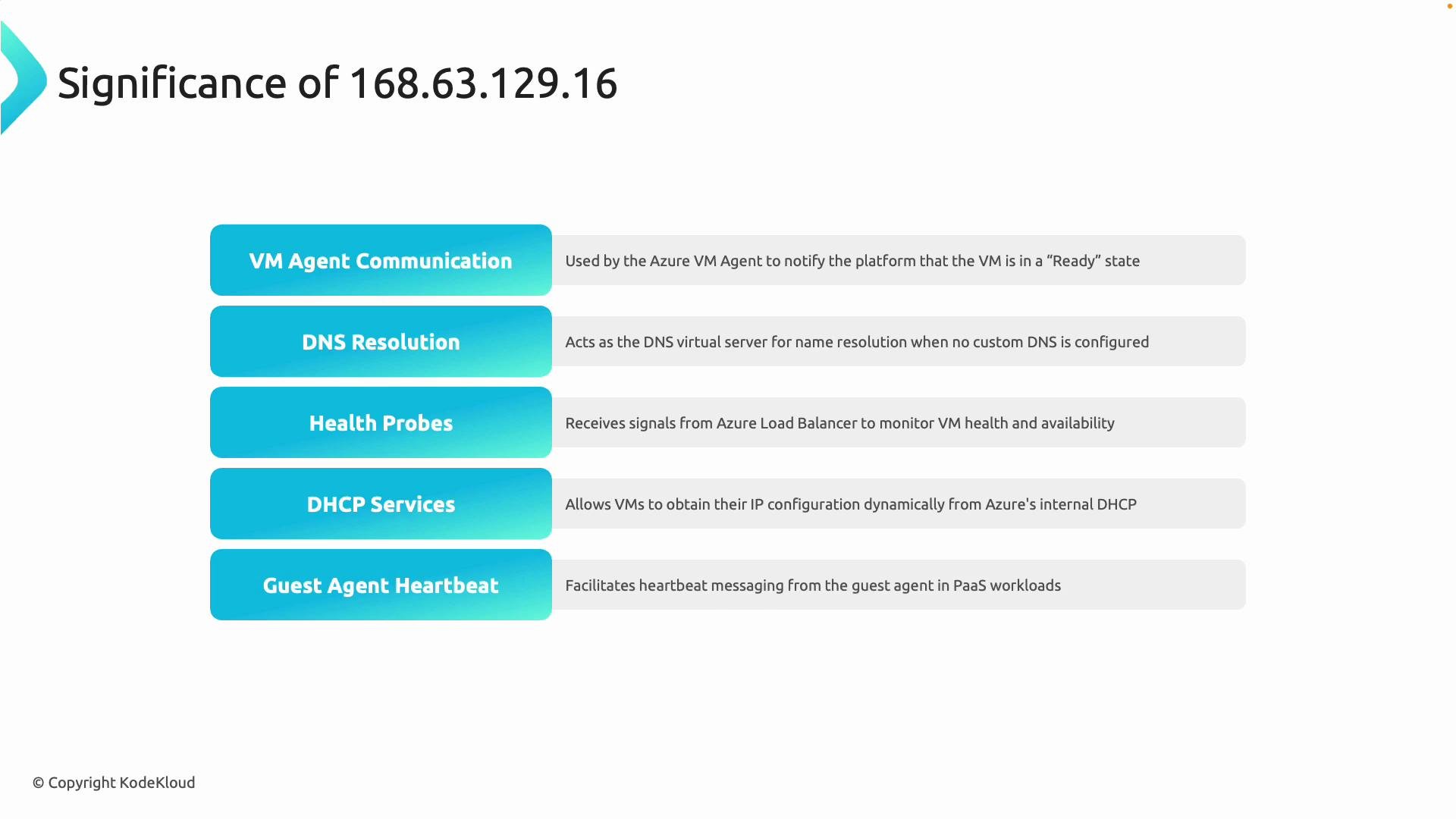
Never block or filter access to
168.63.129.16. Blocking this endpoint can break DNS, DHCP, VM agent communications, and other platform features required for normal VM and Azure service operation.168.63.129.16. If you override DNS, ensure forwarding or conditional forwarders are configured so platform name resolution and required services continue to function.
Best practices
- Centralize Private DNS zones to reduce administrative overhead and avoid replication of records.
- Use virtual network links to provide controlled visibility of zones across VNets.
- For hybrid scenarios, deploy DNS forwarders or Azure DNS Private Resolver to enable on-premises clients to resolve Azure Private DNS zones.
- Do not block
168.63.129.16. Validate network security groups (NSGs) and firewall rules allow necessary access.
Summary
- Azure Private DNS zones provide secure, private name resolution for resources inside VNets.
- Virtual network links are required for VNet visibility to a Private DNS zone.
- Private endpoints can automatically register DNS records in your Private DNS zone.
168.63.129.16is a critical Azure platform endpoint — do not block it.