

- The difference between Public and Internal Load Balancers
- When to use the Gateway Load Balancer for NVAs
- Key differences between Basic and Standard SKUs and recommended scenarios
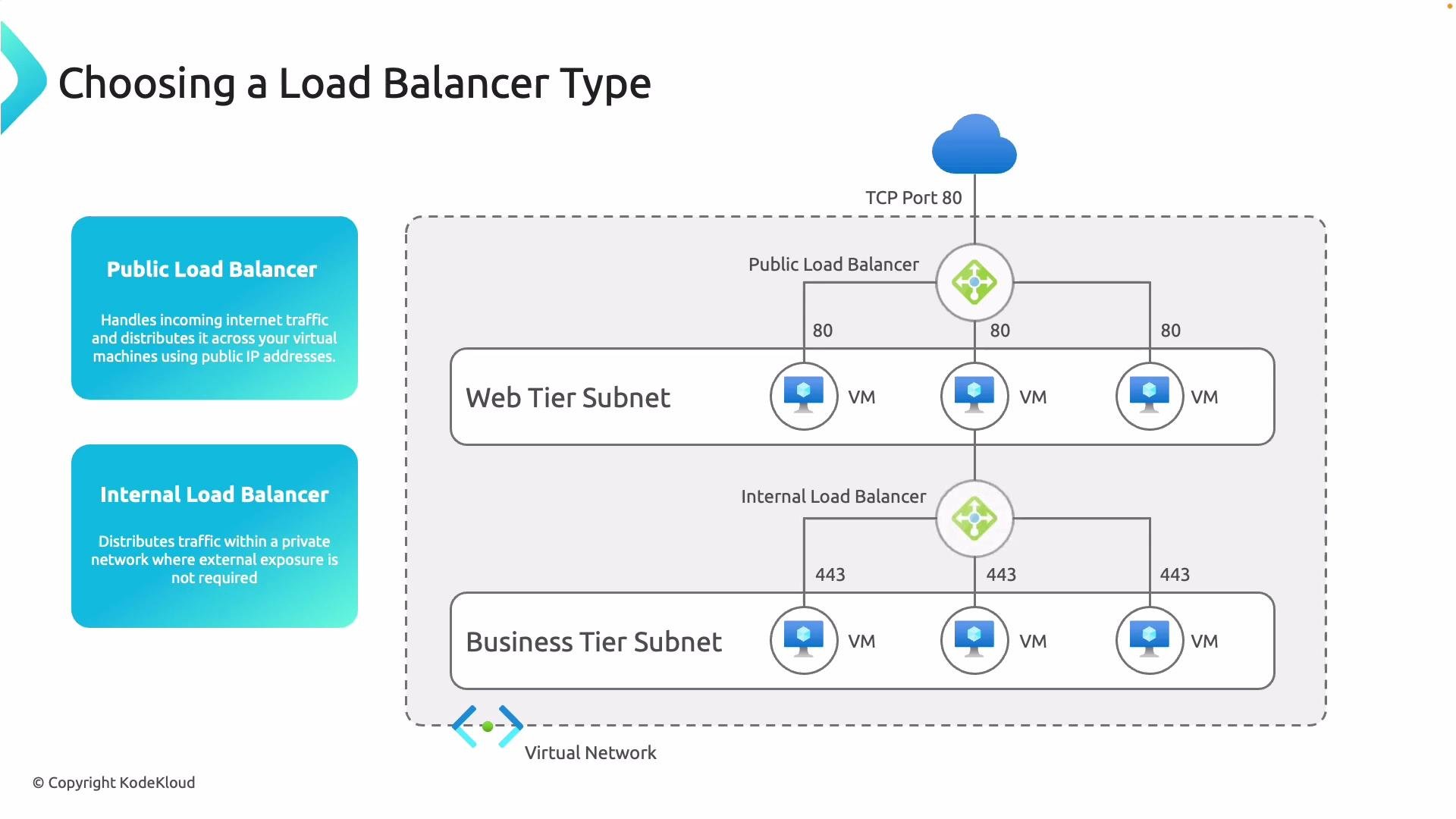
Load balancer types: Public vs Internal
- Public Load Balancer — Receives traffic from the Internet via a public IP address and distributes incoming requests to backend virtual machines. Use this for workloads that must be reachable from outside your Azure virtual network (for example, public web applications).
- Internal Load Balancer — Distributes traffic only within a private virtual network. Use this to balance traffic for internal application tiers or services that must remain private.
Gateway Load Balancer (for NVAs)
A specialized option is the Gateway Load Balancer. It enables transparent, high-throughput integration with third-party network virtual appliances (NVAs), such as firewalls, IDS/IPS, and other security devices. Learn more: https://learn.microsoft.com/en-us/azure/load-balancer/gateway-load-balancer-overview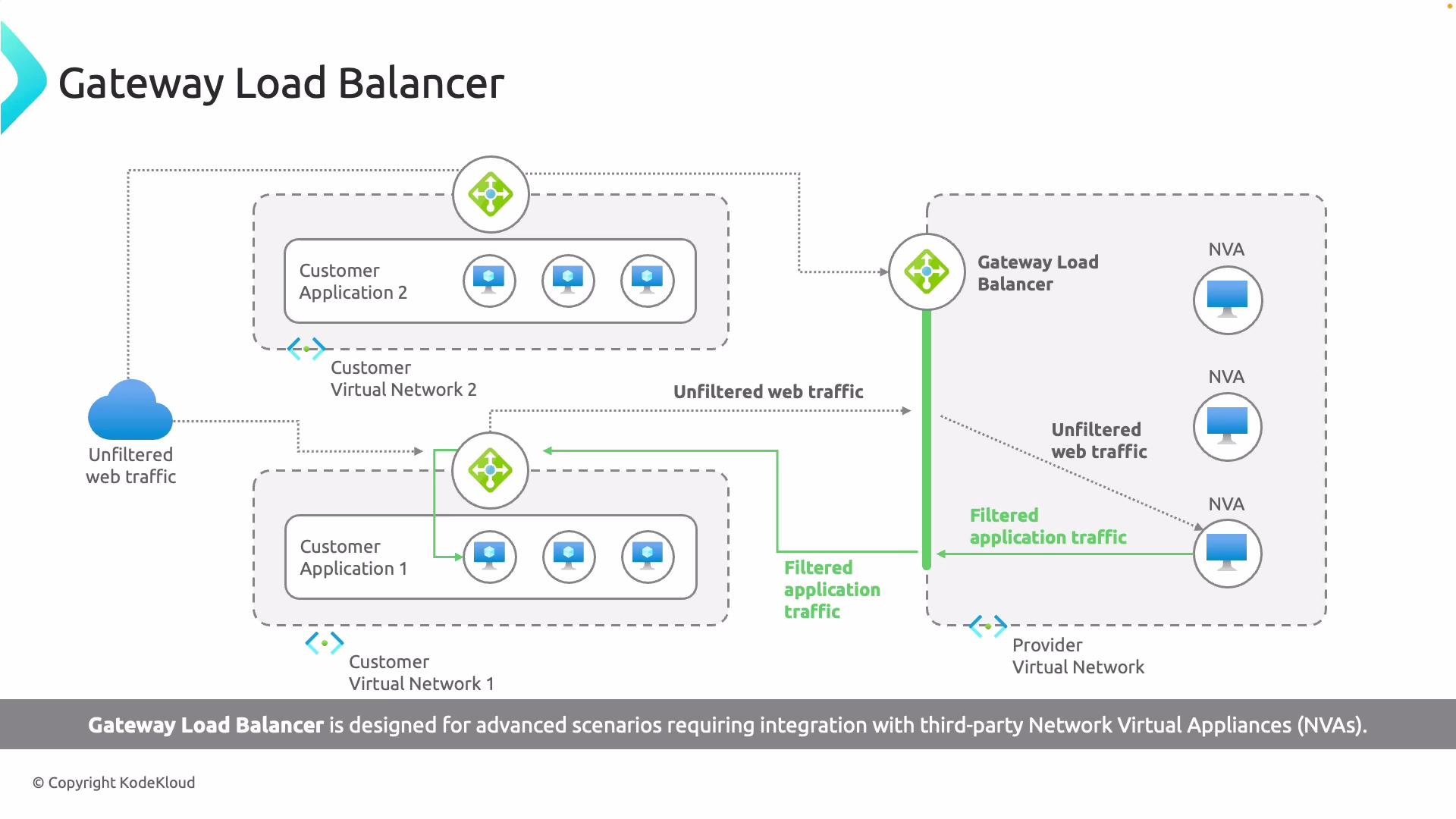
- Unfiltered internet traffic is directed to the Gateway Load Balancer frontend IP.
- Traffic is encapsulated and forwarded to NVAs for inspection and filtering.
- NVAs apply policies, then forward filtered traffic to the application backend.
- Supports chaining of multiple NVAs for complex inspection pipelines.
- Frontend IP — receives incoming traffic.
- Load-balancing rules — determine distribution of packets to backends.
- Backend pools — typically composed of NVAs for Gateway LB deployments.
- Tunnel interfaces — provide connectivity and encapsulation to NVAs.
- Chaining — route traffic sequentially through multiple NVAs for layered inspection.
Load Balancer SKUs: Basic vs Standard
Azure Load Balancer is available in two SKUs: Basic and Standard. Choose the SKU that aligns with your scale, resiliency, and security requirements.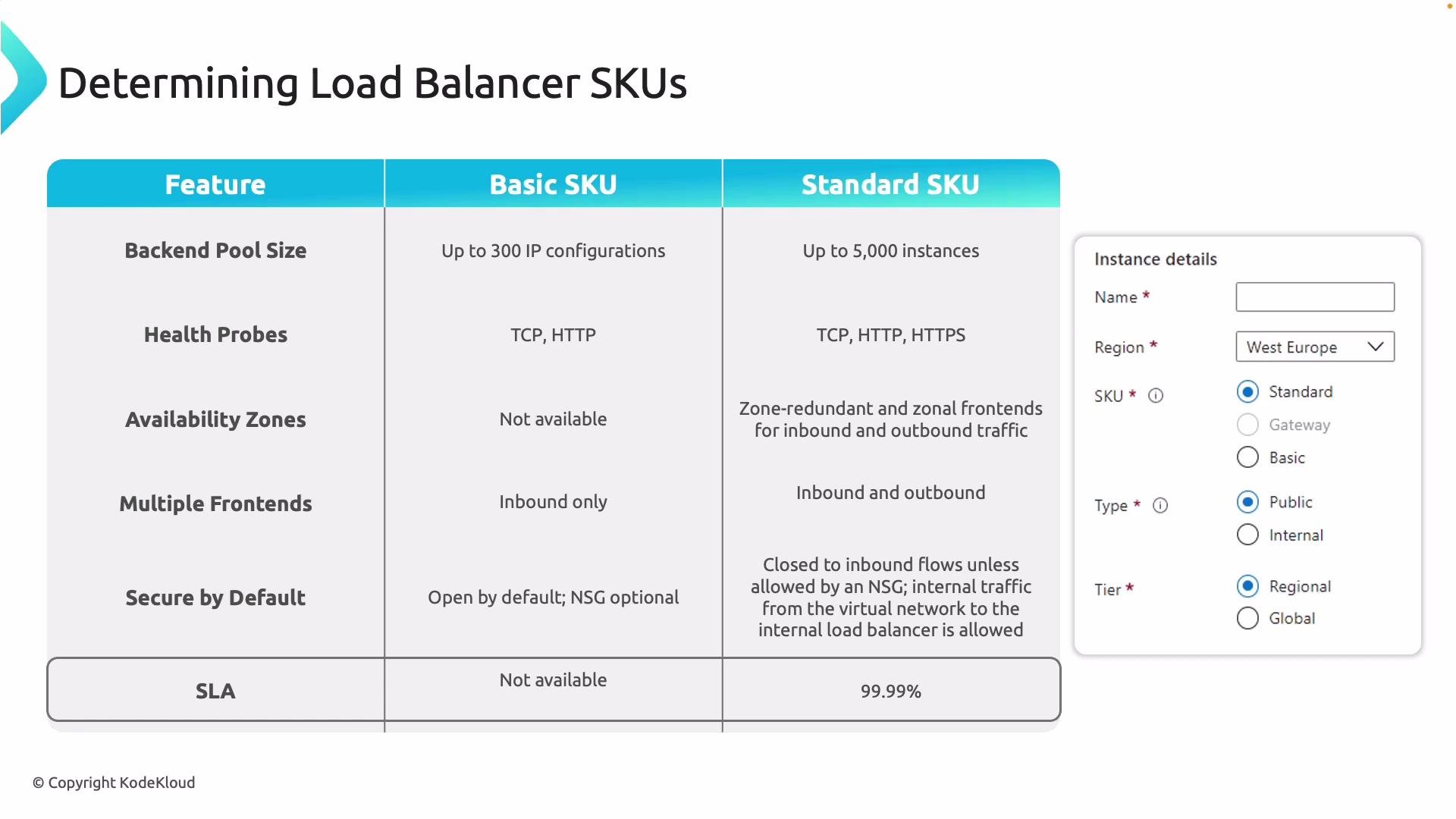
Additional considerations:
- Standard SKU is recommended for production workloads requiring high availability, zone redundancy, and stricter security controls.
- Basic SKU may be acceptable for small, non-critical environments where its limitations are understood and tolerated.
Choosing the right combination
Decide based on these criteria:- Exposure: Public vs Internal load balancer depending on whether the service must be accessible from the Internet.
- Security needs: Use Standard SKU and NSGs for stricter default posture; consider Gateway LB if you require NVAs for deep packet inspection.
- Scale and availability: For large-scale or SLA-bound services, prefer Standard SKU with zone redundancy.
- Global vs regional routing: If you need global load balancing, evaluate Azure Front Door or Traffic Manager alongside regional load balancers.
- Azure Load Balancer overview: https://learn.microsoft.com/en-us/azure/load-balancer/load-balancer-overview
- Gateway Load Balancer: https://learn.microsoft.com/en-us/azure/load-balancer/gateway-load-balancer-overview
- Network Security Groups (NSGs): https://learn.microsoft.com/en-us/azure/virtual-network/network-security-groups-overview
- Azure Front Door: https://learn.microsoft.com/en-us/azure/frontdoor/front-door-overview
- Traffic Manager: https://learn.microsoft.com/en-us/azure/traffic-manager/traffic-manager-overview
For production workloads that require high availability, zone redundancy, and stricter security controls, prefer the Standard SKU. Use Basic only for simple, non-critical scenarios where its limits are acceptable.