

Overview
ExpressRoute provides private connectivity between your on-premises networks and Microsoft Azure. There are four common connectivity models:- Cloud exchange co-location
- Point-to-point Ethernet
- Any-to-any (IP VPN / provider-managed MPLS)
- ExpressRoute Direct (direct connection into Microsoft’s backbone)
Service provider models
These models rely on an ExpressRoute connectivity provider to bridge your on-premises network to Azure.Cloud exchange co-location
In the cloud exchange co-location model, you colocate equipment in the same facility (an exchange or data-hub) as the ExpressRoute provider. You run a short physical cross-connect from your rack to the provider’s equipment, and the provider on-ramps you into Azure. Example: Your company keeps critical systems in a London colocation facility that hosts an ExpressRoute provider. You establish a cross-connect from your rack to the provider’s port, and the provider carries the traffic to Microsoft Azure. This option is ideal for latency-sensitive workloads and organizations already colocated with providers (common in finance and HPC).Point-to-point Ethernet connection
Point-to-point Ethernet gives you a dedicated, private circuit from your datacenter to an ExpressRoute provider. Conceptually it’s a private cable (physical or logical) from your location to the provider, who then provides access to Azure. Example: A hospital requiring strict compliance and predictable throughput contracts a telecom to run a dedicated link from its datacenter to the provider’s network. This model is simple, secure, and provides reliable performance—useful for regulated industries and critical systems.Any-to-any (IP VPN / provider-managed MPLS)
Any-to-any (commonly called IP VPN or provider MPLS) uses a provider-managed WAN to connect multiple branch offices and data centers to Azure. The provider extends connectivity from each site over their WAN and integrates it with ExpressRoute. Example: A multinational retailer uses its WAN provider to connect dozens of stores and offices to Azure through a single ExpressRoute integration point, reducing the need for separate physical connections at each site and simplifying management.Direct model
ExpressRoute Direct lets you connect directly to Microsoft’s global network at an ExpressRoute Direct location without an intermediary provider. This is the highest-control option and can offer very high speeds (up to 100 Gbps) for demanding, latency-sensitive enterprises.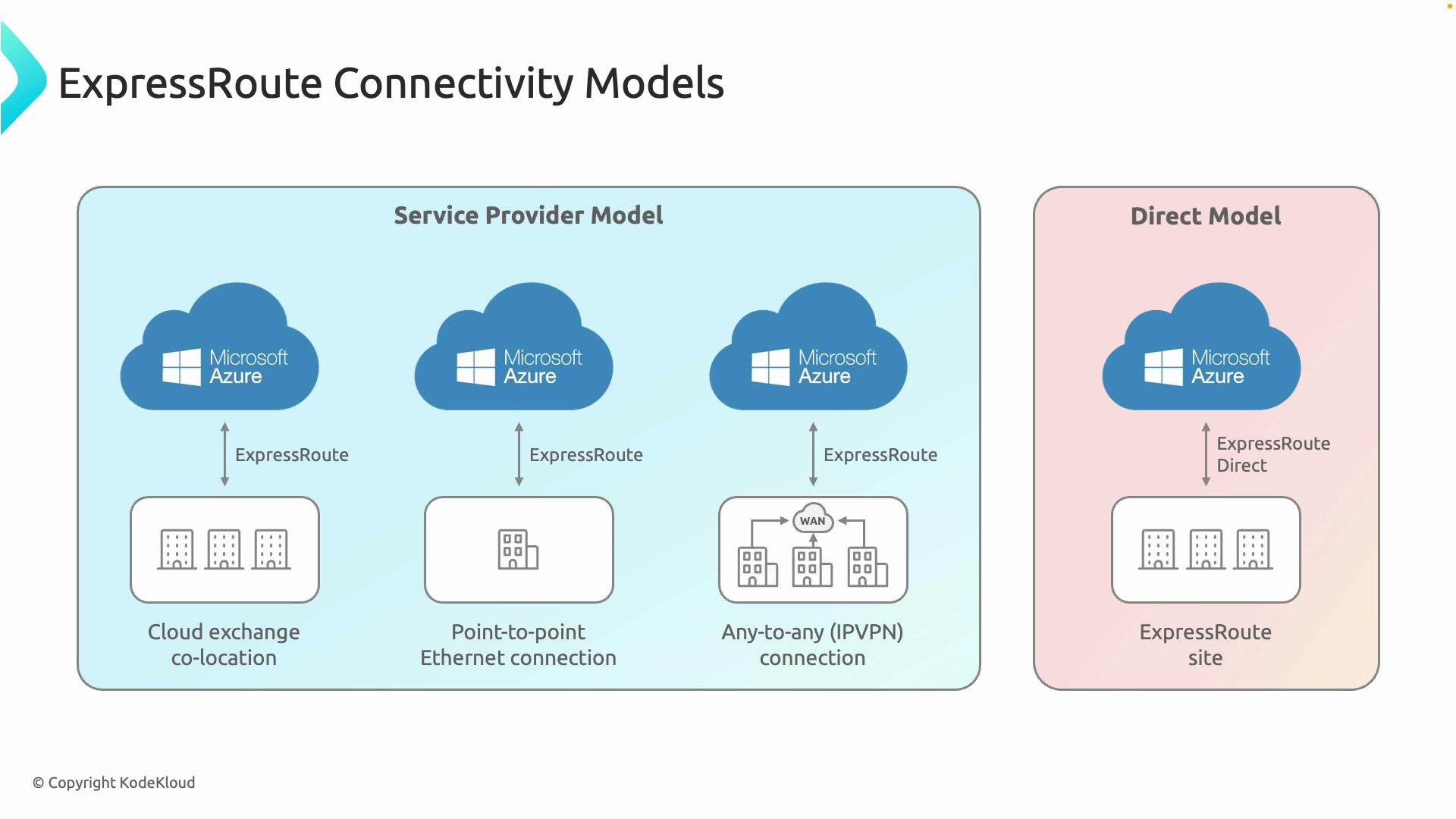
ExpressRoute Direct is preferred when you need maximum bandwidth and control (e.g., high-frequency trading, global backups, large-scale migrations). For many organizations, service-provider models offer a simpler, lower-cost path with sufficient performance.
Comparison table
Choosing the right model
Consider these factors when selecting a model:- Bandwidth needs: choose ExpressRoute Direct for multi-10/100 Gbps; provider models for lower throughput.
- Latency and performance predictability: colocation and direct connections typically minimize latency.
- Regulatory and compliance: dedicated circuits or direct connections often simplify proof-of-control and auditing.
- Operational overhead: provider-managed MPLS reduces hardware and per-site complexity for many branches.
- Cost: Direct connections and colocation typically cost more upfront and require more operational effort than provider-managed options.
Consider contractual SLAs, carrier redundancy, and regulatory requirements before choosing a model. ExpressRoute costs and operational responsibilities vary widely between provider-managed setups and ExpressRoute Direct.
Links and references
- Azure ExpressRoute documentation: https://learn.microsoft.com/azure/expressroute
- Designing Azure network connectivity: https://learn.microsoft.com/azure/architecture/reference-architectures/hybrid-networking/
- ExpressRoute Direct overview: https://learn.microsoft.com/azure/expressroute/expressroute-direct