

- Left: Firewall Manager manages a secured virtual hub (vHub) with integrated third‑party providers (for example, Zscaler, Check Point, or iboss).
- Right: Firewall Manager manages hub VNets where Azure Firewall instances are deployed in the hub VNet.
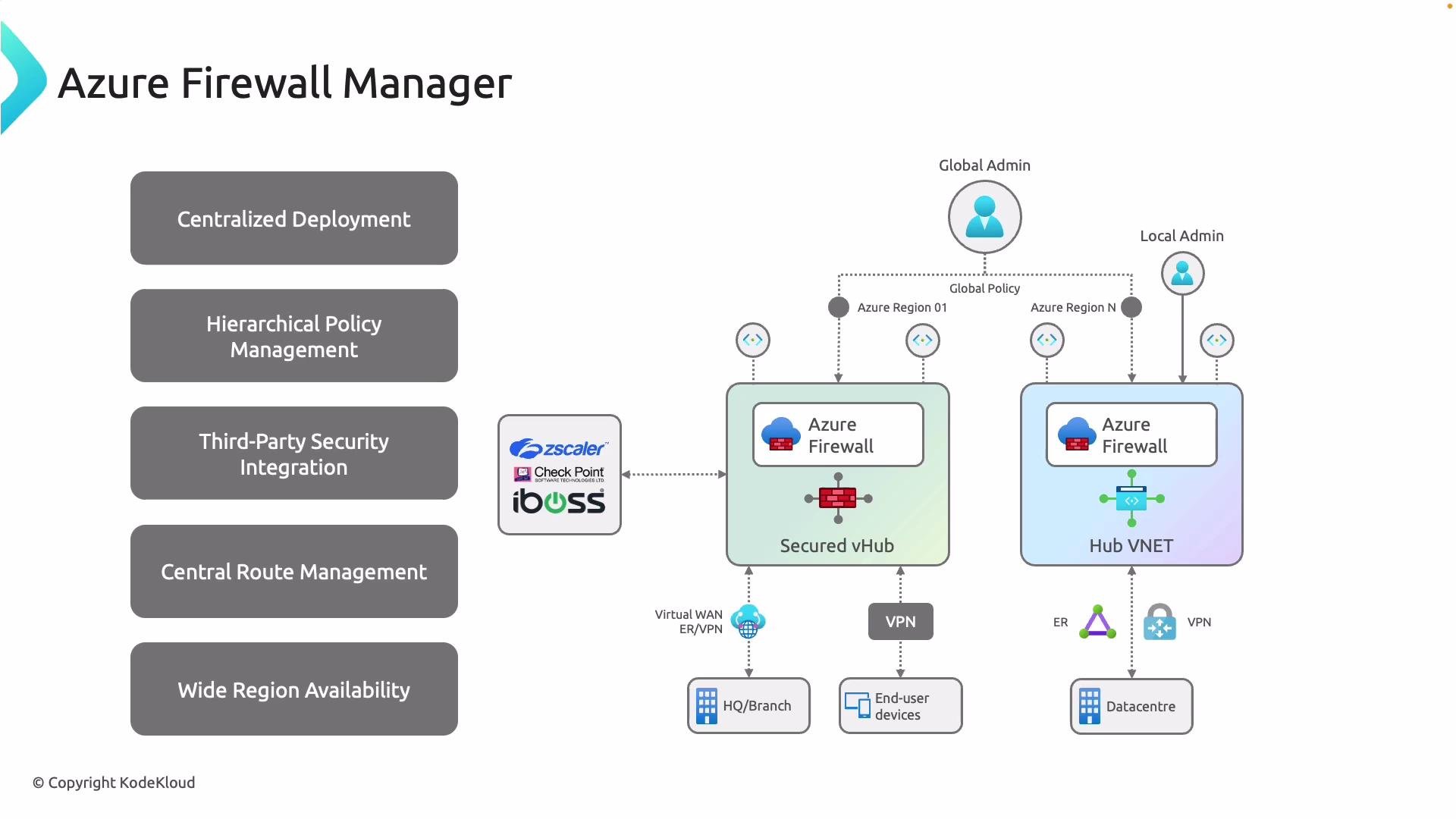
Key capabilities of Azure Firewall Manager
Azure Firewall Manager combines deployment orchestration with hierarchical policy control and routing to simplify enterprise network security at scale.Deployment comparison: secured virtual hub (vHub) vs hub VNet
Choose the model that matches your operational priorities—managed vHub for integrated Virtual WAN scenarios or hub VNets for more traditional hub-and-spoke designs.When deciding between vHub and hub VNet, evaluate your routing needs, partner integrations, and operational model (managed vs. customer-managed). If you rely on Virtual WAN features or SD‑WAN provider integrations, a secured vHub often simplifies management.
Implementation considerations
- Policy design: Start with a global baseline policy in Firewall Manager, then use local policies or delegated rule sets for regional or workload-specific requirements.
- Routing and forced tunneling: Plan route tables and BGP/UDR configurations so traffic reliably traverses inspection points (Azure Firewall or third‑party NVAs).
- Third‑party appliances: Verify partner compatibility with Firewall Manager and validate throughput, logging, and telemetry integration for your workloads.
- Scale and availability: Design firewall instances and hubs for high availability and predictable scaling; consider region distribution to meet compliance needs.
Avoid applying overly permissive local overrides. Hierarchical policy delegation enables flexibility, but misconfigured local rules can weaken global security posture—review local policy exceptions regularly.
Quick links and references
- Azure Firewall Manager documentation
- Azure Firewall overview
- Azure Virtual WAN overview
- Third‑party partners: Zscaler, Check Point, iboss