

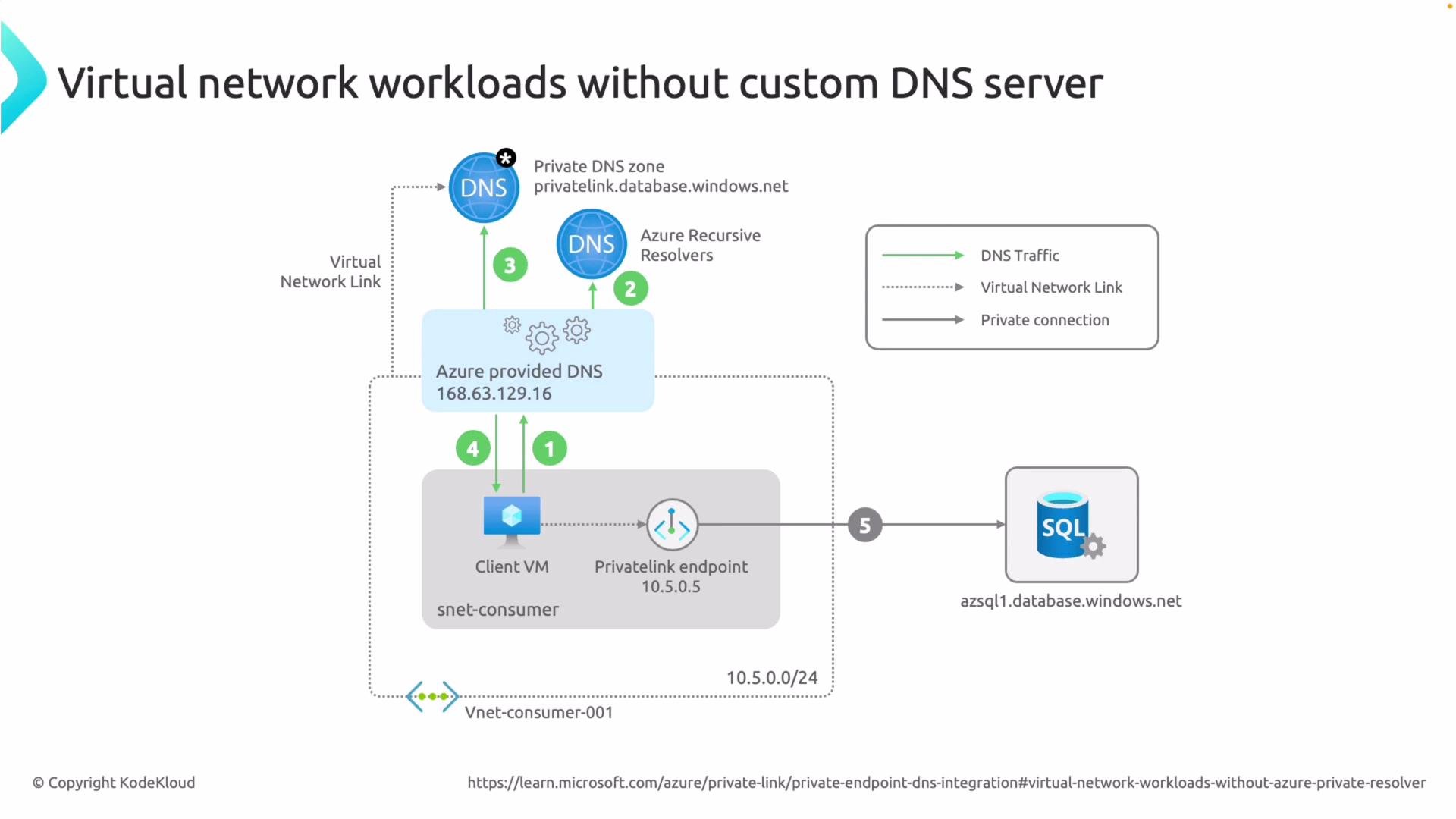
- Virtual network workloads that use Azure-provided DNS (no custom DNS server).
- On-premises workloads that need to resolve Azure private endpoints using Azure DNS Private Resolver.
azsql1.database.windows.net or mystorageaccount.blob.core.windows.net) return private IPs from linked private DNS zones (for example privatelink.database.windows.net) so traffic flows through private endpoints.
Scenario 1 — Virtual network workloads without a custom DNS server
When a VNet uses Azure-provided DNS (the default, no custom DNS server configured), Azure resolves private endpoint hostnames automatically if the relevant private DNS zones are linked to the VNet.
DNS resolution flow:
- A VM in the virtual network issues a DNS query for a public FQDN, e.g.
azsql1.database.windows.net. - The VM sends the query to Azure-provided DNS (the VNet’s inherited DNS setting).
- Azure-provided DNS checks private DNS zones linked to the VNet. If you created or auto-integrated a private DNS zone such as
privatelink.database.windows.netduring private endpoint creation, it finds theazsql1record there. - Azure-provided DNS returns the private IP from the private DNS zone to the client VM.
- The client connects to the service using that private IP via the private endpoint.
- If a client looks up
mystorage.blob.core.windows.netand your private DNS zone for storage (for exampleprivatelink.blob.core.windows.net) contains the record, Azure-provided DNS returns the private IP and the client connects to the storage account’s private endpoint to retrieve data (for example, download an image).
The Azure internal DNS IP address
168.63.129.16 is reachable from Azure VMs but is not routable from on-premises networks. On-premises machines cannot query Azure-provided DNS directly. To resolve private endpoint names from on-premises, use Azure DNS Private Resolver or another supported forwarding solution.- An on-premises client issues a DNS query for an Azure service FQDN (for example
azsql1.database.windows.netormystorage.blob.core.windows.net). - Your on-premises DNS server has a conditional forwarder for the target service domain; it forwards matching queries to the inbound IP(s) of the Azure DNS Private Resolver over VPN or ExpressRoute.
- The Azure DNS Private Resolver receives the query and checks the linked private DNS zone (for example
privatelink.database.windows.net) for the requested record. - The resolver returns the private IP address to the on-premises client through the same connectivity path.
- The on-premises client connects directly to the private endpoint in Azure.
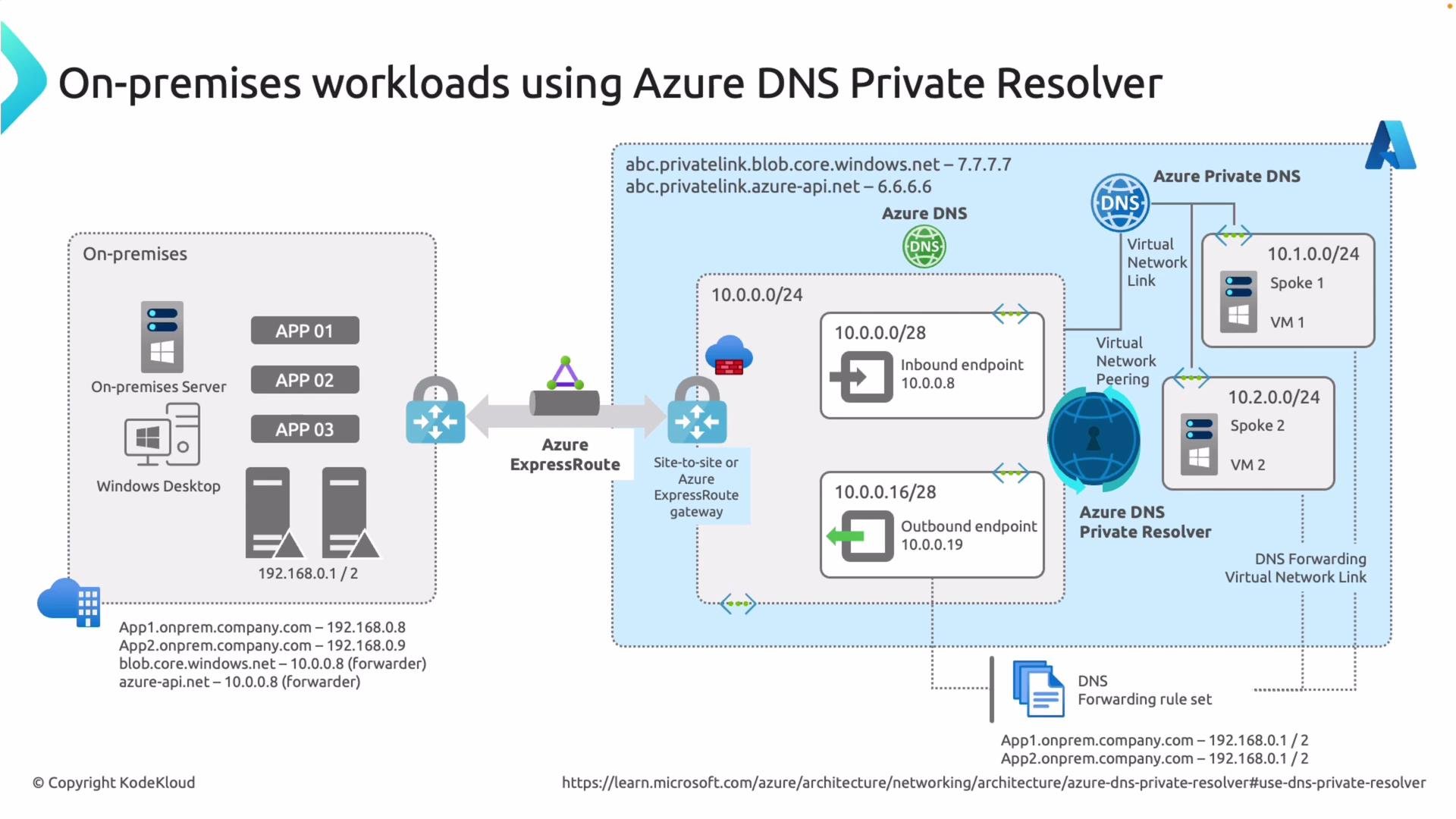
- Configure a conditional forwarder on your on-premises DNS server for the Azure service domain(s) you want to resolve privately (examples below) and point that forwarder to the inbound IP(s) of your Azure DNS Private Resolver.
- Link the resolver to the private DNS zones that contain the private endpoint records (for example
privatelink.database.windows.net). - Once the resolver returns the private IP to the client, the client will access the target Azure service via the private endpoint.
Practical tips
- Ensure your site-to-site VPN or ExpressRoute permits DNS traffic to the resolver inbound IPs.
- If you use split-horizon DNS or custom DNS in Azure, verify that private DNS zones are linked to the correct VNets where clients reside.
- Use
nslookupordigfrom both on-premises and Azure VMs to confirm the DNS answer returns the private IP. - Check network security groups (NSGs) and firewall rules that may block DNS or private endpoint connectivity.
- Azure DNS Private Resolver documentation
- Azure Private Endpoint overview
- Private DNS zones and records
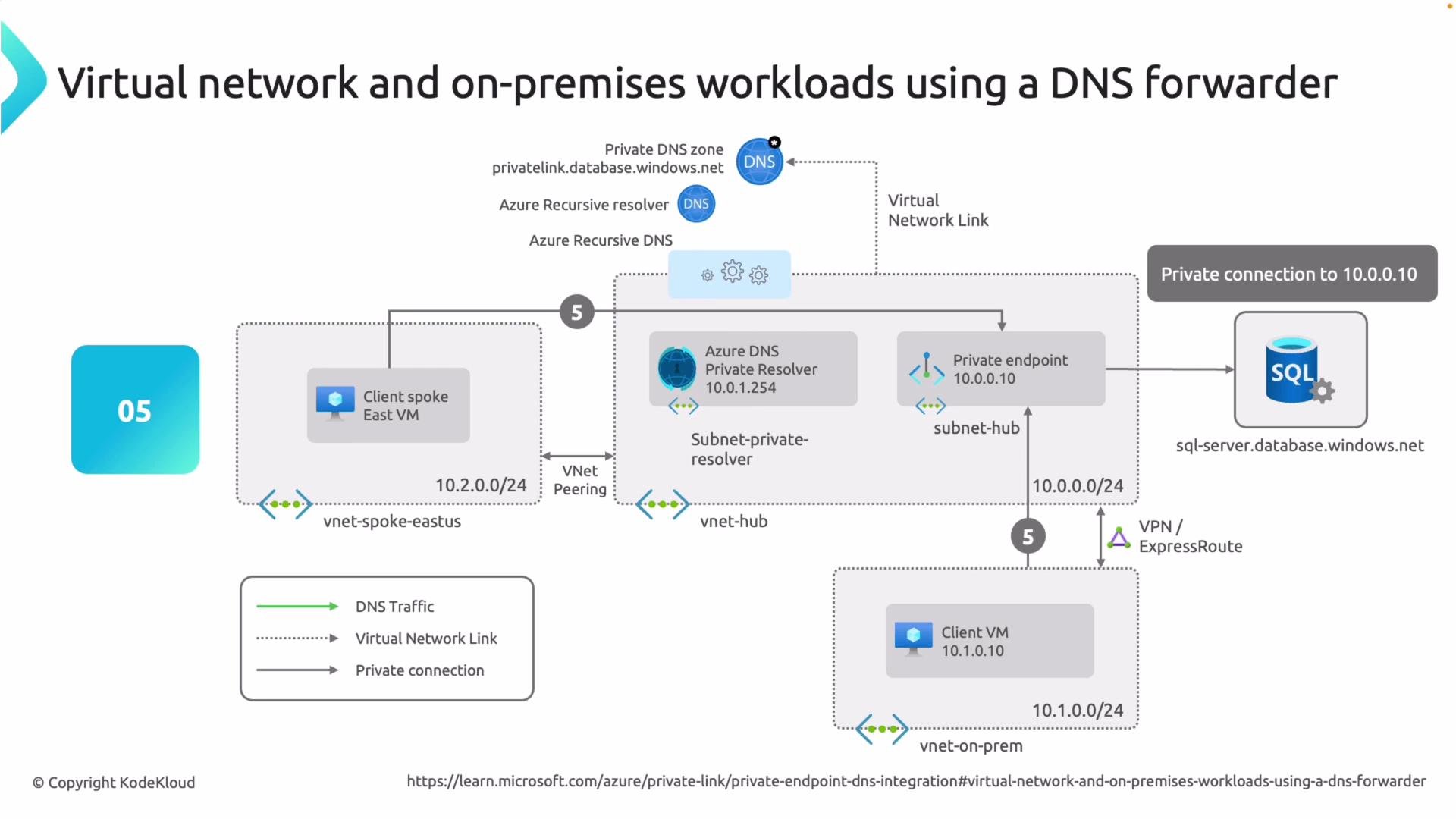
From on-premises, forward DNS requests for the relevant Azure service domains (for example
database.windows.net or blob.core.windows.net) to the Azure DNS Private Resolver inbound IP(s). The resolver must be linked to the corresponding private DNS zones (for example privatelink.database.windows.net) so it can return private endpoint addresses.