

Overview
- Certificate-based authentication: Strong device identity using client certificates signed by a trusted root CA.
- Microsoft Entra ID authentication: Cloud-native user authentication with MFA and Conditional Access integration.
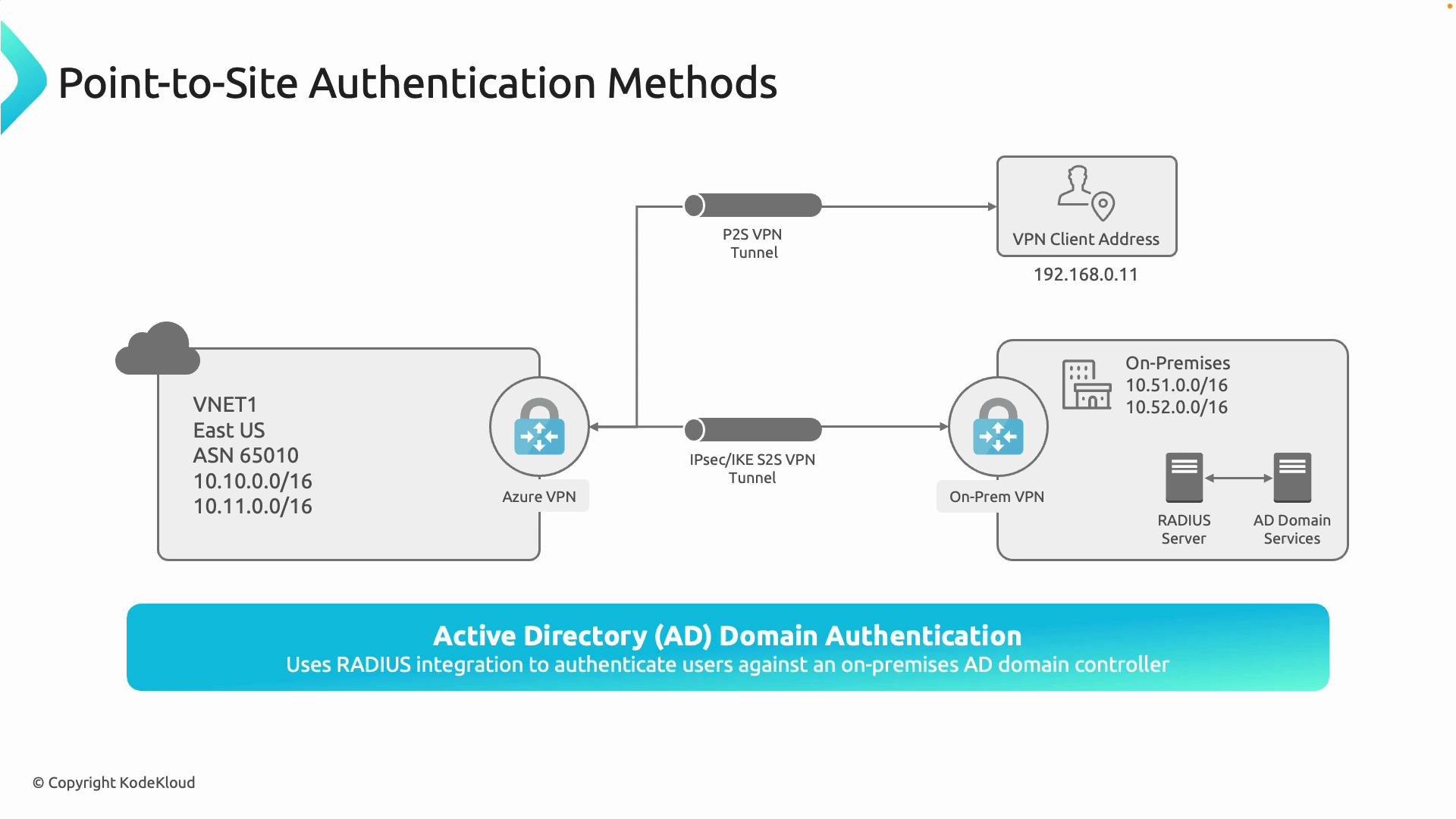
- Active Directory domain authentication (RADIUS): Reuse on-premises AD credentials, ideal for hybrid environments.
1) Certificate-based authentication
Certificate-based authentication requires each client device to present a valid client certificate during the VPN handshake. The certificate must be issued (signed) by a root certificate authority (CA) that the VPN gateway trusts. Typical deployment steps:- Generate or obtain a root CA certificate (enterprise PKI or a public CA).
- Upload the public root certificate to the Azure VPN configuration so the gateway trusts client certificates signed by that root.
- Issue client certificates signed by the root CA and install them on devices that require VPN access.
- Strong device-level trust and reduced reliance on user passwords.
- Works well when you control the endpoint devices (e.g., corporate-owned laptops).
- Certificate issuance, revocation, and lifecycle management add operational overhead.
- Secure storage and distribution of private keys are critical.
If client certificate private keys are not properly protected, device compromise can allow unauthorized VPN access. Use hardware-backed keystores or HSMs where possible and maintain a clear revocation process.
2) Microsoft Entra ID authentication
Microsoft Entra ID (formerly Azure AD) provides a modern, user-centric authentication flow for P2S VPNs. Users sign in with their Entra ID credentials, enabling integration with Conditional Access, multi-factor authentication (MFA), and centralized identity policies. Key benefits:- Integrates with Conditional Access and MFA for stronger, policy-driven security.
- Familiar user experience: sign in with work accounts.
- Centralized administration through Entra ID.
Entra ID authentication for P2S is supported for specific VPN client protocol(s). Confirm current protocol compatibility in Azure documentation before deploying Entra ID for your P2S configuration.
- Best for cloud-first organizations that want to leverage the identity platform for access controls.
- Lightweight for end users compared to certificate distribution.
3) Active Directory domain authentication (via RADIUS)
Active Directory domain authentication uses on-premises AD credentials and a RADIUS server (for example, Microsoft Network Policy Server or third-party RADIUS) to validate user logins. Authentication flow:- VPN gateway forwards user credentials to the configured RADIUS server.
- The RADIUS server validates credentials against Active Directory Domain Services.
- RADIUS returns accept/deny to the VPN gateway, which grants or denies the session.
- Reuses existing AD usernames and passwords and existing network access policies.
- Ideal for hybrid setups where on-prem authentication must remain authoritative.
- Requires a highly available RADIUS infrastructure and secure connectivity between Azure and your RADIUS servers.
- Consider latency and reachability when RADIUS servers are on-premises.
Comparison table
Recommended selection guidance
- Choose certificate-based authentication if device identity and credential-less access are primary goals and you can operate certificate lifecycle processes.
- Choose Microsoft Entra ID when you want cloud-native authentication, MFA, and Conditional Access applied to VPN sessions.
- Choose AD domain authentication via RADIUS to reuse on-prem credentials and align VPN access with existing AD policies in hybrid deployments.
Further resources
- Azure VPN P2S documentation: https://learn.microsoft.com/azure/vpn-gateway/point-to-site-overview
- Microsoft Entra ID (Azure AD) documentation: https://learn.microsoft.com/azure/active-directory/
- Network Policy Server (NPS) and RADIUS guidance: https://learn.microsoft.com/windows-server/networking/technologies/nps/nps-top