Azure Application Gateway is an intelligent Layer 7 (application layer) load balancer and entry point for web applications. It inspects HTTP/HTTPS requests and makes routing decisions based on URL path, host header, cookies and other application‑level data — unlike network load balancers that operate only at Layer 4 (transport). Application Gateway also integrates with the Web Application Firewall (WAF) to protect applications from common threats. When a client browses to your application, the request flow is typically:
  1. The request reaches the Application Gateway frontend IP (public or private).
  2. A configured listener accepts traffic on a specific IP/port/protocol (HTTP/HTTPS).
  3. The gateway evaluates rules and HTTP settings to decide which backend pool should receive the request.
  4. Health probes monitor backend instances so traffic is directed only to healthy resources.
Key components to know:
  • Listener: The endpoint on the gateway that listens on an IP + port + protocol. HTTPS listeners are associated with an SSL certificate.
  • Rule: Maps a listener to a backend pool and HTTP settings, defining how traffic should be routed (path‑based, host‑based/multi‑site, or basic).
  • HTTP settings: Configure backend port, protocol, host header, cookie-based affinity and other session options.
  • Backend pool: Contains targets such as Virtual Machines, VM Scale Sets, Azure App Services (via FQDN), or on‑premises servers.
  • Web Application Firewall (WAF): Optional module (WAF_v2 recommended) that detects and blocks common web attacks.
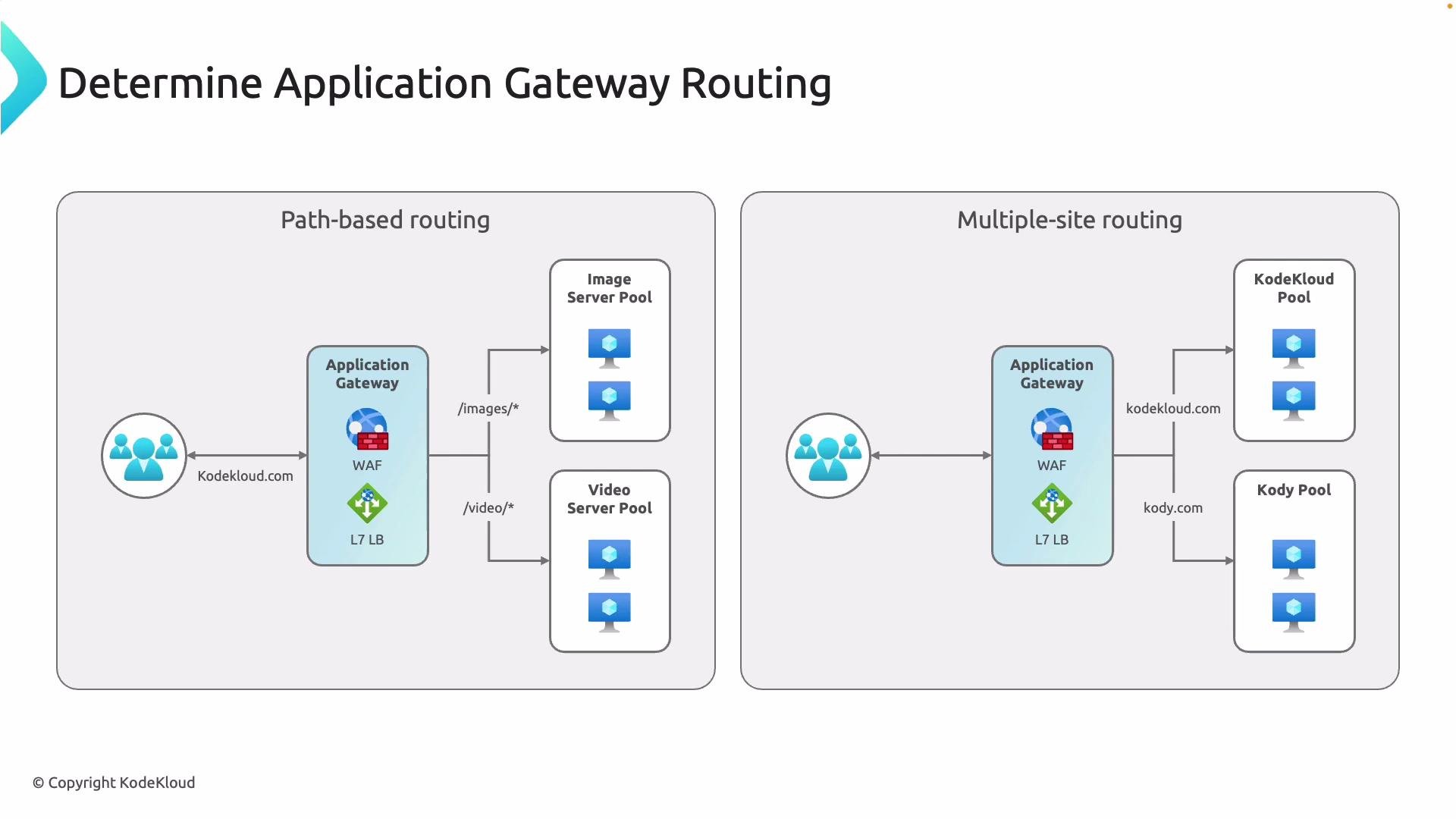
Path- and host-based routing let a single Application Gateway serve multiple sites or route different content types to specialized backend pools. For example, images and video streams can be routed to separate pools optimized for those workloads.
A technical diagram titled "Determine Application Gateway Routing" illustrating two routing scenarios: path-based routing (routing /images/* and /video/* to separate image and video server pools) and multiple-site routing (routing different hostnames like kodekloud.com and kody.com to separate server pools) through an Application Gateway with WAF and an L7 load balancer.
Common routing patterns
  • Path-based routing: Route requests based on URL path (for example, /images/* → image pool, /video/* → video pool).
  • Multi-site (host-based) routing: Route requests for different hostnames to separate backend pools using the Host header.
These application-aware capabilities go beyond DNS or Layer 4 routing and let you centralize management for complex web architectures while optimizing performance and security.

Choosing the right SKU

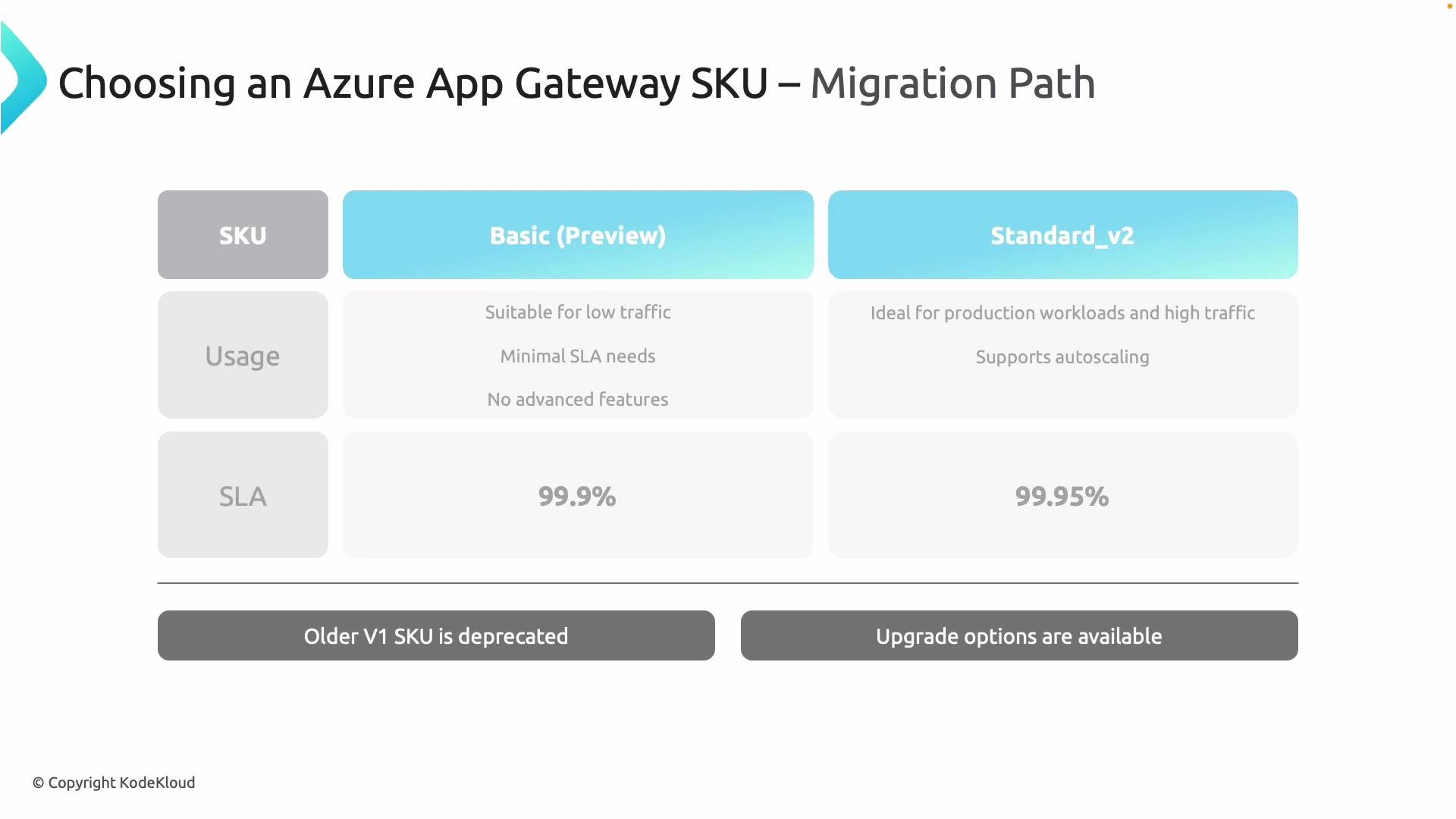
Selecting the correct Application Gateway SKU is critical for availability, performance and feature requirements. Azure provides several SKUs; the most relevant today are Basic, Standard_v2 and WAF_v2. Standard_v1 and WAF_v1 are legacy SKUs and should be migrated to v2 where possible.
SKUBest forKey features
BasicSmall/test workloadsLower capacity, limited features, lower SLA
Standard_v2Production web appsAutoscaling, zone redundancy, higher SLA, performance improvements
WAF_v2Production with security needsAll Standard_v2 features + managed WAF for application protection
Standard_v2/WAF_v2 advantages:
  • Autoscaling to handle variable traffic
  • Zone redundancy for higher availability
  • Higher SLA (varies by SKU/version)
  • Better integration and performance vs. v1 SKUs
If you use a third‑party firewall (for example, Palo Alto Networks or FortiGate), you can place it in front of, or instead of, the integrated WAF and still use Standard_v2 for Application Gateway features.
A presentation slide comparing Azure Application Gateway SKUs, showing Basic (Preview) vs Standard_v2 with usage guidance and SLA numbers (99.9% vs 99.95%). The slide also lists common features like cookie-based affinity, path-based routing, and public/private IP.
Capacity planning tips
  • Estimate connection counts and throughput for your workloads — Standard_v2 supports significantly higher limits than Basic.
  • Review regional quota limits and performance guidance in the Azure documentation to size correctly.
  • Consider session affinity and cookie settings if backend stateful sessions are required.

Deployment building blocks and request flow

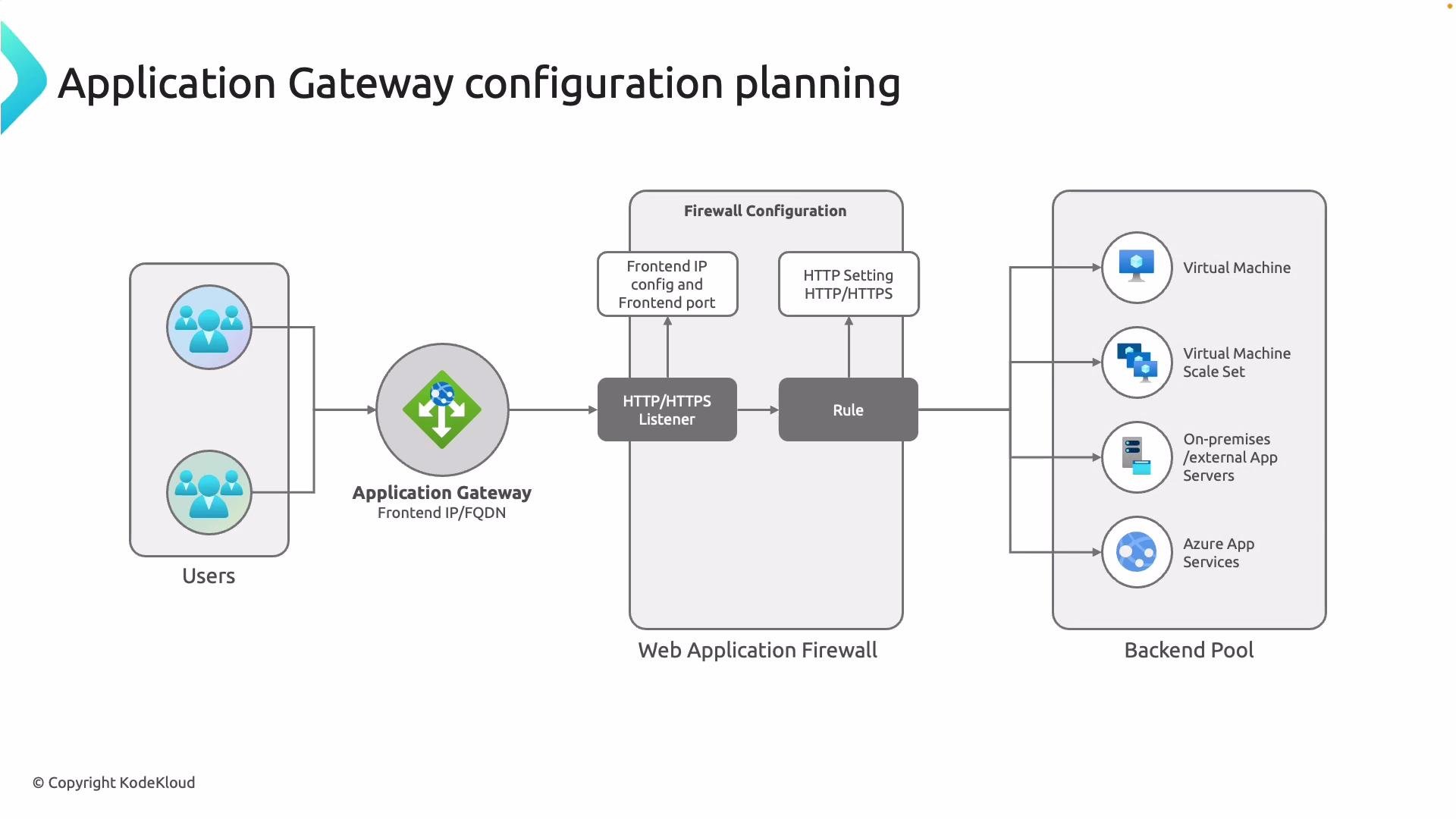
When you deploy an Application Gateway, configure these building blocks in sequence to ensure correct routing and security:
  1. Frontend IP
    • Choose public (internet-facing) or private (internal) frontend depending on access requirements.
  2. Listener
    • Define protocol (HTTP/HTTPS), port and attach SSL certificates for HTTPS.
  3. Rule
    • Connects listener → backend pool + HTTP settings. Choose basic, path-based or multi-site rules.
  4. HTTP settings
    • Set backend protocol/port, override host headers if needed, and configure cookie-based affinity.
  5. Backend pool
    • Add targets: Virtual Machines, VM Scale Sets, Azure App Services (by FQDN), or on‑premises servers (via VPN or ExpressRoute).
  6. Web Application Firewall (optional)
    • Enable WAF_v2 for managed rule sets and advanced protection.
Just like a load balancer maps frontends to backends with rules, Application Gateway rules provide fine-grained, application-aware routing and allow you to centralize SSL, security and advanced routing logic.
A network diagram titled "Application Gateway configuration planning" showing users connecting to an Application Gateway (frontend IP/FQDN) that passes through a Web Application Firewall with an HTTP/HTTPS listener and rule. The traffic is routed to a backend pool containing Virtual Machines, a VM Scale Set, on‑prem/external app servers, and Azure App Services.
Choose the SKU that matches your availability and security needs. Use Standard_v2/WAF_v2 for production workloads to get autoscaling, zone redundancy and managed WAF. If using a third‑party firewall (for example, Palo Alto Networks or FortiGate), design placement so traffic flows through the firewall and Application Gateway in the correct order.

Summary

Azure Application Gateway is the Layer 7 entry point for web apps that provides:
  • Application-aware routing (path- and host-based)
  • SSL offload and certificate management
  • Cookie-based session affinity
  • Integration with a managed WAF (WAF_v2 recommended)
  • Autoscaling and zone redundancy with Standard_v2/WAF_v2
By configuring frontend IPs, listeners, rules, HTTP settings and backend pools, you can centralize routing, security and scalability for multiple sites and workloads behind a single gateway.