When you create the gateway subnet, name it exactly
GatewaySubnet. Allocate enough IP addresses (a /27 or larger is commonly recommended) so the gateway can scale. Do not place any other resources in that subnet.VPN connectivity patterns
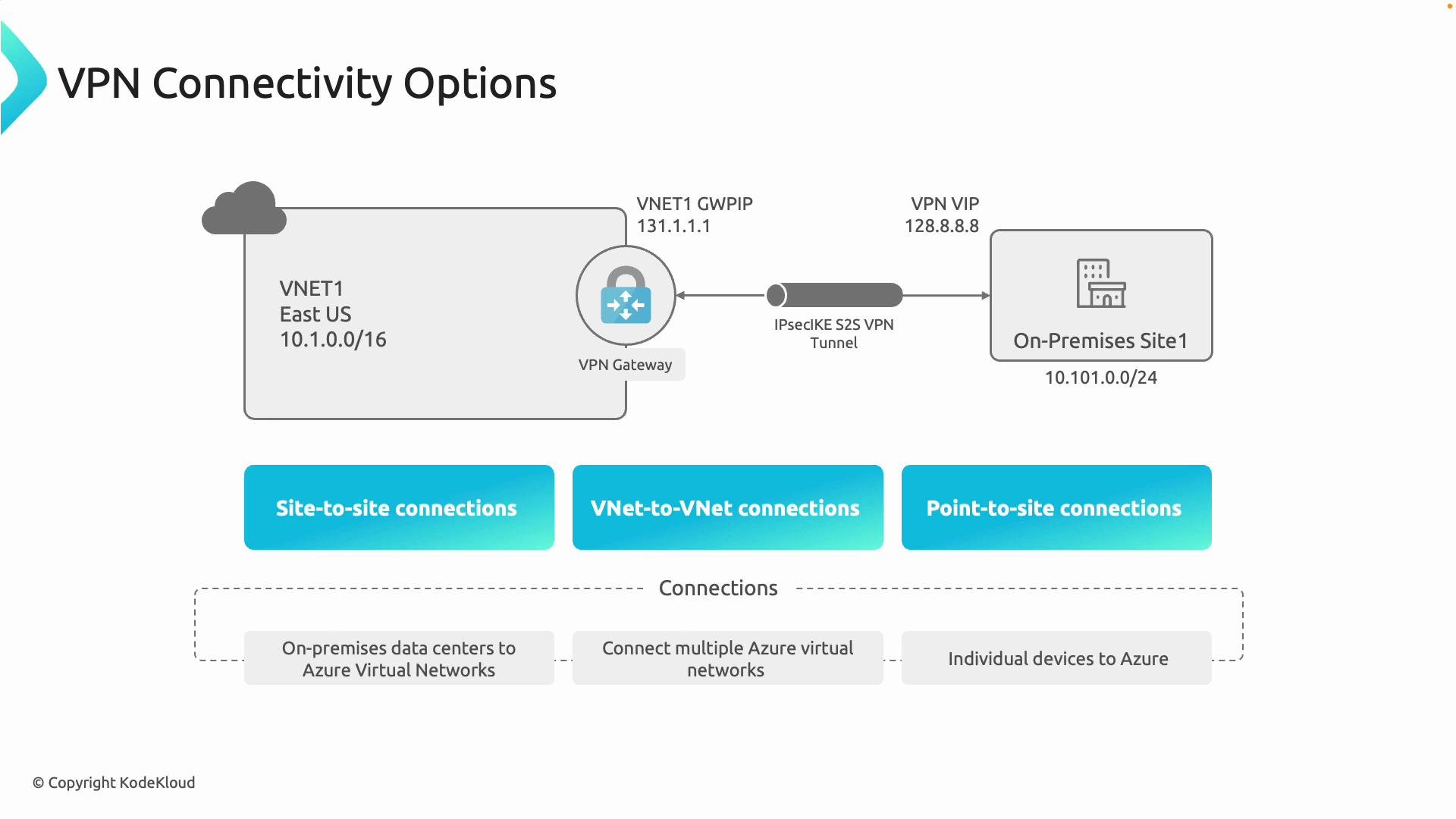
Azure VPN Gateway supports three primary connectivity patterns. Use the table below to quickly match a pattern to its best business scenario.| Connectivity Pattern | What it does | Typical use case |
|---|---|---|
| Site-to-site (S2S) | IPsec/IKE tunnel between an on-premises network and an Azure VNet | Always-on connectivity for an office, branch, or datacenter |
| VNet-to-VNet | Encrypted tunnel between two Azure VNets via VPN Gateway | Connect isolated VNets across subscriptions, tenants, or regions (when peering isn’t suitable) |
| Point-to-site (P2S) | Individual client devices connect securely over the internet to Azure resources | Remote workers or contractors needing secure access from laptops or mobile devices |
- Site-to-site (S2S): Connects an entire on-premises network (for example, an office or datacenter) to an Azure VNet over an IPsec/IKE VPN tunnel. Best for always-on site-level connectivity.
- VNet-to-VNet: Uses the VPN Gateway to connect one Azure virtual network to another. Use this when you need encryption for transit, when crossing subscription or tenant boundaries, or when requiring features such as BGP or route-based tunnels.
- Point-to-site (P2S): Enables individual devices to connect securely to Azure resources over the internet using client-based VPNs (IKEv2, OpenVPN, or SSTP depending on configuration).

- VNet peering is usually preferred for low-latency, high-throughput networking inside Azure because it creates direct connectivity without a gateway.
- Use VPN Gateway (VNet-to-VNet) when you require encryption for the traffic, when peering is not possible (cross-tenant or cross-cloud), or when gateway-specific features (BGP, forced tunneling, route-based tunnels, or cross-region gateway transit) are required.
- Use site-to-site to link multiple branch offices (for example, Boston, New York, Texas) to their VNets in Azure.
- Use point-to-site for individual remote developers or contractors who need secure access.
- Use VNet-to-VNet via VPN Gateway when peering cannot meet cross-subscription, cross-tenant, or encryption requirements.
Choosing SKU and generation
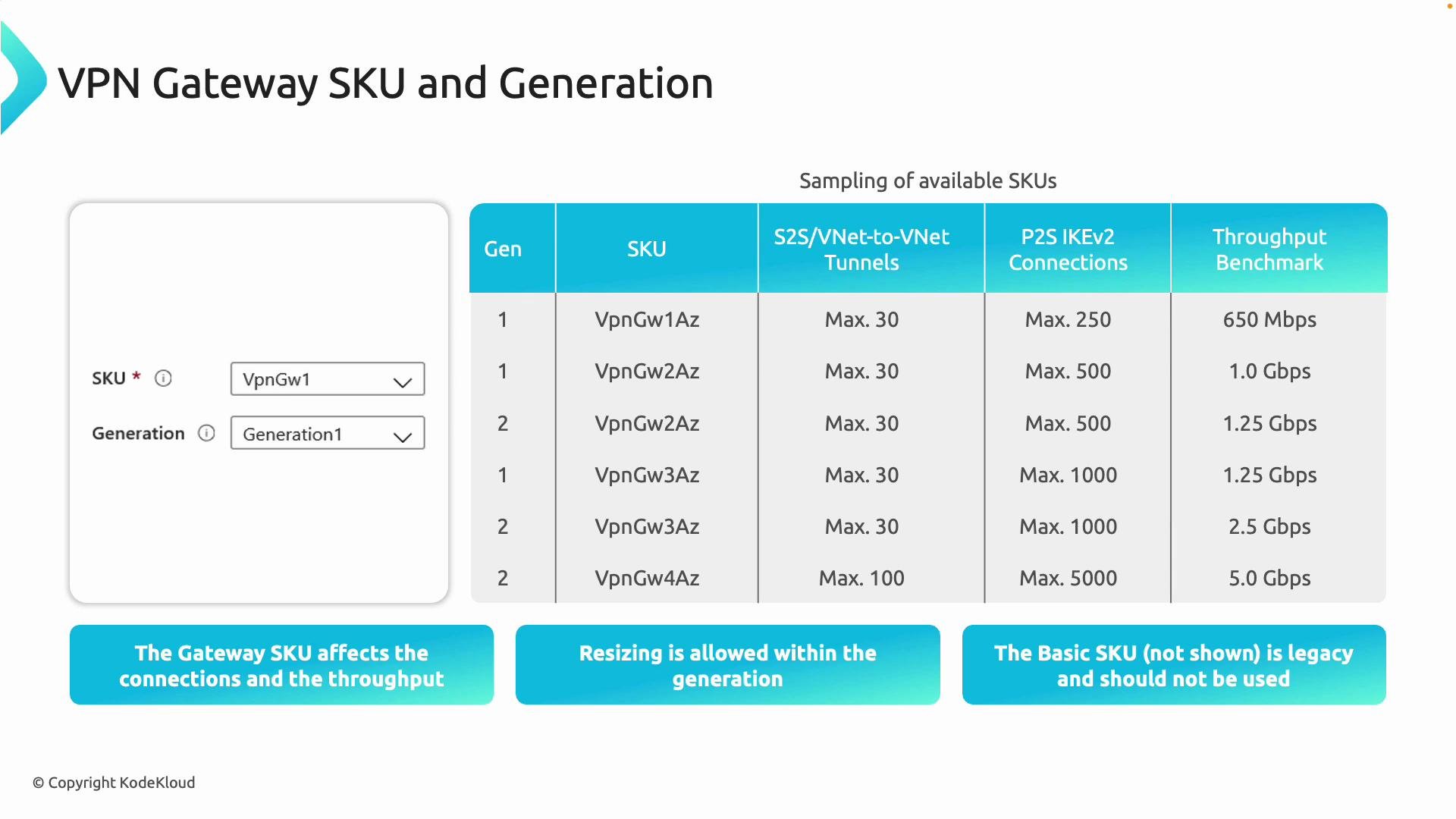
When deploying a VPN Gateway, pick the right SKU and generation to match your performance, scale, and feature requirements. Generation 2 SKUs generally offer higher throughput and larger connection limits than Generation 1 SKUs. Consider the following factors when choosing a SKU:- Number of site-to-site tunnels and VNet-to-VNet connections required.
- Point-to-site client count and client protocol (IKEv2, OpenVPN).
- Aggregate throughput and expected sustained bandwidth.
- Required gateway features: BGP support, active-active, zone-redundancy, and forced tunneling.
| Selection factor | Guidance |
|---|---|
| Throughput & scale | Prefer higher VpnGw SKUs (VpnGw1/2/3 or higher) or Generation 2 for more tunnels and throughput |
| Features | Use non-Basic SKUs for BGP, route-based VPNs, active-active and cross-region features |
| Future growth | Choose a SKU that supports resizing paths to scale up within the same generation (validate supported resize operations) |
| Legacy constraints | Avoid Basic SKU for new deployments — it lacks modern features and performance |

- Generation 2 SKUs typically provide higher throughput and greater connection limits than Generation 1.
- You can usually resize a gateway to another SKU within the same generation to increase capacity — verify supported resize paths in the official Azure documentation before making changes.
- Avoid deploying the Basic SKU for new workloads; it is considered legacy and does not include many modern features.
Do not use the Basic VPN Gateway SKU for new deployments. It has limited features, lower throughput, and is considered legacy.
Quick checklist for design
- Create
GatewaySubnetand size it (recommended /27 or larger). Do not deploy any other resources into that subnet. - Choose connectivity patterns (S2S, VNet-to-VNet, P2S) according to business needs.
- Select SKU and generation based on throughput, tunnel count, and required features (BGP, active-active, redundancy).
- Validate resize paths and migration steps if you expect to scale the gateway later.
- Review security and routing (forced tunneling, NSG considerations, BGP route advertisements) as part of the overall network design.
Links and references
- Azure VPN Gateway documentation
- Azure Virtual Network overview
- Designing and implementing Azure networking solutions (AZ-700)
GatewaySubnet), which connectivity patterns meet your requirements (S2S, VNet-to-VNet, P2S), and how SKU and generation choices affect scale and throughput, you can design a secure, scalable VPN solution for your Azure environment.