

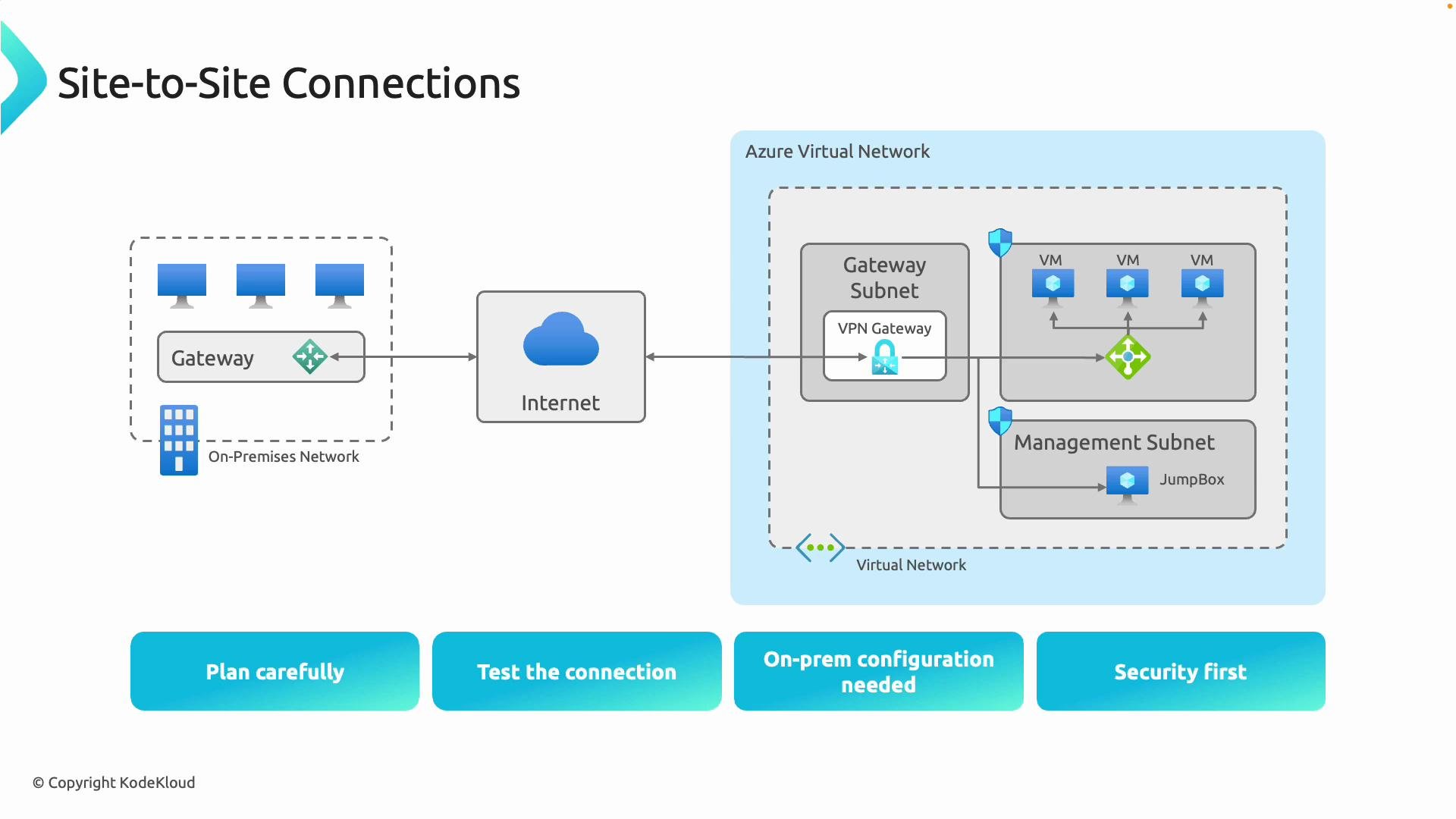
Planning checklist
Plan before you deploy—addressing addressing, capacity, and compliance up front avoids downtime and rework.Plan address space and gateway SKU before deployment. Overlapping address ranges will prevent proper routing, and choosing the correct gateway SKU ensures the required bandwidth and features.
Security considerations
- Prefer certificate-based authentication where supported; certificates provide stronger authentication than pre-shared keys (PSKs).
- If PSKs are used, ensure they are high-entropy and rotated regularly.
- Use modern encryption and integrity algorithms for IKE/IPsec and prefer IKEv2 when supported by both endpoints.
- Apply strict access control, logging, and monitoring on both the Azure and on-premises sides.
- Validate device compatibility—consult vendor documentation for supported configurations.
Do not reuse weak PSKs. If using PSKs, ensure they are complex and rotated according to your security policies. Consider certificate-based authentication for higher security where possible.
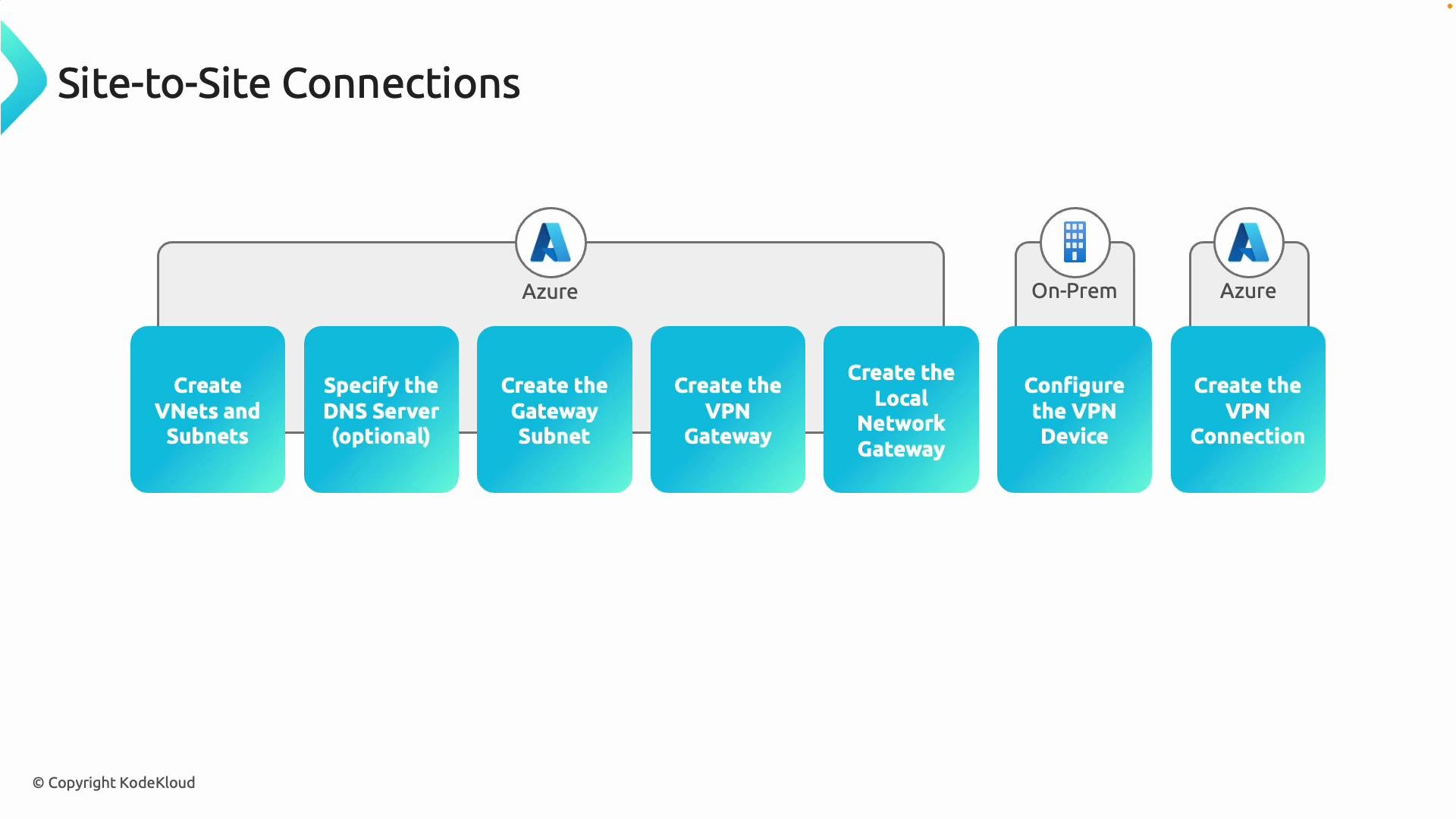
High-level setup steps
- Create the Azure Virtual Network(s) and subnets.
- Reserve a subnet named exactly
GatewaySubnet. Microsoft recommends a size of/27or larger to allow for gateway instances. - Optionally configure custom DNS servers or forwarding for resources inside the VNet.
- Reserve a subnet named exactly
- Deploy the Azure VPN gateway into the
GatewaySubnet.- Choose gateway type
Vpnand VPN typeRouteBased(recommended for BGP support and most modern scenarios). UsePolicyBasedonly for specific legacy scenarios. - Select an appropriate SKU (throughput, SLA, and feature set).
- Choose gateway type
- Create a Local Network Gateway in Azure.
- The Local Network Gateway stores the on-premises VPN device public IP (or FQDN) and the on-premises address prefixes that Azure should route to.
- Configure your on-premises VPN device.
- Configure the on-premises device with the Azure VPN gateway public IP or FQDN, the same PSK or certificate settings, and advertise/allow the on-premises prefixes.
- Create the site-to-site VPN connection in Azure to link the VPN gateway and the Local Network Gateway.
- Validate connectivity and routing end-to-end.
- Verify tunnel(s) are established, routes are propagated, and firewalls/NSGs permit the desired traffic.
About the Local Network Gateway
- The Local Network Gateway is an Azure resource that represents your on-premises network and VPN device. It stores:
- The on-premises public IP address of the VPN device.
- The on-premises address prefixes that Azure should route to that device.
- Example: if your on-premises VPN device public IP is
33.2.1.5, create a Local Network Gateway and set its gateway IP address to33.2.1.5and add the on-premises address ranges to be reachable from Azure (for example:10.0.0.0/16). - For multiple branch offices or data centers, create multiple Local Network Gateways and individual site-to-site connections from the Azure VPN gateway to each location.
Putting it together
- Create the
GatewaySubnetand deploy the Azure VPN gateway into that subnet. - Create the Local Network Gateway resource(s) that point to your on-premises public IP(s) and include the on-premises prefixes.
- Configure the on-premises VPN device to point to the Azure VPN gateway public IP (or FQDN), and configure matching PSK or certificate settings.
- Create the site-to-site connection resource in Azure to link the VPN gateway and Local Network Gateway.
- When parameters match on both sides, the IPsec/IKE tunnel should establish and traffic will route between on-premises address ranges and Azure VNets.
Verification checklist
References and further reading
- Azure VPN gateway documentation: https://learn.microsoft.com/en-us/azure/vpn-gateway/
- Azure VPN device configuration guide: https://learn.microsoft.com/en-us/azure/vpn-gateway/vpn-gateway-about-vpn-devices
GatewaySubnet, VPN gateway, Local Network Gateway), and the step-by-step sequence to establish a site-to-site VPN. For device-specific configuration examples and the latest SKU/performance information, refer to the Azure VPN gateway documentation and your device vendor guides.