

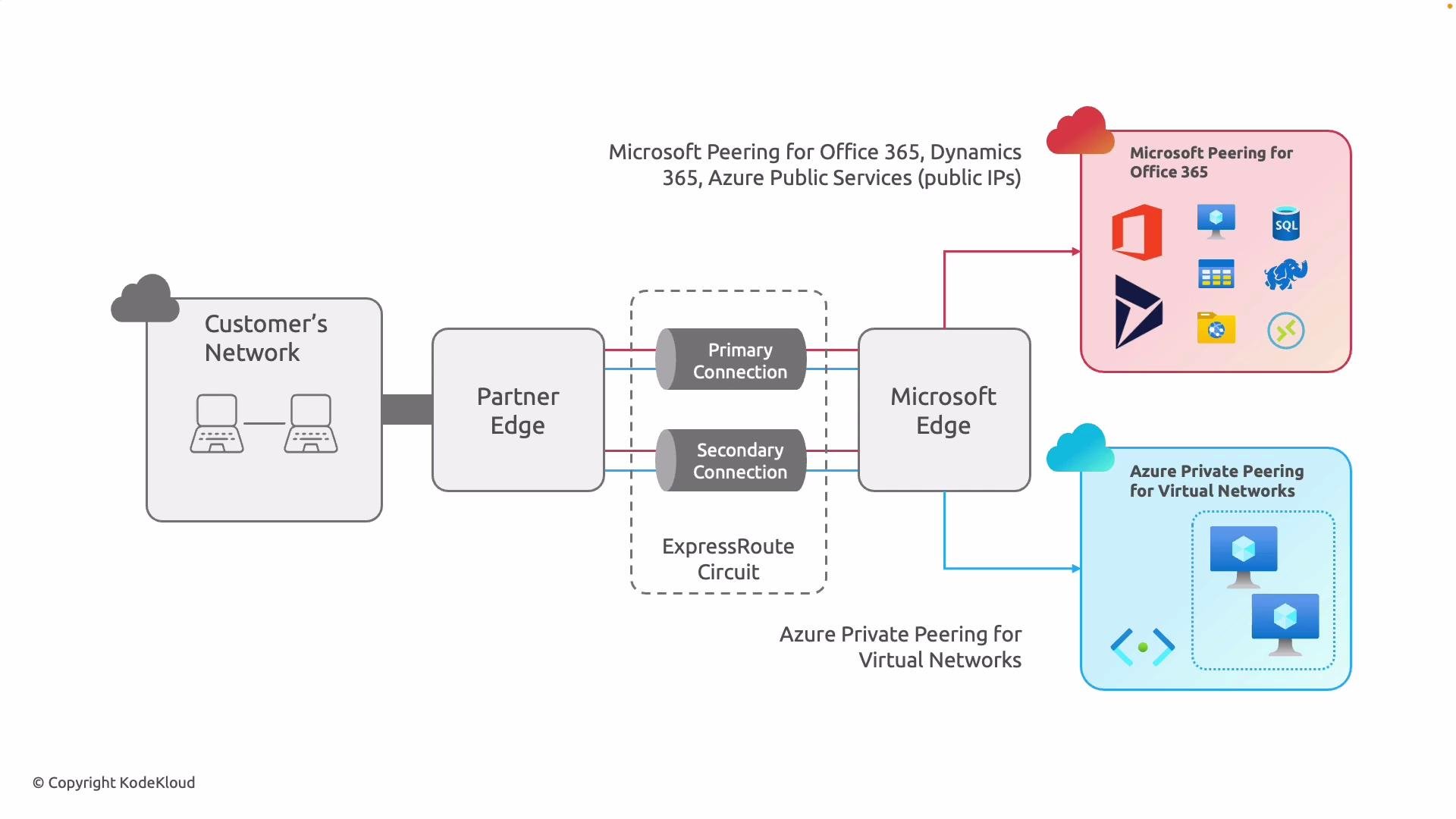
- Blue layer (Private Peering): Infrastructure-level connectivity for your custom workloads and internal services.
- Red layer (Microsoft Peering): Private access to Microsoft-managed SaaS and PaaS services, using Microsoft public IP prefixes.
- If you only need to extend your private network into Azure for hybrid apps, DR, or lift-and-shift, private peering alone may be sufficient.
- If your users or apps rely heavily on Microsoft SaaS (Microsoft 365, Dynamics 365) and you want to bypass the public Internet, enable Microsoft peering.
- If you need both private IP access to VNets and private access to Microsoft public services, enable both peerings on the same circuit.
- Each peering uses separate BGP sessions and route advertisement policies; configure route filters and prefix filters on Microsoft peering to control which Microsoft public prefixes you receive and advertise.
- Consider security, compliance, and latency requirements when selecting peerings.
Best practices and operational notes:
- Manage each peering independently: they have separate BGP sessions, prefixes, and routing policies. This provides granular routing control and easier troubleshooting.
- Use route filters on Microsoft peering to avoid receiving unnecessary Microsoft public prefixes and to limit advertised prefixes.
- Test routing and failover behavior in a staging environment before deploying to production.
- Monitor ExpressRoute circuit health and performance with Azure monitoring tools and service provider telemetry.
Align your peering choices with your application topology, security posture, and compliance requirements. For many organizations, the recommended approach is to enable both peerings so internal infrastructure and Microsoft SaaS traffic each follow the most appropriate, private path.
- Private peering = Azure VNets, private IP addressing, infrastructure-level connectivity.
- Microsoft peering = Microsoft public services (SaaS/PaaS) reachable over ExpressRoute using Microsoft public IP prefixes.
- Choose peerings based on which services you need to reach privately, routing control needs, and performance/compliance goals.
- Azure ExpressRoute overview: https://learn.microsoft.com/azure/expressroute/
- ExpressRoute peering and routing: https://learn.microsoft.com/azure/expressroute/expressroute-peering
- Microsoft 365 network connectivity guidance: https://learn.microsoft.com/microsoft-365/enterprise/office-365-ip-addresses-and-endpoints