Concept and analogy
- Hub: A central VNet that hosts shared, centrally managed services such as VPN/ExpressRoute gateways, firewalls (Azure Firewall or NVAs), DNS, and other common infrastructure. Think of the hub as an international airport terminal where all inbound and outbound traffic is processed and inspected.
- Spokes: Individual VNets for workloads (production, test, dev, team environments). Spokes peer with the hub to consume shared services. By default, spokes do not peer directly with each other unless explicitly configured.
- Simplifies security and policy enforcement.
- Reduces duplication of expensive appliances (gateways, firewalls) per spoke.
- Provides a single point for monitoring, logging, and egress control.
Gateway transit (shared gateway) and peering
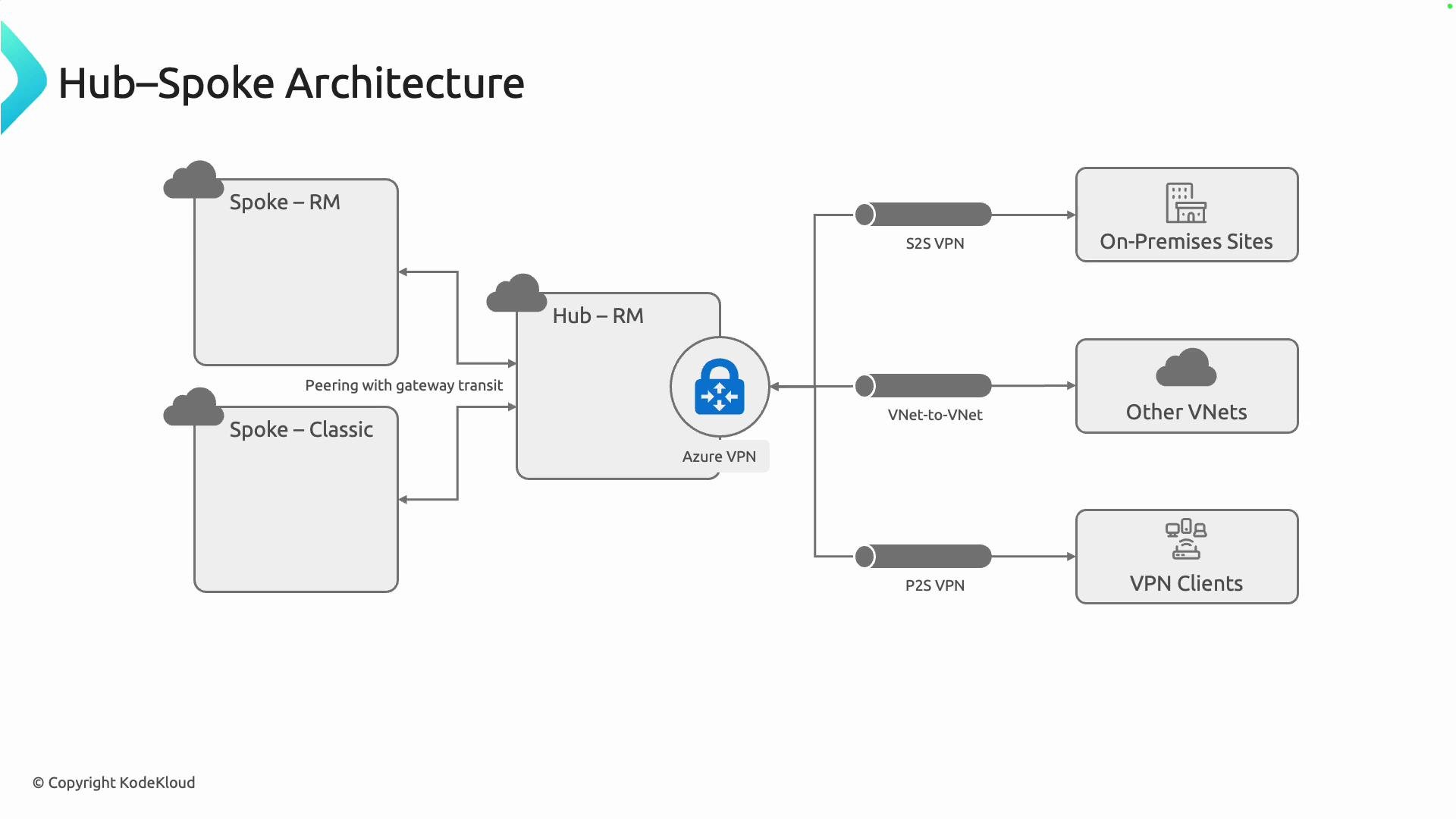
- Hub-to-spoke connectivity is typically implemented with VNet peering, which uses the Azure backbone to provide high-bandwidth, low-latency private links.
- When spokes must use the hub’s gateway for outbound connectivity (to on-premises or the Internet), enable gateway transit:
- Set
AllowGatewayTransiton the hub side of the peering. - Set
UseRemoteGatewayson each spoke peering.
- Set
- Enabling gateway transit lets spokes share a single VPN or ExpressRoute gateway in the hub instead of deploying individual gateway appliances in every spoke.
To use the hub VPN/ExpressRoute gateway from spoke VNets, set
AllowGatewayTransit on the hub peering and UseRemoteGateways on each spoke peering. This is required for gateway transit to work.Connections and centralisation
The hub commonly provides centralised connectivity to:- On-premises datacenters via VPN or ExpressRoute.
- Other Azure VNets (including hub-to-hub or partner VNets).
- Remote VPN clients for administrative or user access.
- Creates a single place to apply NSGs, Azure Firewall rules, routing, monitoring, and diagnostics.
- Avoids deploying and managing duplicate gateway appliances and firewalls for each spoke.
One gateway only
In most hub-spoke designs, a single central VPN/ExpressRoute gateway in the hub is sufficient. This mirrors the airport analogy: spokes leverage the hub’s international runway rather than building one each. Be aware that deploying or resizing a VPN gateway is an operational activity that can take significant time (often ~40–45 minutes depending on SKU and region). Plan gateway changes and automation accordingly to avoid unexpected delays.VNet peering vs VPN gateway — concise comparison
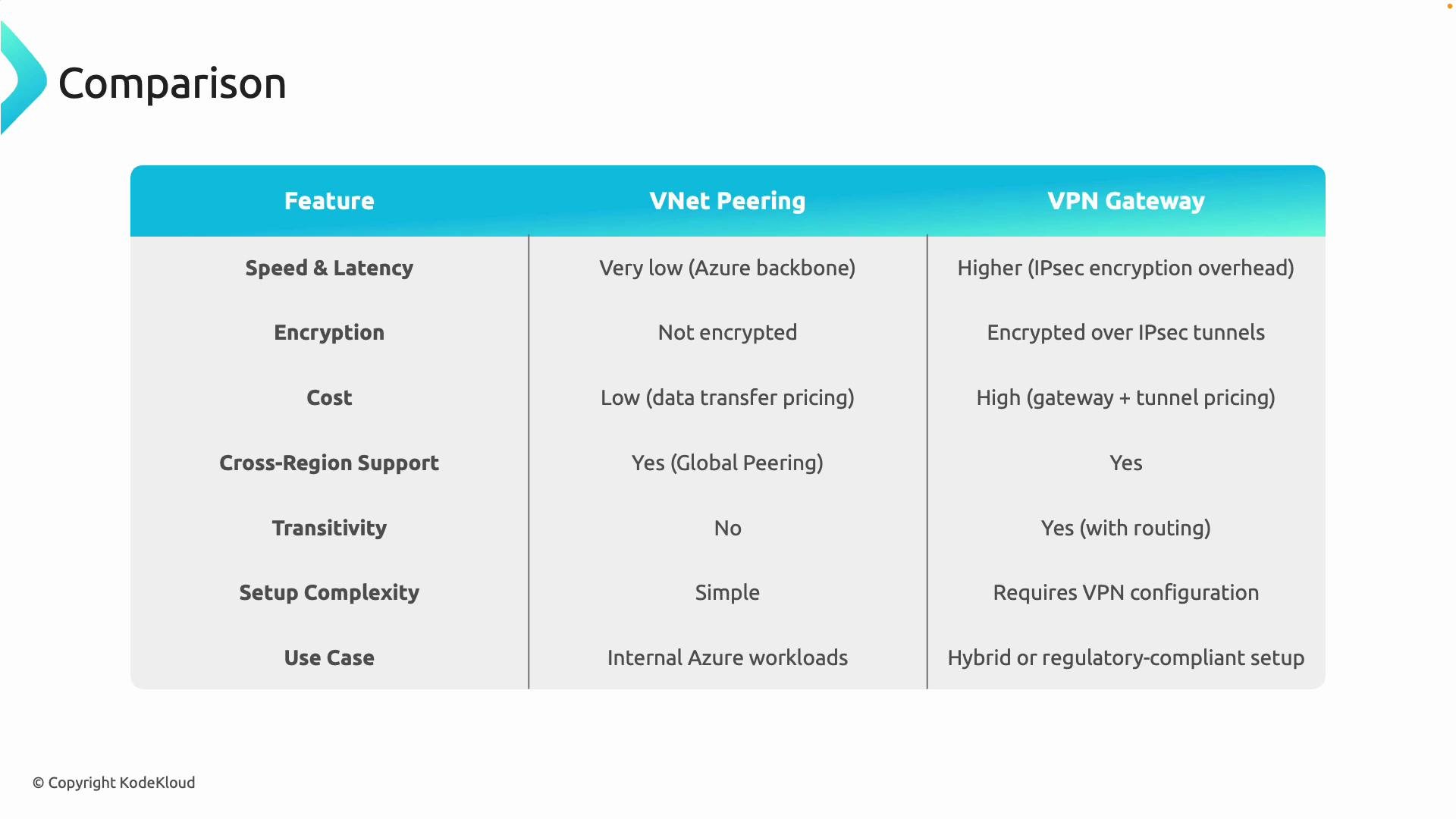
Choosing between VNet peering and VPN gateways depends on performance, encryption requirements, cost, and topology. The following table summarises the key differences and typical use cases.Operational guidance
- Topology: Use a star topology where each spoke peers directly with the hub. This keeps routing clear and centralises policy enforcement.
- Default: VNet peering is the recommended default for internal Azure connectivity due to cost and performance.
- Use a central hub gateway when you need:
- Encrypted tunnels to on-premises or third-party clouds,
- Regulatory compliance that requires encryption or dedicated inspection,
- Centralised egress and traffic inspection via a hub firewall or NVA.
- Hybrid approach: It’s common to peer all spokes to the hub for internal traffic while letting the hub provide centralized gateway transit for hybrid connectivity.
Quick checklist (implementation)
- Design hub VNet with sufficient address space for gateway and shared services.
- Peer each spoke to the hub; avoid full mesh peering between spokes unless required.
- If using gateway transit:
- Configure
AllowGatewayTransiton the hub peering. - Configure
UseRemoteGatewayson each spoke peering.
- Configure
- Centralise logging and monitoring in the hub (Network Watcher, NSG flow logs, Azure Firewall logs).
- Test routing and failover scenarios; account for gateway deployment and update times.
Summary
Hub-spoke architecture centralises shared network services in a hub VNet while keeping workload VNets isolated as spokes. It simplifies security, reduces cost and operational overhead, and scales well as your Azure footprint grows. Use VNet peering for high-performance internal Azure traffic; use VPN/ExpressRoute gateways when encrypted hybrid connectivity or centralised inspection is required.Links and references