

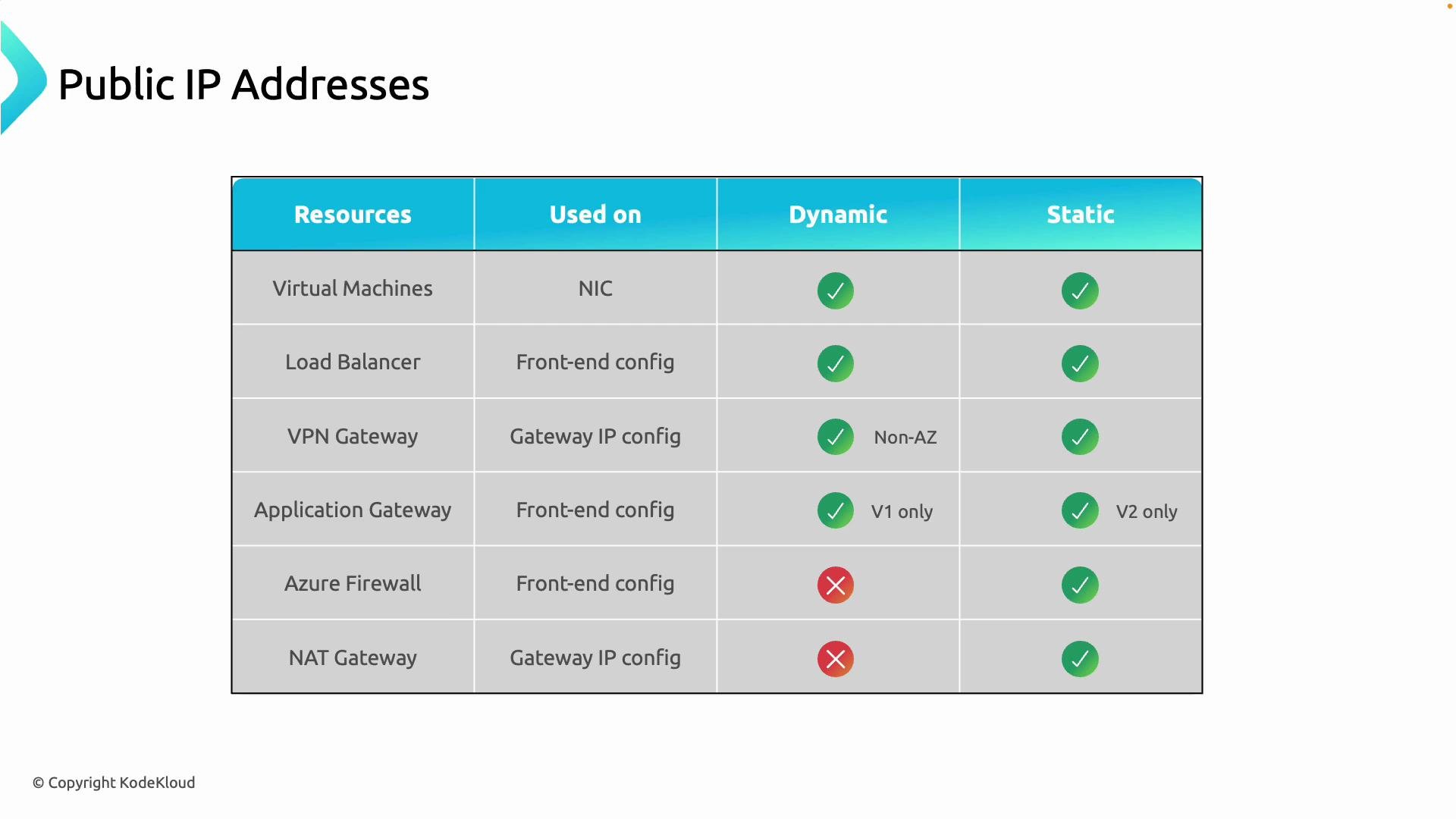
- Where do you assign the public IP?
- Can the resource use a dynamic or static public IP?
Quick reference table
Resource-by-resource details
Virtual Machines
- Where to assign: Attach the public IP to the VM’s NIC (network interface) IP configuration.
- Dynamic vs Static: Both are supported.
- Guidance: Prefer a static public IP when you need a stable address (for DNS records, allow-lists, or monitoring).
Load Balancer
- Where to assign: Assign the public IP to the load balancer frontend IP configuration.
- Dynamic vs Static: Both are supported depending on SKU and configuration. Standard SKU typically uses static addresses.
- Guidance: Use static public IPs for public-facing load balancers serving production traffic to avoid endpoint changes.
VPN Gateway
- Where to assign: Public IP attaches to the gateway’s IP configuration.
- Dynamic vs Static: Static public IPs are supported and recommended for predictable connectivity.
- Guidance: VPN gateways must have a reachable public IP so remote networks or on-premises sites can connect (site-to-site and point-to-site).
Application Gateway
- Where to assign: Attach the public IP to the Application Gateway frontend configuration (Application Gateway is a layer-7 load balancer).
- Dynamic vs Static:
- v1: typically used with dynamic public IPs.
- v2: supports static public IPs and is recommended for stable endpoints.
- Guidance: For publishing apps to the Internet with a stable endpoint, use Application Gateway v2 and a static public IP.
Azure Firewall
- Where to assign: Configure the firewall’s public IP on its frontend.
- Dynamic vs Static: Only static public IPs are supported.
- Guidance: Static public IPs ensure predictable source/destination addressing and consistent firewall rules and NAT behavior.
NAT Gateway
- Where to assign: Associate the NAT Gateway with one or more subnets to provide outbound internet connectivity for resources in those subnets.
- Dynamic vs Static: Dynamic public IPs are not supported. Use one or more static public IP addresses or a public IP prefix.
- Guidance: Use NAT Gateway for scalable and predictable outbound SNAT addressing.
Public IP SKUs: Standard vs Basic
Prefer the Standard SKU for new deployments: it provides static addressing, availability-zone support, and a more secure default posture.
Basic SKU is being retired. Avoid creating new Basic public IPs and plan migration of existing Basic public IPs to Standard before retirement.
Example: Create and attach a public IP to a VM (Azure CLI)
This example creates a Standard (static) public IP and attaches it to an existing NIC. Replace the placeholders with your resource names and resource group.- Create a Standard, static public IP:
- Attach the public IP to an existing NIC IP configuration (
ipconfig1is the default name; adjust if different):
- Verify the public IP is attached to the VM:
- To create a VM with a public IP in a single command, use
az vm createwith the--public-ip-addressparameter. - For Basic SKU and dynamic allocation, change
--skuand--allocation-methodrespectively (e.g.,--sku Basic --allocation-method Dynamic), but prefer Standard/Static for production.
Best practices and guidance
- Use static public IPs for production systems to prevent endpoint drift and simplify DNS and firewall rules.
- Use Standard SKU for security defaults and availability-zone support.
- Minimize exposure: only assign public IPs when necessary. Use internal load balancers, VPN/ExpressRoute, Application Gateway, or Azure Firewall to reduce direct public exposure.
- For outbound predictability, use NAT Gateway with static public IPs or a public IP prefix.
- Automate resource creation and IP assignment using ARM templates, Bicep, or Terraform to ensure consistency across environments.
Further reading and references
- Azure Public IP address documentation
- Azure Load Balancer documentation
- Azure Application Gateway documentation
- Azure Firewall documentation
- NAT Gateway overview
- Assign public IPs where the resource expects them (NICs, frontend configs, gateway IP configs, firewall frontends, NAT Gateway associations).
- Prefer static addresses and the Standard SKU for production deployments to ensure predictable, secure endpoints.