

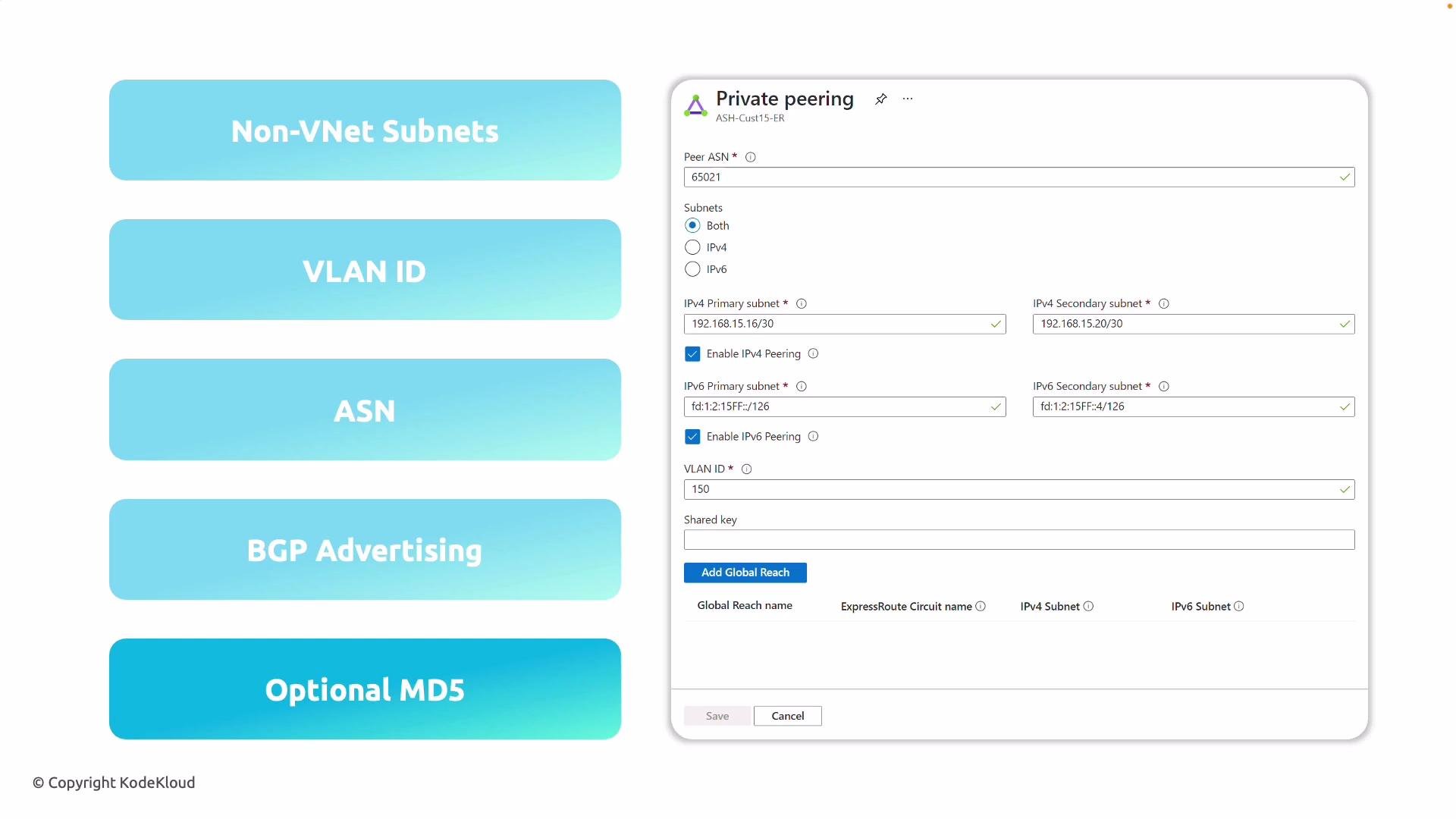
Detailed explanation of each configuration item
-
Primary and secondary /30 subnets
- Azure requires two distinct
/30point-to-point ranges: one for the primary BGP session and one for the secondary session. Each/30contains exactly two usable addresses—one assigned to your on-prem router and the other to Microsoft’s edge router. Plan these subnets so they do not overlap any VNet or on-premises networks you will advertise.
- Azure requires two distinct
-
VLAN ID
- The VLAN ID is the 802.1Q tag used on the Layer 2 segment between your edge router and Microsoft’s edge. Ensure the VLAN ID entered in the portal is the same VLAN configured on your physical or virtual on-prem interface and matches the connectivity provider’s configuration (when applicable).
-
ASN (Autonomous System Number)
- Enter the ASN that will identify your network in BGP. This can be your organization’s ASN or one provided by your connectivity provider. The ASN is used in path selection and BGP session establishment with Microsoft’s ASN.
-
BGP peer IP addresses
- The portal expects the IP addresses drawn from the
/30subnets you defined. After you save the private peering configuration, configure those same IP addresses on your on-premises router interfaces so the BGP neighbor relationships can form.
- The portal expects the IP addresses drawn from the
-
Route advertisement (BGP settings)
- Configure which on-premises prefixes are advertised to Azure via ExpressRoute. Correct route advertisement ensures Azure VNets can reach your on-prem networks and allows your on-premises routers to learn Azure VNet prefixes. Verify route filtering and summarize carefully to avoid leaking unintended networks.
-
MD5 hash for the BGP session (optional)
- BGP MD5 adds an authentication layer for the BGP session. While optional, MD5 is recommended where possible to safeguard against unauthorized peers and accidental route injection. If you enable MD5, configure the same string on both the portal and your on-premises devices.
-
Global Reach (optional)
- If you operate multiple on-premises sites and want to connect them via Microsoft’s network (rather than sending traffic over the public Internet or private direct links), consider enabling ExpressRoute Global Reach. Global Reach allows traffic between your sites to transit the Microsoft backbone when multiple ExpressRoute circuits are present and enabled for Global Reach.
- Open your ExpressRoute circuit in the Azure portal and select the Private peering tab.
- Enter the Primary and Secondary
/30subnets for BGP peering. - Specify the VLAN ID that will be used on the Layer 2 link.
- Enter your ASN (or the provider’s ASN if applicable).
- Input the BGP peer IP addresses (from each
/30). - Configure route advertisement settings and any prefix filters required.
- (Optional) Enable MD5 authentication and enter the MD5 string.
- (Optional) Enable Global Reach if you need Microsoft backbone connectivity between on-prem sites.
- Save the configuration and coordinate with your on-prem team or provider to configure the same values on your equipment.
- Verify the chosen
/30subnets do not overlap any VNet or on-prem address space to be advertised. - Confirm the VLAN ID and peer IPs exactly match your on-premises configuration.
- Coordinate and confirm the ASN with your provider or routing team.
- Decide whether to enable BGP MD5 authentication for additional session security.
- If connecting multiple sites, evaluate ExpressRoute Global Reach and follow Azure guidance for multi-circuit configurations.
Make sure the configuration you enter in the Azure portal is mirrored exactly on your on-premises routers (VLAN, peer IPs, ASN, BGP timers, and optional MD5) so the BGP sessions can establish and routes are exchanged correctly.