

DevOps Pipeline at a Glance
1. Continuous Integration (CI)
When Jenkins detects a push to a feature branch, it executes the following pipeline. Any failure halts progress early, ensuring only high-quality code advances.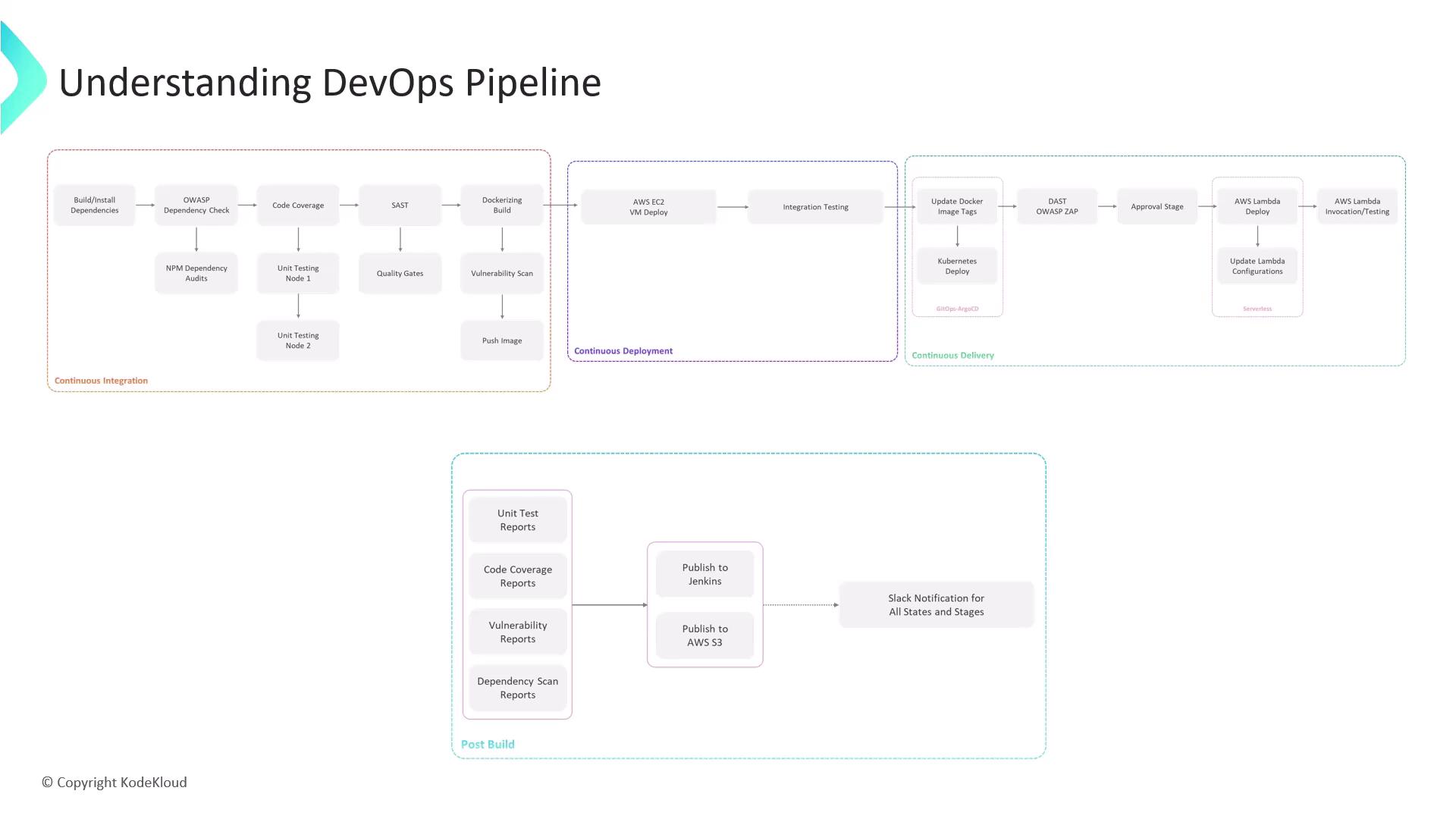
1.1 Install Dependencies
Install Node.js project packages:1.2 Dependency Vulnerability Checks
Scan for known vulnerabilities:1.3 Unit Tests & Coverage
Run unit tests and generate coverage reports:1.4 Static Code Analysis
Analyze code quality with SonarCloud and enforce a quality gate.If the SonarCloud quality gate fails, the Jenkins build is marked as failed. Address all blockers before proceeding.
1.5 Containerization
Package the application into a Docker image:1.6 Image Vulnerability Scan
Use Snyk to scan the container:1.7 Push to Container Registry
On success, push the image to your registry (e.g., Docker Hub or AWS ECR):2. Continuous Deployment (CD)
Once the image is available in the registry, deploy and test on AWS EC2.-
Deploy the Docker container on an EC2 instance:
- Execute integration tests to validate endpoints.
-
Create a pull request (PR) from your feature branch to
main—this triggers the continuous delivery pipeline.
3. Continuous Delivery
A GitOps-driven rollout ensures your changes propagate safely to production-like environments.- Update Kubernetes manifests with the new image tag.
- Let Argo CD sync the cluster automatically.
- Run Dynamic Application Security Testing (DAST) using OWASP ZAP.
- Peer review and merge the PR.
- A manual approval step in Jenkins authorizes the final deployment.
A designated approver must review security and compliance reports before deploying to production.
- Deploy updated Lambda functions:
- Verify the Lambda endpoints:
4. Post-Build
After deployments complete, gather and publish artifacts:- Archive test results, coverage, and vulnerability reports in Jenkins.
-
Upload to Amazon S3 for audit and compliance:
- Notify your team via Slack webhook.
This pipeline showcases Jenkins’ flexibility across EC2, Kubernetes, and Lambda environments, integrating security, testing, and delivery best practices from code commit to production.
Links and References
- Jenkins Documentation
- Docker Official
- AWS CLI Reference
- OWASP Dependency-Check
- SonarCloud
- Snyk
- Argo CD
- OWASP ZAP