

- Co-located containers (multiple regular containers)
- initContainers (ordered initialization)
- Sidecar containers (support and augmentation)
1) Co-located containers
Co-located containers are simply multiple regular containers declared underspec.containers. They all share the same Pod lifecycle and resources (network namespace, volumes), but Kubernetes does not guarantee the startup order for these containers. Use co-located containers when multiple processes must run together but do not require strict ordering.
When to use:
- Multiple cooperating services that can start and run independently.
- Lightweight helper processes that do not require a guaranteed ordering with the main app.
- Regular containers start independently; readiness of each may vary.
- Use
readinessProbe/livenessProbeon each container to manage traffic and restarts. - For lifecycle coordination, consider using initContainers, readiness checks, or in-app wait logic.
2) initContainers
initContainers are special containers that run sequentially and to completion before any regular containers in spec.containers are started. Each initContainer must exit successfully before the next initContainer or the main container(s) start. This provides a simple and robust way to enforce startup ordering and perform one-time setup tasks.
Common uses:
- Waiting for an external dependency (database, API).
- Performing schema migrations or seeding data.
- Creating files, config, or permissions that main containers depend on.
initContainers that run sequentially, then the main app starts:
initContainersrun in order and must succeed for the Pod to progress.- If an
initContainerfails, kubelet will retry it according to the Pod’srestartPolicy(Pod-level). - Use shared volumes to pass initialization output (files/config) to the main containers.
3) Sidecar containers
Sidecar containers are regular containers that run alongside your main application in the same Pod and provide auxiliary functionality such as log shipping, reverse-proxying, metrics scraping, or configuration refreshing. Because sidecars are just regular containers, Kubernetes does not natively enforce that a sidecar is ready before the main container — you must design coordination if ordering matters. Typical use cases:- Log shippers (Filebeat, Fluentd)
- Proxies or network agents (Envoy)
- Configuration or cert refreshers
- Local caches or data prefetchers
- If the sidecar must be available before the main app, enforce this via:
- Application-level wait logic (main app polls sidecar readiness endpoint),
readinessProbechecks and readiness gates (note: readiness gates require an external controller/mechanism),- Or use an
initContainerto perform setup required by both.
- You cannot set
restartPolicyper container;restartPolicyis a Pod-level field. Design expectations for individual containers accordingly. - To avoid losing termination logs, design a shutdown coordination mechanism so the sidecar can flush buffered logs after the main app exits. Use
preStophooks, shared volumes, signal handling, andterminationGracePeriodSeconds.
restartPolicy applies to the entire Pod, not individual containers. Containers are restarted by the kubelet according to the Pod restartPolicy. Do not assume per-container restart behavior can be configured via each container spec.Kubernetes guarantees sequential execution only for
initContainers. For regular containers (including sidecars), implement explicit coordination (readiness probes, initContainers, shared signals) when startup or shutdown ordering matters.Realistic example: logging pipeline with a Filebeat sidecar
A common sidecar use case is log shipping. In this pattern, the application writes logs to a shared volume or the container filesystem; a Filebeat sidecar reads those logs and ships them to Elasticsearch, which can be visualized via Kibana.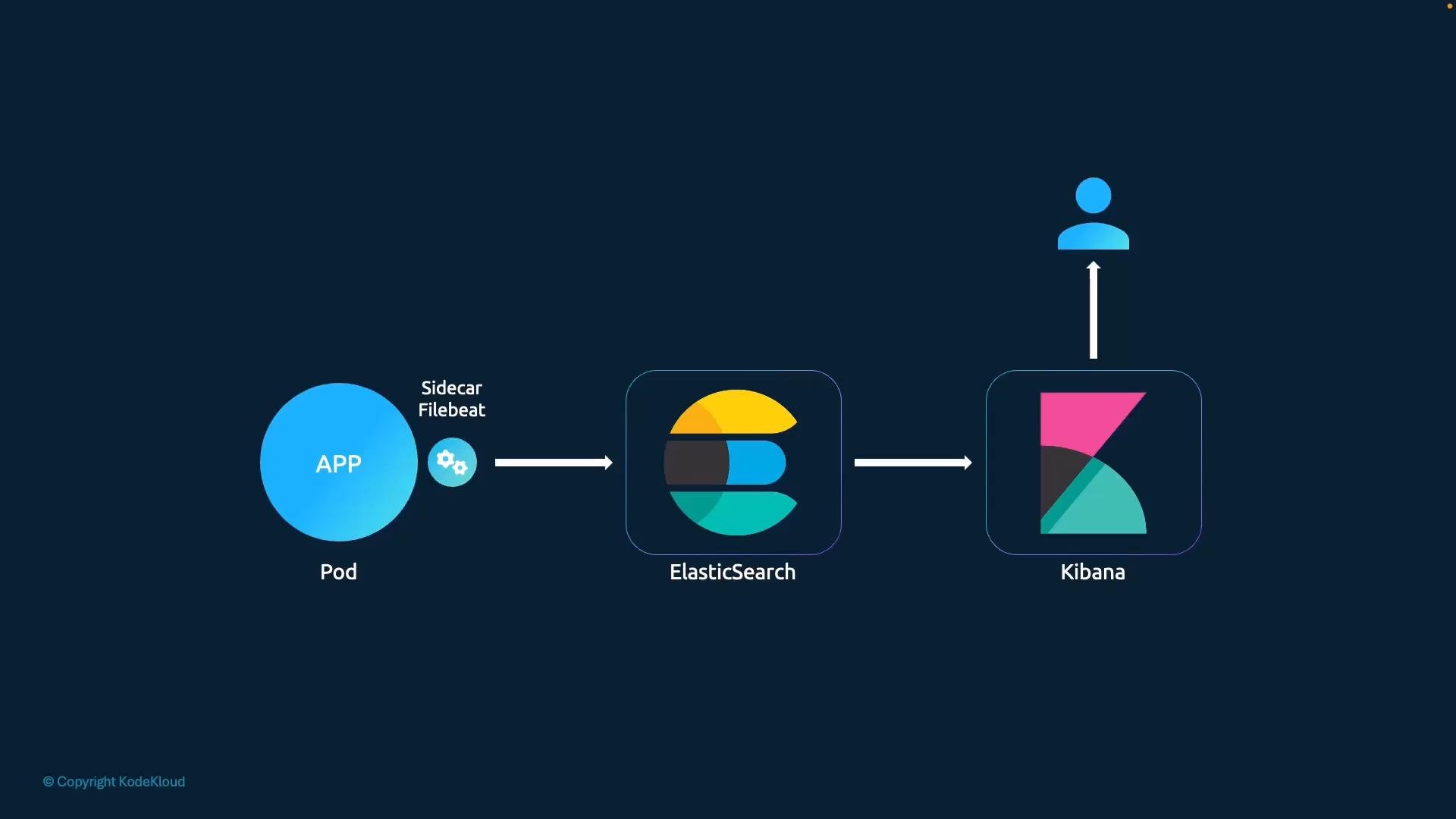
- Use a shared volume (emptyDir or hostPath as appropriate) for log exchange between app and sidecar.
- Ensure the sidecar continues long enough to ship termination logs and flush buffers.
- Implement graceful shutdown: main app can trigger a flush signal or write a marker the sidecar watches for.
- Tune
terminationGracePeriodSecondsandpreStophooks so the sidecar has time to complete log shipping.
Comparison: Patterns at a glance
Summary and recommendations
- Choose
initContainerswhen you need guaranteed sequential initialization before your main containers run. - Use co-located containers when ordering is not required and processes can start independently.
- Use the sidecar pattern for companion processes (logging, proxying, metrics), but design explicit coordination if the main app depends on the sidecar’s readiness or if you must guarantee capture of startup/termination logs.
- Plan for Pod-level lifecycle semantics (e.g.,
restartPolicy,terminationGracePeriodSeconds) and use shared volumes, probes,preStophooks, and signals to synchronize containers inside a Pod.