

- Kubernetes supports only the most recent three minor releases. Plan upgrades so your cluster never falls outside the supported window.
- Kubernetes components can run different versions during rolling upgrades, but they must follow the supported version skew policy.
Example:
- If the API server is
v1.10:- controller-manager and scheduler:
v1.10orv1.9 - kubelet and kube-proxy:
v1.10,v1.9, orv1.8 - No component should be
v1.11(a higher version than the API server)
- controller-manager and scheduler:
How do you upgrade?
Upgrade steps depend on how the cluster was provisioned:
- Managed Kubernetes (cloud provider): provider typically performs or automates upgrades via UI/API.
- kubeadm-managed clusters: use
kubeadmto plan and apply control-plane upgrades, then upgrade node packages. - Custom/manual installs: you must upgrade each component manually.
1.10 and want to reach 1.13. The major phases are:
-
Upgrade control plane (masters)
- Upgrade kubeadm to the target minor version on the machine where you run the upgrade.
- Run
kubeadm upgrade applyto update API server, controller-manager, scheduler and cluster manifests. - Control-plane components are briefly restarted. During this window:
- Existing workloads on worker nodes continue serving users.
- Management operations (new API changes, scheduling, and controller actions) are unavailable until control plane recovers.
- After control-plane upgrade, node kubelets may still report older versions until you upgrade them.
-
Upgrade worker nodes
- Strategies:
- Upgrade all workers at once (downtime risk).
- Rolling upgrade: drain, upgrade, uncordon each node sequentially (minimal downtime).
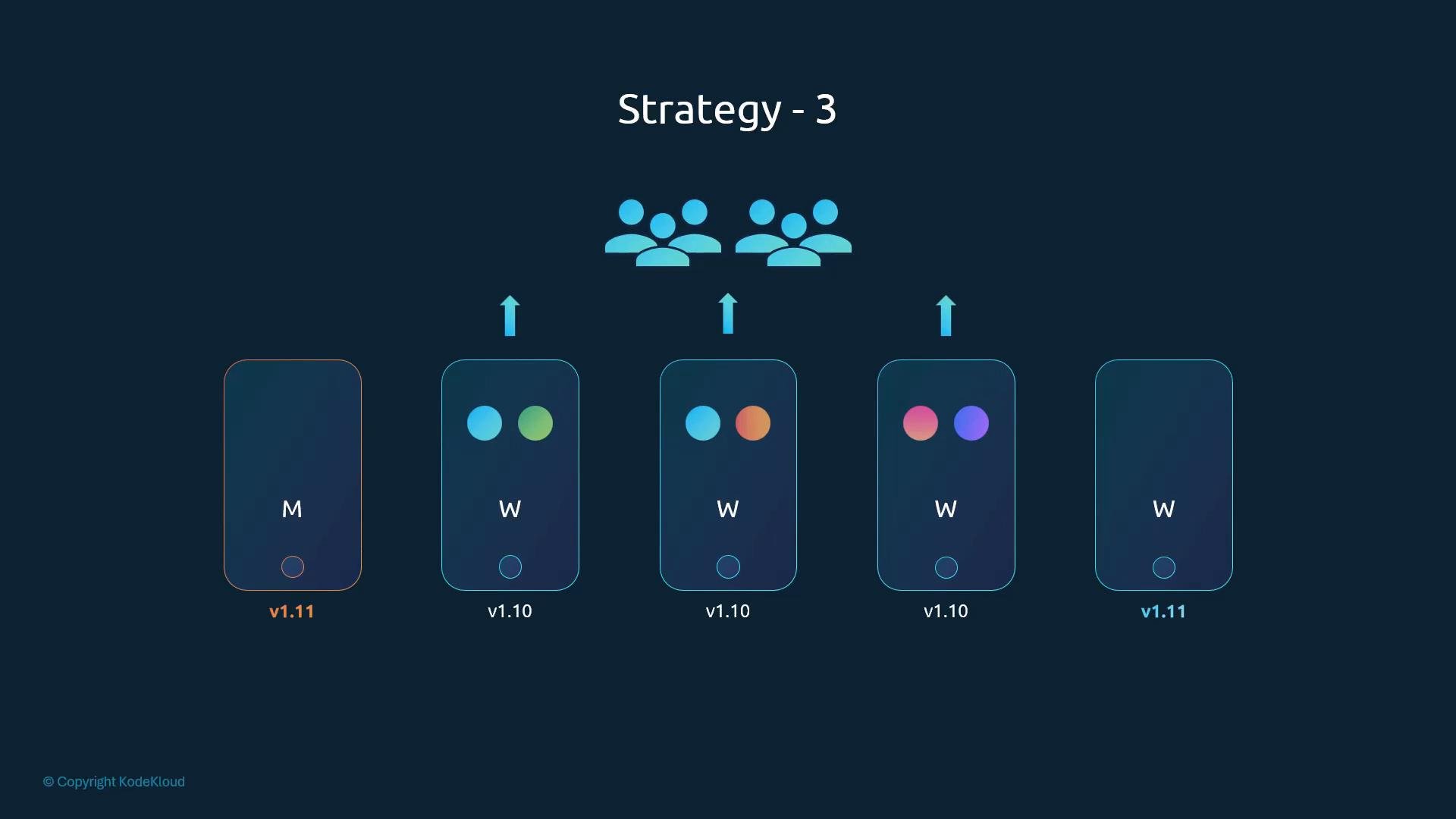
- Blue/green: add new-version nodes, migrate workloads, remove old nodes.
- Strategies:
- Check available upgrades and preflight checks:
Always upgrade the
kubeadm CLI binary first to the target minor version for each step (for example, upgrade kubeadm to v1.12.x before running kubeadm upgrade apply v1.12.x). After upgrading kubeadm, upgrade the control plane, then upgrade kubelet and kube-proxy on each node.Back up your cluster state (etcd backup) and read the release notes for each minor release you’ll cross. Some upgrades require manual steps for third-party components (e.g., etcd or CNI changes). Failing to back up or to follow release notes can cause irrecoverable outages.
- Update
kubeadmon the host used to perform the upgrade (usually a control-plane host):
- Apply the control-plane upgrade:
- Verify node versions (note:
kubectl get nodesshows the kubelet versions reported by nodes):
kubelet on masters to host static pods for control-plane components. If kubelet is present, upgrade and restart it:
- Drain the node:
- On the drained node, update
kubeadmandkubeletpackages:
- Update the node’s kubelet configuration to match the control plane:
- Restart kubelet:
- Make the node schedulable again:
- Draining marks the node unschedulable; uncordoning marks it schedulable again. Pods will be scheduled according to cluster demand and scheduler decisions.
- Repeat drain → upgrade → uncordon for each worker node sequentially.
- If
kube-proxyis deployed as a DaemonSet with image tags or manifests managed by cluster-level manifests, kubeadm may update the DaemonSet image during control-plane upgrades; verify after upgrade. - In other deployments, you may need to update kube-proxy manually.
v1.12, if you plan to progress to v1.13 repeat:
- Upgrade
kubeadmon control-plane host(s) tov1.13. - Run
kubeadm upgrade apply v1.13.xto update the control plane. - Upgrade
kubeletpackages on each node (one at a time) and adjustkube-proxyif required.
Summary
- Upgrade one minor version at a time (e.g.,
1.10 → 1.11 → 1.12). - Upgrade
kubeadmfirst on the host where you run the upgrade, then runkubeadm upgrade applyfor the control plane. kubeadmupgrades control plane components and manifests; it does not upgrade thekubeletbinary on nodes — upgrade kubelet packages on each node and restart kubelet.- Use
kubectl drainandkubectl uncordonto perform rolling upgrades on worker nodes with minimal disruption. - Always back up cluster state and read release notes for intermediate releases.
- Kubernetes Release Notes
- kubeadm upgrade documentation
- Kubernetes Version Skew Policy
- etcd backup and restore