

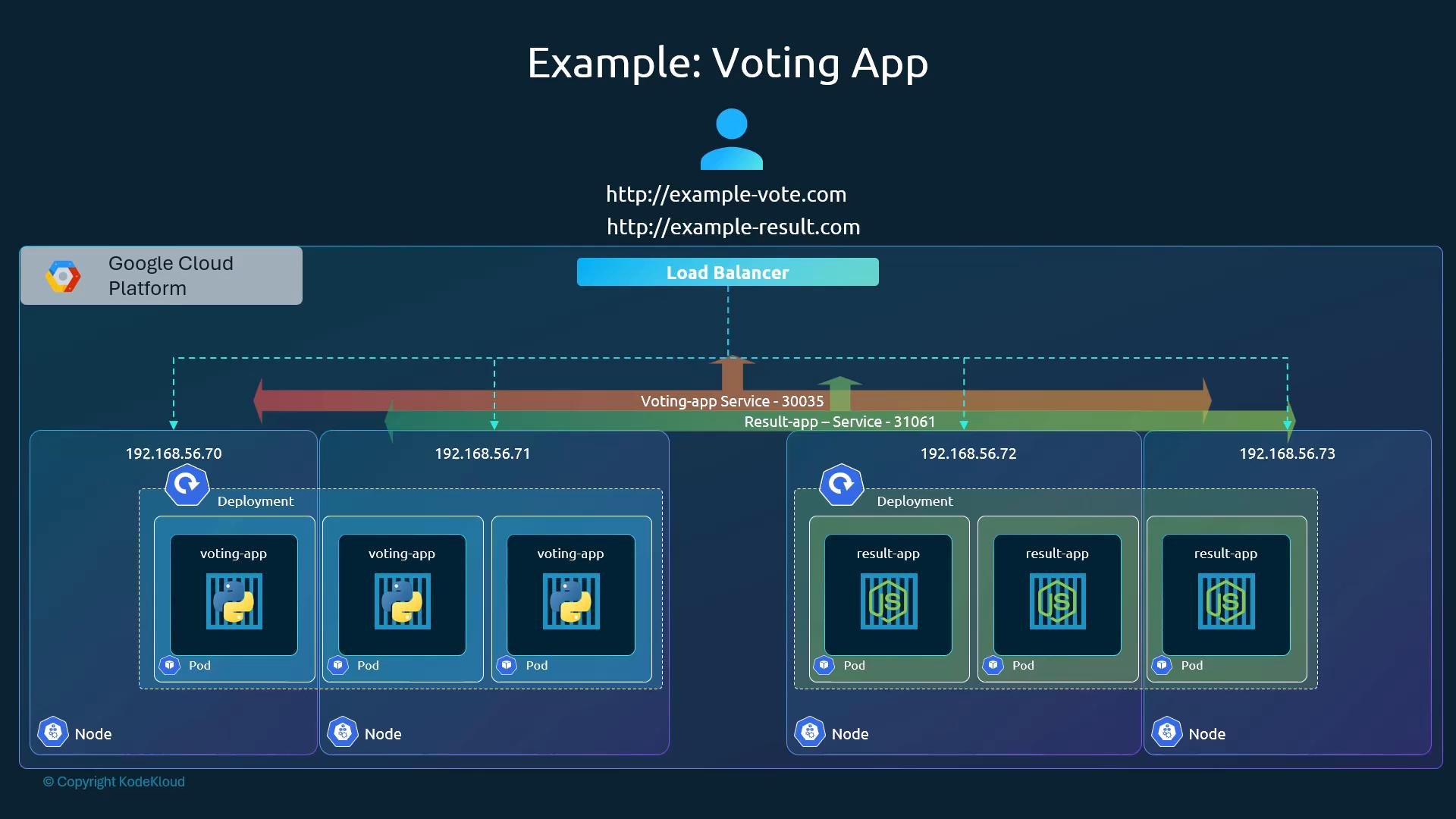
LoadBalancer provides a single external IP or hostname that routes traffic to Pods running in the cluster. This is especially useful for exposing front-end applications (for example, a voting app and a result app) that are running on worker nodes.
Previously we looked at the NodePort Service, which exposes each Service on a high port on every node in the cluster. For a four-node cluster, exposing both frontends with NodePort yields many possible node IP:port combinations, for example:
192.168.56.70 and 192.168.56.71, the NodePort Service is exposed on every node IP in the cluster. All node IPs will accept and forward traffic to the Service.
End users typically expect a single URL such as http://example-vote.com or http://example-result.com. There are two main approaches to provide that single address:
- Provision an external load balancer yourself (for example, a VM running HAProxy or NGINX) and point DNS to it; it then forwards to node IPs and NodePorts.
- Let Kubernetes request a cloud provider–managed load balancer by using
type: LoadBalanceron the Service. This is the simpler option when running on a supported cloud platform.
type: LoadBalancer does not automatically provision an external load balancer. In those environments, a LoadBalancer Service typically falls back to behaving like a NodePort Service unless you provide an external load balancer or use a special solution:
- Use a dedicated reverse proxy (HAProxy, NGINX) in front of the cluster.
- Use MetalLB, which provides LoadBalancer semantics for bare-metal clusters: https://metallb.universe.tf
- Use platform-specific solutions or local cluster features (for example, minikube and kind have mechanisms/plugins to simulate LoadBalancer behavior).
If you need a single external IP or hostname and you run on a supported cloud provider, set
type: LoadBalancer for the Service and Kubernetes will request the cloud load balancer. For unsupported environments, consider alternatives such as an external reverse proxy, MetalLB, or the platform-specific plugins provided by minikube and kind.
Summary
- Use
NodePortwhen you need a simple way to expose a Service on cluster nodes or when running in unsupported environments. - Use
LoadBalancerto get a single external IP/hostname automatically when running on a supported cloud provider. - For bare-metal or local clusters that need LoadBalancer semantics, consider
MetalLBor an external reverse proxy.
- Kubernetes Services documentation: https://kubernetes.io/docs/concepts/services-networking/service/
- MetalLB: https://metallb.universe.tf
- Minikube LoadBalancer docs: https://minikube.sigs.k8s.io/docs/handbook/loadbalancer/
- HAProxy: https://www.haproxy.org
- NGINX: https://www.nginx.com