

eth0 on the local network (example IP 192.168.1.10).
Docker networking modes (overview)
Docker provides several networking modes. The table below summarizes their purpose and a simple example command for each.
For more details, see the official Docker networking documentation: Docker Networking.
none network
Thenone network gives the container no network interfaces that provide external connectivity. By default the container will only have the loopback interface up. You can add interfaces manually if required.
Example:
--network none cannot reach each other or external hosts unless you explicitly configure additional interfaces or attach them to a network.
host network
When you run a container with--network host, it uses the host’s network namespace directly. There is no network isolation between host and container.
Example:
- A service inside the container listening on port 80 will be reachable on the host’s port 80.
- Two containers cannot both bind the same host port at the same time when using the host network.
Bridge network (default)
The default bridge network is the most common mode. Docker creates an internal, host-local bridge (typically calleddocker0) and places containers in separate network namespaces connected to that bridge via virtual ethernet (veth) pairs.
Common characteristics:
- Historically the bridge uses the
172.17.0.0/16range, though the exact prefix can vary by Docker version and host configuration (you may see/24on some systems). - The host has a
docker0interface that acts as an L2/L3 switch for all containers attached to the bridge.
docker0 IP address:
bridge corresponds to the host interface docker0.
Network namespaces and veth pairs
When Docker launches a container in bridge mode:- Docker creates a new network namespace for the container.
- It creates a veth pair (virtual ethernet pair). One end is attached to the host bridge (
docker0), and the other end is moved into the container’s network namespace and typically namedeth0.
eth0:
docker inspect output. Example fragment:
7 & 8, 9 & 10). Conceptually each pair is a virtual cable connecting the container namespace to the host bridge.
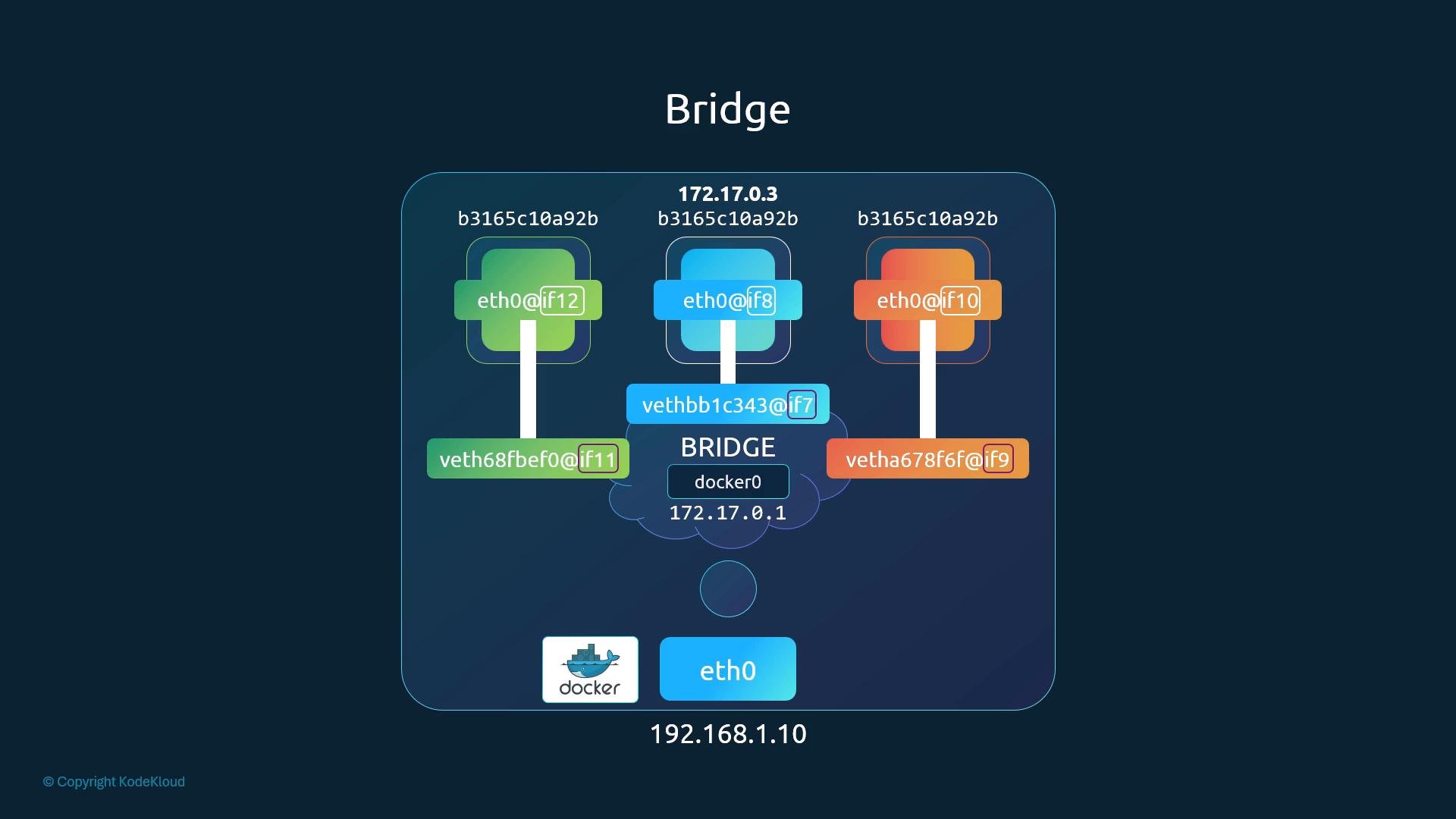
Container-to-container and host access
Containers attached to the same bridge network can communicate directly using their private IP addresses (for example172.17.0.3). The host can also reach containers via their bridge IPs.
Port mapping (host-to-container)
By default, containers on the bridge network are not reachable from external networks. To expose a container service to external clients, use port publishing:8080 is forwarded to the container’s IP and port 80. Under the hood, Docker inserts iptables NAT (DNAT) rules to translate the destination address and port to the container.
Inspect the NAT table to find Docker-created rules. For example:
If
ip netns does not show Docker-created namespaces on your system, you may need to make Docker’s namespace directory visible to ip netns, or use tools like nsenter or docker exec to inspect network state. Platform-specific details vary; consult your OS or Docker vendor documentation for exact steps.Summary
- Docker’s default bridge network (
bridge/ host interfacedocker0) acts as a host-local L2/L3 switch connecting container network namespaces to the host. - For each container Docker creates a network namespace and a veth pair; one end is attached to the host bridge, the other becomes the container’s
eth0. - Containers can communicate on the bridge network using their private IPs. To make a container service available externally, publish ports with
-p/--publishand Docker will add iptables NAT rules to forward traffic.
- Docker Networking Overview
- iptables manual
- For multi-host and orchestrated environments, investigate CNI plugins and container orchestration networking models (Kubernetes CNI, Weave, Flannel, Calico).