

db) is assigned a stable ClusterIP (for example, 10.96.0.12) and forwards traffic to one or more backend Pods. But the Service object itself is virtual: it exists in the API and control plane memory and does not have network interfaces or processes. To make a Service IP reachable from every node, something on each node must install and maintain the forwarding rules for that Service IP — that something is kube-proxy.
Why kube-proxy exists and what it does
- Ensures traffic sent to a Service IP on any node is forwarded to one of the backend Pods.
- Watches the Kubernetes API for Service and Endpoint (or EndpointSlice) changes.
- Converts Service definitions into node-local networking rules and implements them using the selected datapath (iptables, IPVS, eBPF, or the legacy userspace proxy).
10.96.0.12 is forwarded to a backend Pod IP such as 10.32.0.15. For Services with multiple backends, kube-proxy also implements the local load-balancing behavior so traffic is routed to one of the available Pods.
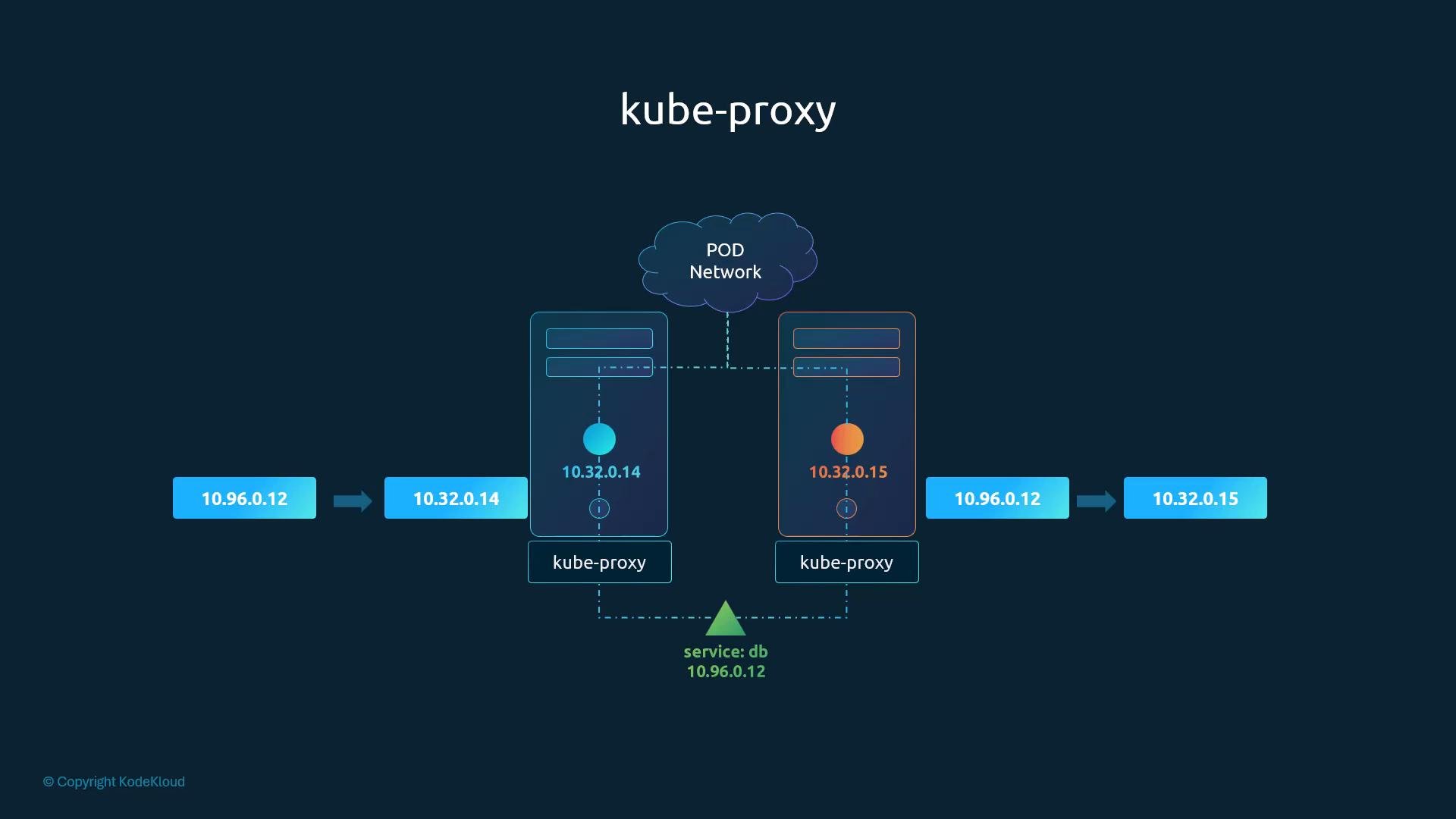
A Kubernetes Service is a logical construct. kube-proxy is the node-level agent that implements Service IP routing on each node (commonly via iptables, IPVS, or eBPF). The Service itself does not have network interfaces or processes.
- Manual install: system administrators install the kube-proxy binary and run it as a system service.
- DaemonSet (typical for kubeadm): kube-proxy runs as a Pod on every node, managed by a DaemonSet in the
kube-systemnamespace.
kube-system. Useful inspection commands:
kube-proxy proxy modes
Configure the proxy mode via the kube-proxy configuration (for kubeadm-managed clusters, this is typically stored in the
kube-proxy ConfigMap).
Choosing the right datapath
- iptables: good default choice; well supported.
- IPVS: better for high connection rates and large scale.
- eBPF: offers very efficient packet processing and advanced features but requires kernel and tooling support.
- userspace: avoid unless you have a specific legacy constraint.
- Check the kube-proxy pods and logs in
kube-system. - Inspect the kube-proxy ConfigMap to verify the configured mode.
- For iptables mode, inspect
iptables-saveoutput to see Service rules. - For IPVS mode, use
ipvsadm -L -non nodes to view virtual servers and destinations.