

- TLS ensures confidentiality, integrity, and authentication for communication between cluster components and administrators.
- Proper certificate management (creation, signing, rotation, storage) is fundamental for cluster security and availability.
- Public/private key pairs are the foundation of TLS. A server keeps a private key and presents a certificate (containing the public key) so clients can verify its identity.
- A Certificate Authority (CA) has its own key pair and signs server and client certificates. Distributing the CA’s root certificate allows clients to trust certificates signed by that CA.
- TLS can authenticate servers (server certificates) and, when configured, clients (client certificates) — enabling mTLS.
- Server certificates — installed on services to secure their HTTPS endpoints.
- Root/CA certificates — used to sign server and client certificates.
- Client certificates — presented by clients when mutual TLS (mTLS) is required.
- Files or extensions containing the word
keyor.keyare private keys. - Files with
.crtor.pemare typically public certificates (PEM-encoded). - Keep private keys secret and never commit them to public repositories.
Private keys usually contain the word
key (as an extension or in the filename). Files without key are typically public certificates. Use this rule to avoid confusion when many files are present.- Servers present server certificates to secure their endpoints.
- Clients present client certificates (or other credentials) to prove identity when required.
Server-to-server and server-as-client scenarios
- The kube-apiserver is a server for cluster clients, but it also acts as a client when connecting to other servers such as etcd or kubelets. In these flows etcd will see the API server as a client and may require client authentication.
- You can reuse the API server’s serving certificate for outgoing client connections or issue a separate client certificate for the API server. Using separate certs helps separate concerns and simplifies rotation and auditing.
- Client certificates: used by components and users to authenticate to the kube-apiserver.
- Server certificates: used by services (kube-apiserver, etcd, kubelet) to secure their HTTPS endpoints.
- Single CA for all components (simpler but less isolation).
- Multiple CAs (e.g., separate CA for etcd and a different CA for control-plane components) for improved isolation and scoped trust.
ca.crt and ca.key). Server and client certificates are generated and signed by the CA so that components trust one another.
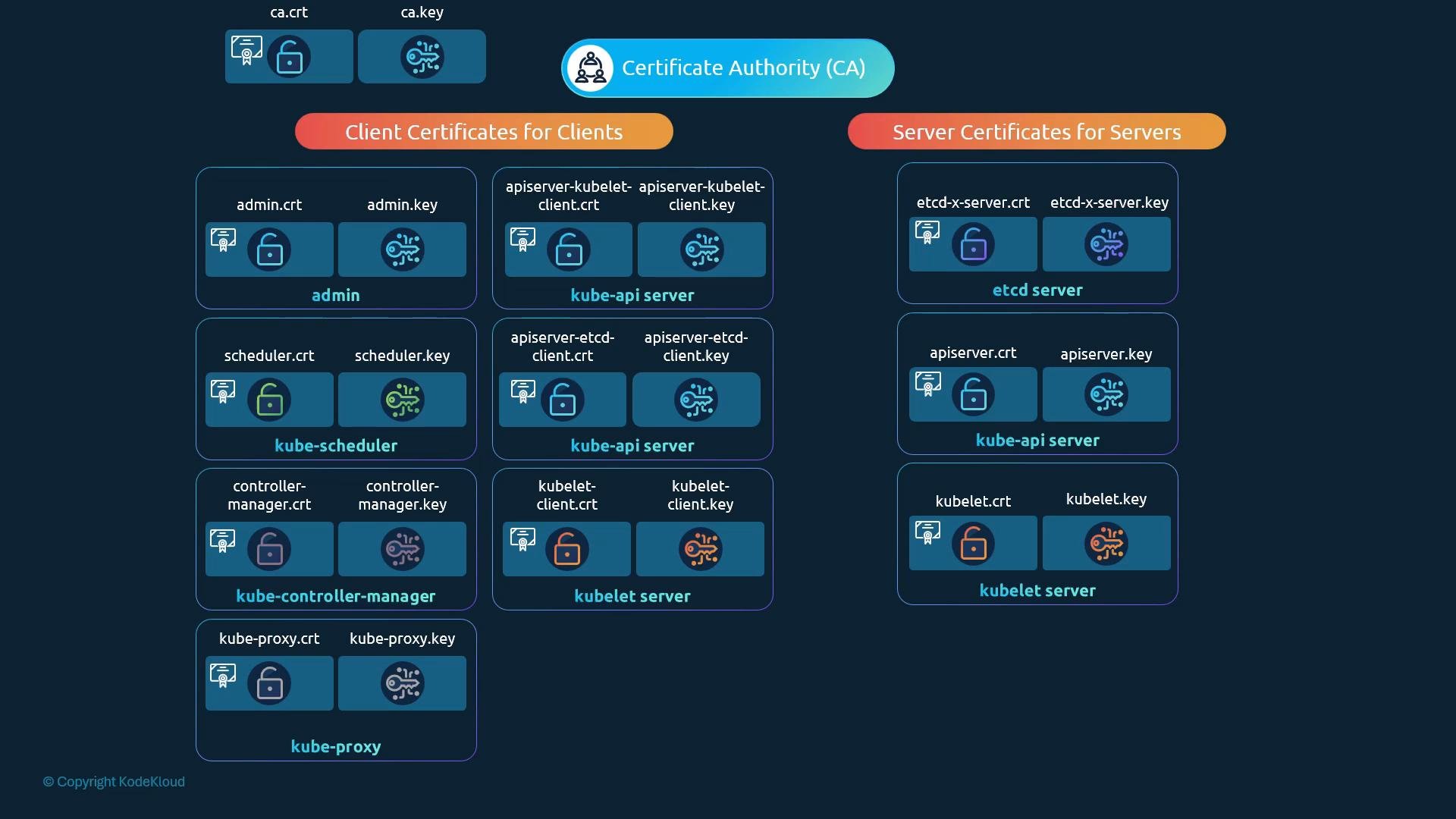
- Generate a CA private key and certificate (e.g.,
ca.key/ca.crt). - Create certificate signing requests (CSRs) for each component and sign them with the CA.
- Discuss Subject Alternative Names (SANs) and Common Name (CN) usage — note that SANs are authoritative for hostname/IP verification in modern TLS clients; CN is deprecated for that purpose.
- Plan for certificate rotation, secure storage, and revocation strategies.
Always protect private key files (e.g.,
*.key and *-key.pem). If a private key is compromised, any certificate relying on it must be revoked and replaced.