

Kubernetes clusters are commonly provisioned in two ways:
- Self-managed (manual): control-plane binaries are often run as systemd services and certificates are managed by the cluster operator.
- kubeadm-managed: kubeadm usually generates certificates and runs control-plane components as static pods with manifests under
/etc/kubernetes/manifests.
Quick checklist
- Identify how the control plane is launched: systemd services vs kubeadm static pods.
- Collect certificate file paths from service unit files or static pod manifests.
- Inspect certificates with
opensslto extract CN, SANs, issuer, and expiration. - Build an inventory (spreadsheet) for ongoing tracking.
- Use logs (
journalctl,kubectl logs,crictl logs) to find TLS handshake errors.
Where to find certificate configuration
- Self-managed control plane (systemd): check the unit file for
ExecStartarguments that reference certificate files.
kube-apiserver unit snippet:
- kubeadm-managed control plane (static pods): check the static pod manifest for the API server (usually under
/etc/kubernetes/manifests).
command arguments pointing to certificate files. Example excerpt:
Create an inventory of certificates
Maintain a spreadsheet or CSV that records, per certificate:- File path
- Common Name (CN)
- Subject Alternative Names (SANs)
- Organization (O)
- Issuer
- Expiration date (UTC)
- Purpose / Usage (e.g., API server TLS, etcd server, kubelet client)
Refer to Kubernetes docs for recommended CN/SAN values: https://kubernetes.io/docs/tasks/tls/managing-tls-in-a-cluster/
Inspect certificate details with OpenSSL
Useopenssl x509 to display certificate fields. Replace the path with the certificate you want to inspect.
- Subject CN (e.g.,
CN=kube-apiserver) - SANs (DNS and IP entries)
- Issuer CN (e.g.,
CN=kubernetes) - Not Before / Not After (validity window)
- Key usage and extended key usage to determine server/client role
Pay attention to SANs and expiration:
- Modern TLS validation prefers SANs over the CN for hostname verification.
- Expired certificates cause immediate TLS handshake failures; rotate/replace them before expiry.
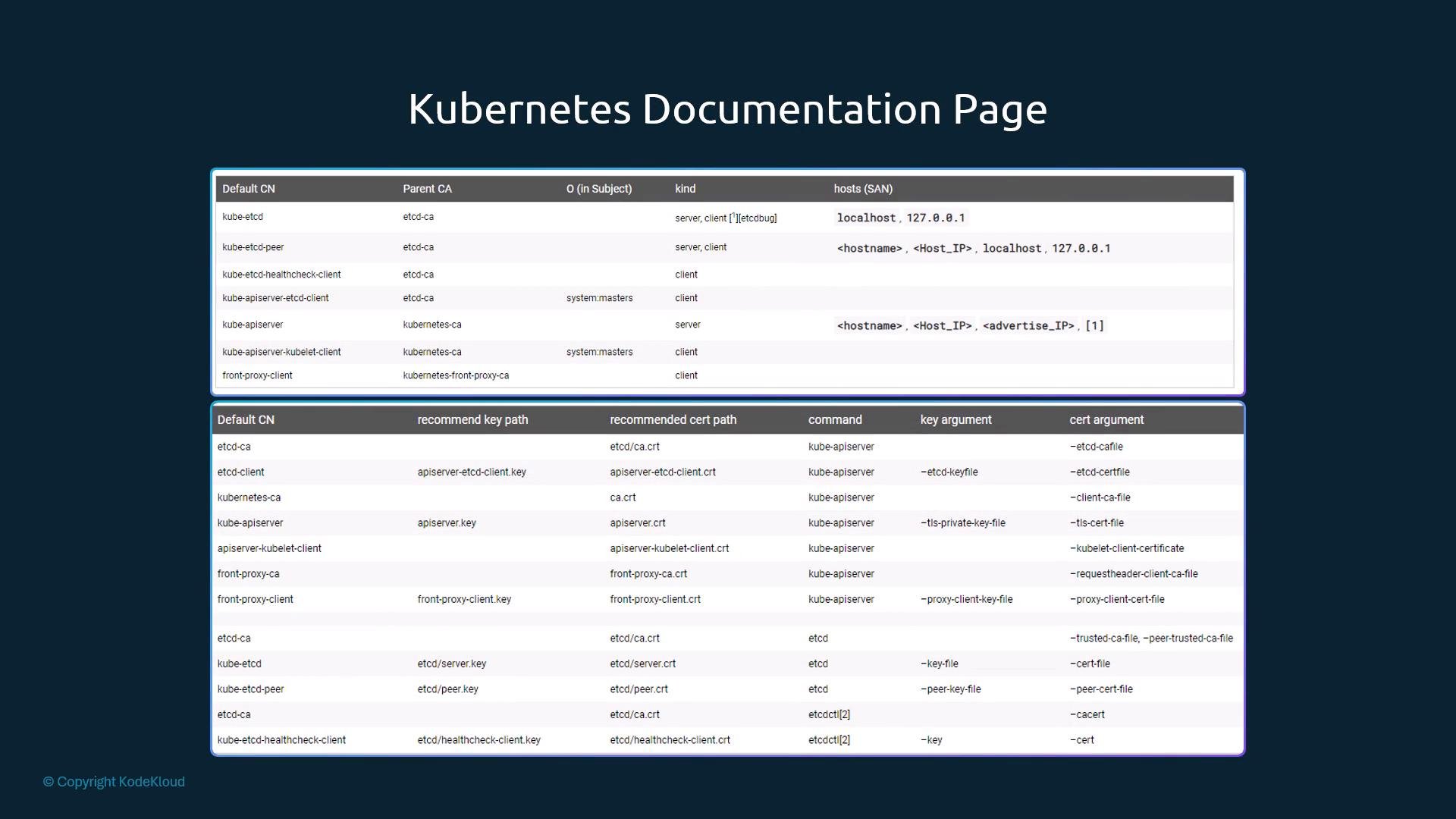
What to verify during an audit
- SAN coverage: Ensure the certificate’s SANs cover the hostnames/IPs clients use (API server cluster IP, service DNS names, node IPs as required).
- Issuer: Confirm certificates are issued by the expected CA (e.g., the kubeadm CA or an organization CA).
- Validity: Certificates must not be expired and should have renewal policies consistent with your security guidelines.
- Usage flags: Check Key Usage / Extended Key Usage are appropriate (server vs client certificates).
- Ownership: Confirm organization fields and intended subject match usage (e.g.,
system:mastersfor privileged clients).
Troubleshooting with logs
TLS-related failures typically show up in component logs. How you collect logs depends on how the control plane runs.- systemd-managed components:
- kubeadm / pod-managed components:
kubectl cannot reach the cluster, fetch container logs from the container runtime:
For runtimes with crictl (e.g., containerd):
Summary
- Determine how the control plane is launched (systemd vs static pods).
- Extract certificate file paths from service unit files or static pod manifests.
- Inspect certificates with
opensslto verify CN, SANs, issuer, key usage, and expiration. - Create and maintain a certificate inventory for proactive rotation.
- Use
journalctl,kubectl logs, orcrictl logsto diagnose TLS handshake failures.
- Kubernetes TLS documentation: https://kubernetes.io/docs/tasks/tls/managing-tls-in-a-cluster/
- Lab exercises: Labs - Certified Kubernetes Administrator with Practice Tests